

- A useful recap preserves the cause of a conflict, the important decisions and their consequences, rather than stitching together dramatic shots alone.
- The current normal workflow limits selected source footage to one hour in total; trial input restrictions are separate.
- The requested theme count is a target. Source evidence or task failures can result in fewer themes being saved.
- All-narration mode and mixed mode treat original dialogue differently. Review the actual audio and subtitles in each saved result.
- Check character names, chronology, supported claims and shot-to-narration alignment before treating a generated recap as finished.
A recap needs a clear story and evidence for every claim
AI short-drama narration turns selected drama footage into themes, shots and a narrated edit. The editorial goal is a shorter story that still explains what happened and why. A strong recap helps the viewer understand a conflict; a sequence of emotional reactions alone may leave out the fact that caused it.
This guide follows the source-selection, analysis, voice, subtitle and output workflow. It includes a fictional worked example and review questions you can apply to your own material. For selecting standalone moments from broader footage, start with the long-video selection guide. A narrated drama recap needs additional work on plot and viewpoint.
Capability descriptions come from a read-only review of the current client implementation and the product guide, not a hands-on production test. Limits and access can change, so check the settings, account state and cost information displayed in your client before starting.
Prepare selected footage, an output folder and a story boundary
Prepare a coherent part of the story that fits the input limit. The normal workflow currently accepts no more than one hour of selected source footage in total. Several short files still count toward the same combined limit. The currently implemented trial path limits each trial input to ten minutes in total. Trial eligibility and remaining uses are separate from the normal one-hour ceiling, so check the account notice rather than assuming every account can submit the normal maximum.
- Use readable local video files that contain the dialogue and visual context needed for the recap.
- Select the files that belong to the same story arc, and check their sequence.
- Choose an output directory you can write to and recognize later.
- Decide which characters and turning point the recap should cover.
- Inspect voice choices, subtitle options and the account's displayed access and charges.
Start with an arc that has an identifiable premise and consequence. If you include only a confrontation and omit the misunderstanding behind it, no amount of narration can reliably recover the missing fact. Include the needed source moment or narrow the recap to what the selected footage actually establishes.
The current client shows separate charging information for narration processing and services such as voice generation, subtitle positioning and selected subtitle-removal modes. Do not assume the first estimate covers every optional operation. Review the displayed estimate and notices rather than planning around a fixed price quoted elsewhere.
Choose themes and a narration mode deliberately
Set a theme count that reflects genuinely different angles in the source. The current theme-count control accepts 1 to 10, while the duration control accepts 0.5 to 20 minutes per theme. These are available setting ranges, not a guarantee that the source supports ten distinct recaps or every requested duration.
A theme might follow a misunderstanding, a character's decision or the reveal that changes the audience's interpretation. Two themes are not meaningfully different if they repeat the same events with a different opening sentence. Ask whether each angle has its own evidence and a clear reason for the viewer to watch it.
| Mode | Current behavior | Main review task |
|---|---|---|
| All narration | Uses generated narration throughout and turns off original sound | Confirm the narrator explains facts that were previously conveyed through dialogue. |
| Mixed with original clips | Inserts selected original-dialogue segments between narration; those segments do not receive overlapping narration | Check that the dialogue is understandable and its transition from narration preserves context. |
Choose all narration when a consistent retelling serves the purpose. Choose mixed mode when an original line or exchange is important to the story and worth hearing directly. Do not choose mixed mode just to increase variety; a fragment can be emotionally striking while remaining confusing without its setup.
The application reports when it cannot reach the requested theme count and can save fewer successful themes than requested. Read the actual result summary. A requested count is an input, not evidence that every output exists or passed review.
Worked example: retell a fictional misunderstanding
This example is hypothetical and uses an invented story. It demonstrates editorial decisions, not an observed result from the software. Assume the selected source is a 22-minute fictional episode, and the goal is a 90-second recap about a misplaced document.
Story premise: Mina leaves a signed agreement in a blue folder. Chen moves the folder to protect it from a spilled drink. Mina sees the empty desk and believes the agreement was taken. A later exchange reveals where the folder went. The selected footage includes the move, the accusation and the explanation.
Make a simple character and evidence map
| Fact to explain | Required source evidence | What the recap must avoid |
|---|---|---|
| Mina expected the agreement on the desk | Her placing or identifying the blue folder | Calling it a stolen contract before any theft is established |
| Chen moved the folder | The movement or a clear later admission | Claiming a secret motive that the source never states |
| Mina misunderstands the empty desk | Her accusation and its context | Presenting the accusation as the narrator's confirmed fact |
| The misunderstanding is resolved | The revealed folder and explanation | Inventing a reconciliation not shown in the selected ending |
Select two possible themes, then assess whether both are needed
One angle follows Mina: “An empty desk leads to the wrong conclusion.” Another follows Chen: “A helpful action becomes a misunderstanding.” Both use the same source, but they emphasize different causes and decisions. If the footage does not clearly show Chen's intention, the second angle should avoid claiming it as a fact. Request fewer themes when only one angle has enough support.
Draft the spine of the narration
“Mina expects to find the agreement in its blue folder. When the desk is empty, she assumes Chen has taken it. The audience has already seen him move the folder away from a spilled drink. Their disagreement continues until the folder is found and Chen explains the move.”
The first sentence needs the folder setup. The second needs Mina's reaction. The third needs the movement or other clear evidence for it. The final sentence needs the reveal. This is a shot-to-claim checklist: if a sentence has no supporting moment, rewrite it or add the relevant source before generating the recap.
For a mixed-mode version, retain the original exchange that confirms the folder's location only if the dialogue is complete enough to make sense. Avoid narrating over that exchange. For all narration, explain the same fact plainly and check that the visual reveal lasts long enough to be recognized.
Run analysis, then inspect the themes and saved results
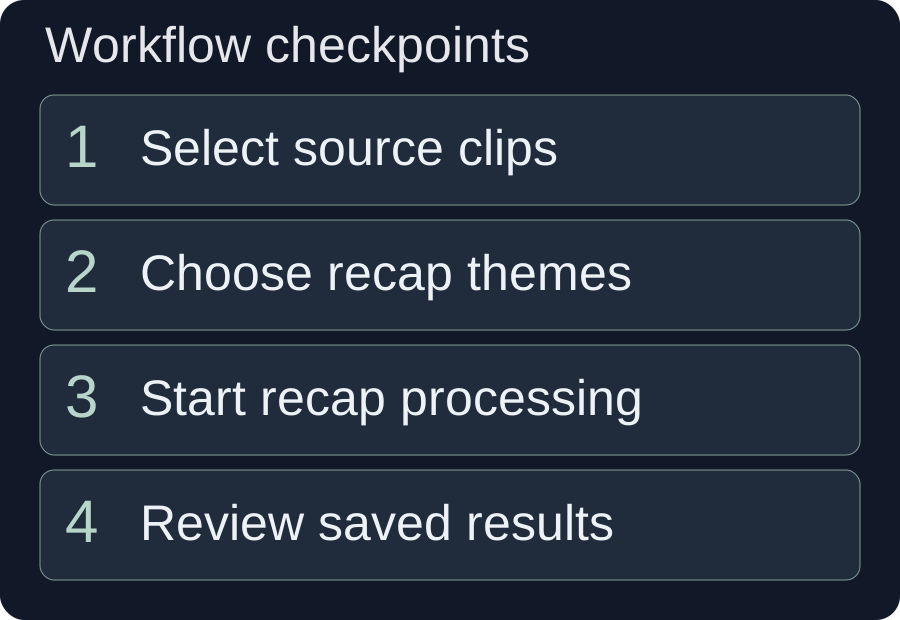
Use the selected files and settings to start the workflow, then follow its reported stages and results. The client analyzes content, organizes themes and shots, generates narration audio and assembles outputs. Success at an early stage does not prove that a later voice or save stage succeeded.
- Select the source and destination. Confirm the checked files and their total duration, not just the list of files visible in the window.
- Set the theme count, target duration and mode. Recheck these against the story boundary and the desired recap.
- Choose voice and subtitle options. Inspect the displayed account and charging information before submission.
- Start processing and read the logs. Look for theme shortfalls, failed themes or voice-generation problems.
- Inspect each successful saved result. Confirm its title, location, playback and relationship to the intended theme.
The current workflow keeps one selected voice role for a theme's generated narration rather than choosing a new narrator for each shot. Still listen for pronunciation, unwanted pauses and pacing. A consistent voice does not ensure a correct script.
Outputs are also organized in the asset library under completed short-drama narration material. If the result offers an editable draft, open it for refinement; the client reports when a result lacks a usable draft. Do not assume every old or incomplete result can be reopened as a fully editable project.
Before changing the whole script, inspect a specific weak transition. If the recap jumps from the accusation to the ending, you may need the explanatory source moment rather than a more dramatic voice. For broader shot-boundary problems, the video splitting guide explains how to inspect clips without interrupting a complete action or thought.
Review voice, dialogue and subtitles as one sequence
Listen to narration and original dialogue in context, then check the text shown with them. Character names, pronouns and negation deserve particular attention because one wrong word can change who did what.
Separate narrated and original-dialogue intervals
In mixed mode, ensure a retained exchange begins with enough context and ends after the important response. Abruptly switching back to the narrator mid-sentence can distort its meaning. The current mode avoids adding narration to those original-dialogue segments, but you still need to review loudness, intelligibility and the transition.
Distinguish old subtitles from new narration subtitles
Adding narration subtitles and handling subtitles already present in the source are separate choices. If you enable both without reviewing the frame, the viewer may see competing text. The client offers subtitle-removal or covering options with their own limitations and charging notices. Check what the chosen mode actually does; do not assume a perfectly reconstructed background.
The narration-subtitle option segments short captions using the narration text and measured audio timing. It does not prove that every name or phrase is correct, nor that retained original dialogue has complete captions. W3C's caption guidance explains that captions convey needed speech and non-speech audio information, and that automatic text requires accuracy review.
Review the recap with sound off to find missing text, then with sound on to verify timing and meaning. A transcript can provide another way to inspect the spoken content, but it does not replace checking synchronized on-screen captions.
Fix the cause of a weak or failed recap
Use the result summary and the actual edit to separate source problems from processing problems. Correct missing evidence in the source selection; correct failed tasks through the reported stage and error information.
| Problem | What to inspect | Fix |
|---|---|---|
| Selected input is rejected as too long | Total duration of checked files and trial status | Reduce the selected arc within the applicable limit. Do not confuse the normal ceiling with a trial allowance. |
| Fewer themes are saved than requested | Shortfall notices and failed-theme logs | Review successful themes individually; request fewer distinct angles or add relevant evidence if necessary. |
| The narrator assigns an unsupported motive | Dialogue and visual evidence for that sentence | Rewrite as an observed action or attributed belief. Remove the invented motive. |
| The viewer cannot understand the conflict | Premise and causal transition | Restore the setup or narrow the recap to a complete smaller event. |
| Original dialogue interrupts narration awkwardly | Beginning and end of the retained exchange | Use a complete exchange, improve its surrounding context or choose all narration. |
| Voice or output processing fails | Reported task stage and saved-result count | Check the specific failure and account or service state. Do not count analyzed themes as exported videos. |
| Subtitles collide or misname a character | Source text, new caption text and position | Correct names and review source-subtitle handling separately from narration captions. |
If you make a manual narration change, recheck every affected shot and caption. Changing “she suspects him” to “he confesses” is a factual change, not a wording polish. It needs different evidence.
Approve one complete recap before producing more
Finish by reviewing the saved video from beginning to end. Confirm the conflict, turning point and selected ending are understandable without the full source. Check that each important narrated claim has supporting footage or clearly attributed dialogue.
- Character names and relationships remain consistent.
- Chronology is clear, including any deliberate flashback.
- The recap distinguishes a character's accusation from an established fact.
- Voice, original dialogue and subtitles match the chosen mode.
- Every expected successful result exists and plays from its saved location.
Use the same checks on additional themes rather than approving them because one version passed. When the output needs more precise manual trimming, continue with the timeline review and refinement workflow. A coherent, verified recap is the useful deliverable; the requested count alone is not.
Frequently asked questions
Is the one-hour limit the length of the finished recap?
No. It is the current normal limit for the total selected source footage. The per-theme output duration is a separate setting, and trial access has its own input restrictions. Check the selected files and the account notices before starting.
How is drama narration different from choosing highlights?
Highlight selection identifies useful or striking moments. A narrated recap also needs themes, a causal plot, supported narration and matching shots. A dramatic clip can be a good highlight while remaining a poor standalone explanation.
Will requesting more themes guarantee more saved videos?
No. The requested theme count is a target. Insufficient evidence or later processing failures can reduce the successful saved count. Read the actual summary and inspect each saved result.
Based on a read-only review of src/renderer/src/pages/videoCreation/aiShortDrama/index.jsx in the current client source on 10 October 2026. The client was not operated and no generation or export result is claimed. The Mina and Chen story, source length and recap target are entirely hypothetical. Account privileges, estimates and trial conditions must be checked in the client. Official external sources were read on the same date.