AIMIX 데스크톱 영상 편집기

Voice Synthesis: 100+ Languages, 2000+ Voices, One-Click Voiceover

Turn scripts into speech with support for 100+ languages and 2000+ natural voices, covering major languages and dialects. Pair it with Voice Cloning to create a signature voice. Batch voiceover + subtitles in one integrated output.

AIMIX 다운로드

사용 방법

Voiceover is "half the soul" of a short video. Voice Synthesis turns your script into natural speech in one click: 100+ languages and 2000+ voices—from news broadcasting to emotional narration, there is always one that fits your content. With Voice Cloning, you can even batch-narrate with your own voice.

01

Pick a voice

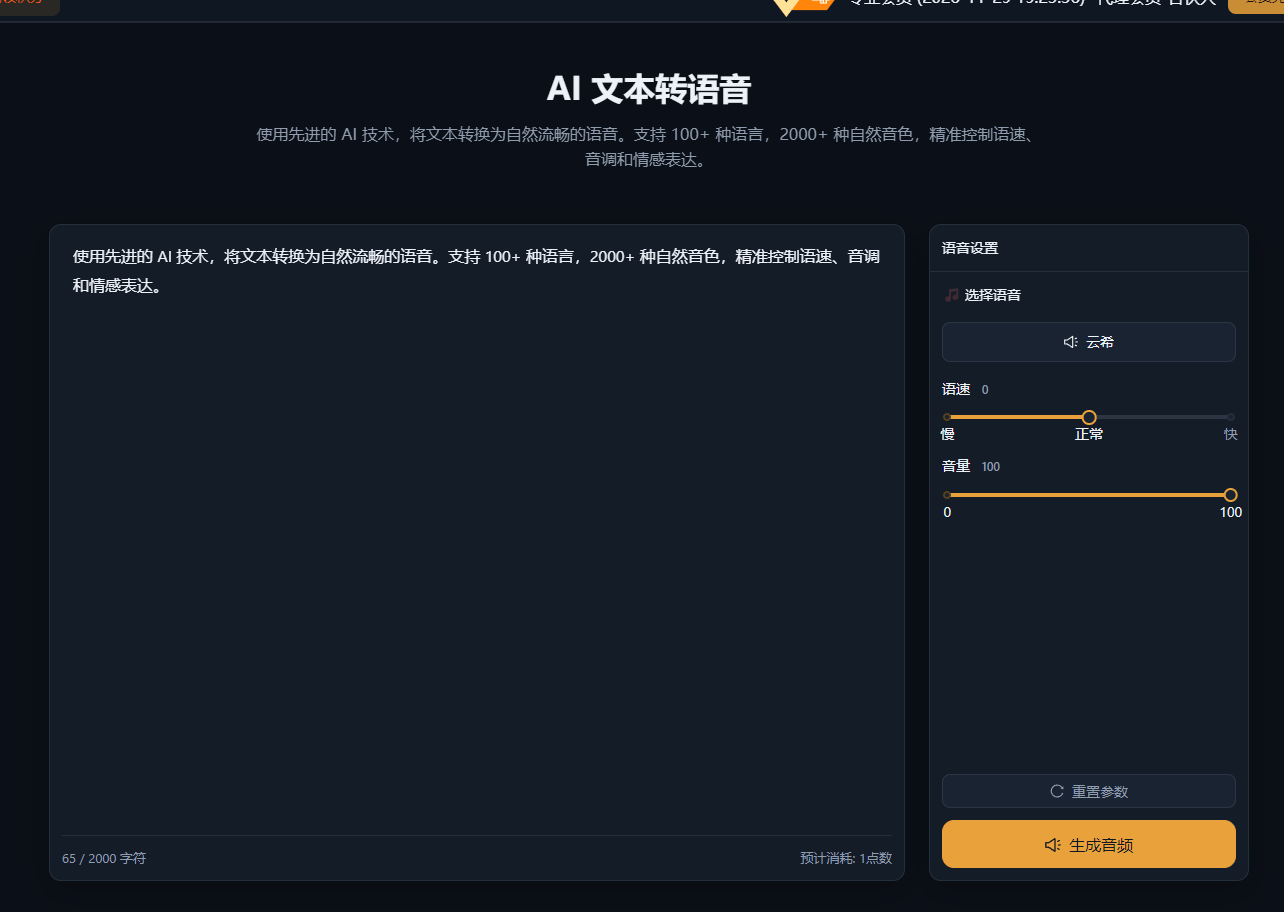
Filter 2000+ voices by language, gender, and style: news broadcast, gentle female, magnetic male, child voices, dialects—choose by your content’s tone.

02

One-click synthesis

Paste your script or import it from Script Management, adjust speed, pitch, and volume, then synthesize with one click. Segment-based export is supported, with filenames mapped to storyboard shots.

03

Voiceover + subtitles in one

Use "Batch Voiceover + Subtitles" to generate speech and subtitles in sync—no separate timing pass needed. Export audio files or jump straight into editing.

AIMIX 클라이언트 "스크립트 생성" 창: 영상 설명을 입력하면 AI가 스토리보드 표를 생성
AIMIX 클라이언트의 "스크립트 생성" 창: 설명으로 스토리보드를 생성한 뒤 길이와 문구를 바로 수정하고, 원클릭으로 더빙하거나 Excel로 내보낼 수 있습니다.

실제 사례

아래 5개의 스크립트는 AIMIX "AI 스크립트 생성"의 실제 결과입니다. 각 사례에 표기된 영상 설명을 입력해 생성했으며, 스토리보드 표는 수정 없이 그대로 옮겼고 길이는 생성값입니다. 화면 설명이 생성되지 않은 장면은 "—"로 표시했습니다.

Multilingual matrix: one piece of content, many language versions

입력한 영상 설명

Best for: cross-border e-commerce, multi-region content distribution

结构Workflow: Chinese script → translate → pick the matching language voice → batch voiceover

  • 100+ languages covering major markets
  • Swap the voice on the same script for a new language version
  • Combine with batch mixing for a multilingual matrix

Language is the biggest barrier in cross-border e-commerce or multi-region distribution. Voice Synthesis supports 100+ languages: translate the same script, swap the voice, and you get English, Japanese, Spanish versions—one piece of content covering multiple markets.

Voice Cloning: batch voiceovers in your own voice

입력한 영상 설명

Best for: personal brands, knowledge IPs · need a consistent personal voice

结构Workflow: record a voice sample → AI clones your voice → batch voiceover with the cloned voice

  • Clone from just a few minutes of samples
  • Cloned voice closely matches your own
  • Clone once, use unlimited times

For personal brands, "voice recognition" matters most. Voice Cloning needs only a few minutes of samples for the AI to replicate your voice—every voiceover from then on uses your own voice, no re-recording. See the Voice Cloning feature page for details.

How to choose a voice

Filter 2000+ voices along these dimensions:

DimensionSample optionsFits content like
LanguageChinese/English/Japanese/Spanish/Arabic…Choose by target market
GenderMale/Female/ChildChoose by content tone
StyleNews broadcast/Gentle narration/High-energy selling/AudiobookChoose by content type
Speed0.5x ~ 2.0xSpeed up for fast-paced selling, slow down for knowledge sharing

We recommend previewing the same script with 3-5 voices to compare, then saving your pick as the default.

편집 결과의 주도권 유지

100+ languages, 2000+ voices

From Chinese to Arabic, news broadcast to emotional narration—there is always a voice that fits your content.

One-click batch voiceover

Voiceover in one click from Script Management, with segment export and filenames mapped to storyboard shots.

Voiceover + subtitles in one

Subtitles generate in sync during batch voiceover—no separate timing pass.

Custom voices with Voice Cloning

Record a few minutes of samples and batch-narrate with your own voice.

자주 묻는 질문

Does voiceover consume credits?

Voice Synthesis is billed by character count; see the client for exact usage. Batch voiceover lets you estimate the total cost before exporting.

Which languages are supported?

100+ languages, including Chinese, English, Japanese, Korean, Spanish, French, German, Arabic, and other major languages plus some dialects.

Do the voices sound natural?

Built on the latest speech synthesis engine, most voices come close to human quality; we recommend previewing and picking the best fit.

Can I adjust speed and pitch?

Yes. In the voiceover panel you can adjust speed (0.5x~2.0x), pitch, and volume—fine-tune until you are happy, then export.