AIMIX 데스크톱 영상 편집기

Batch Text Extraction: Upload Once, Get the Copy From an Entire Batch of Videos

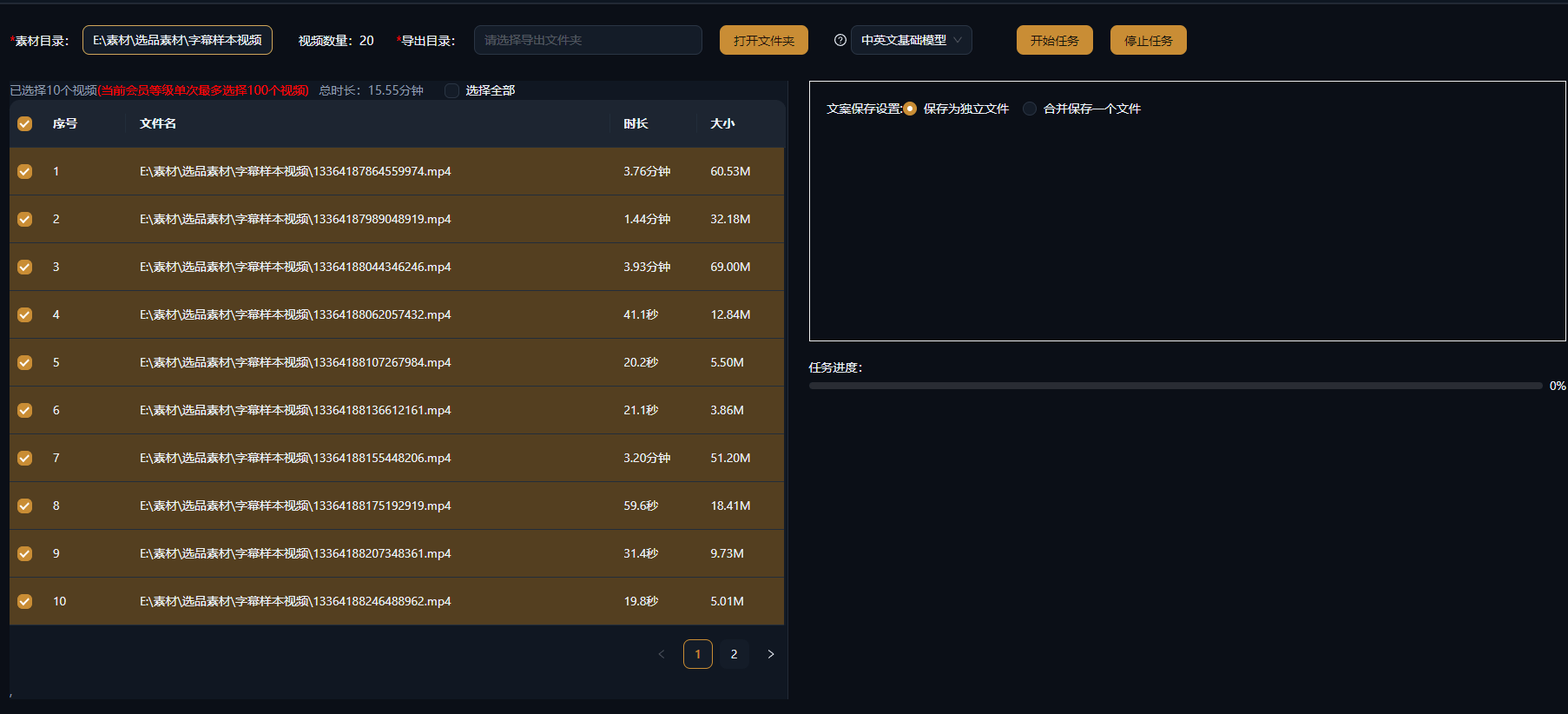
Upload multiple videos and audio files in one batch, and AI transcribes every spoken word in a single run. Benchmark-account teardowns, footage-library audits, and live-stream archive organizing go from one-by-one processing to whole-batch runs, with all results managed in one place and exportable anytime.

AIMIX 다운로드

사용 방법

Tearing down one benchmark account means transcribing dozens of videos — upload one, wait, export, repeat — and the copy-paste alone is enough to make you quit. Batch Text Extraction runs the whole pipeline as one batch: drop in dozens of videos, AI works through the queue, and when it finishes you have every transcript — just upload, go do something else, and come back to the results.

01

Upload materials in batch

Drag all the videos or audio you want transcribed into Batch Text Extraction in one go: benchmark-account videos, live-stream recordings, and course audio can be mixed together — the system queues each item for processing.

02

Batch transcription

AI handles speech recognition, sentence breaks, and punctuation automatically, with multilingual content supported; the task list shows the progress of every item in real time, and all transcripts are ready when the run finishes.

03

Manage and export in one place

Transcripts are archived by source item: edit and correct them online, export the text in batch, or save them into Script Management as raw material for viral-script teardowns or new scripts.

AIMIX 클라이언트 "스크립트 생성" 창: 영상 설명을 입력하면 AI가 스토리보드 표를 생성
AIMIX 클라이언트의 "스크립트 생성" 창: 설명으로 스토리보드를 생성한 뒤 길이와 문구를 바로 수정하고, 원클릭으로 더빙하거나 Excel로 내보낼 수 있습니다.

실제 사례

아래 5개의 스크립트는 AIMIX "AI 스크립트 생성"의 실제 결과입니다. 각 사례에 표기된 영상 설명을 입력해 생성했으며, 스토리보드 표는 수정 없이 그대로 옮겼고 길이는 생성값입니다. 화면 설명이 생성되지 않은 장면은 "—"로 표시했습니다.

Benchmark teardown: pull all the hit scripts from an account in one pass

입력한 영상 설명

Best for: content strategists, paid-traffic teams · systematic teardown of benchmark accounts

结构Workflow: collect benchmark videos → batch-extract the copy → analyze structure and hooks one by one → build up script templates

  • Dozens of benchmark videos extracted in one batch
  • No uploading and waiting one at a time
  • Results filed straight into Script Management

The biggest friction in a benchmark teardown is "getting the copy": dozens of high-view videos to transcribe or extract one at a time. With Batch Text Extraction you upload once, the whole batch runs, and minutes later every script is in hand — compare opening hooks, benefit order, and closing lines one by one, quickly spot the fixed formula this account follows, and just fill in your own product following that structure.

Typical scenarios for batch extraction

Any situation with "lots of copy, one-by-one processing not worth it" is a fit for a batch run:

B

e

F

o

We recommend uploading by account or theme, filing the results into groups in Script Management, and gradually building a searchable "copy library."

편집 결과의 주도권 유지

Run the whole batch, no babysitting

Upload once and let the queue run — the copy from dozens of items arrives in one sweep, dozens of times faster.

Results managed in one place

Archived by item, corrected online, exported in batch — your transcripts stop scattering across random documents.

Feeds straight into creation

Transcripts can be saved to Script Management and continue into viral-script teardowns, AI rewriting, or voiceover and editing.

자주 묻는 질문

Does Batch Text Extraction consume credits?

AI transcription credits accrue by media duration; an estimate is shown before you submit a task, with the exact amount per the client.

How many items can I upload at once?

Batch tasks are supported, with exact count and concurrency limits per the client; for large sets, we suggest submitting in groups and running the urgent ones first.

How accurate is the transcription?

Clear spoken content like voiceovers and courses gets high accuracy; for noisy audio or overlapping speakers, we recommend denoising first or a manual proofread.

Which languages are supported?

Chinese, English, Japanese, and more, plus some dialects; mixed Chinese-English content can be transcribed too.

Can results be exported in batch?

Yes. Text can be exported in bulk, and results can also be edited online and saved to Script Management for unified archiving.

How is it different from single-item extraction?

Same underlying capability — the batch version simply turns upload, transcription, and management into one bulk flow. Use it when you have many items; for a one-off, either works.

AIMIX 다운로드

AIMIX 다운로드