AIMIX 데스크톱 영상 편집기

Super Editor: Multitrack Professional Editing + AI Acceleration + Batch Remixing

A multitrack timeline, AI editing, and batch remixing in one: refine on multiple tracks, hand the repetitive work to AI, and scale output with batch remixing — a single tool for the entire workflow.

AIMIX 다운로드

사용 방법

The biggest pain point in editing is scattered tools: one app for fine cuts, another for subtitles, a third for remixing. Super Editor packs multitrack editing, AI editing, and batch remixing into one timeline — polish and volume production without switching tools.

01

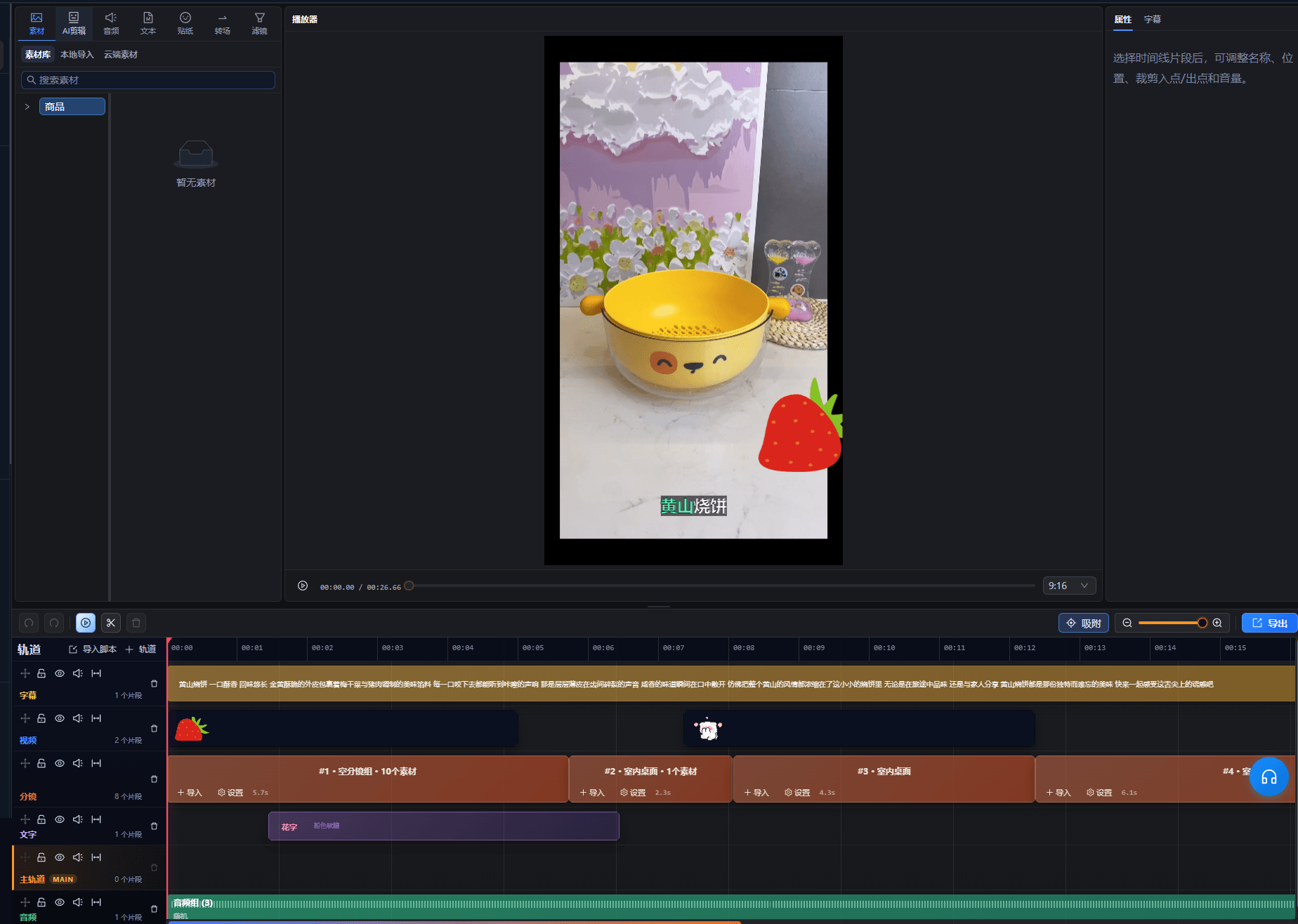
Multitrack timeline editing

Video, audio, subtitles, and stickers sit on separate layered tracks, with frame-by-frame refinement, speed changes, transitions, and keyframes.

02

AI editing acceleration

Automatically trim talking-head pauses, generate subtitles, and dub in one click; scripts drive footage alignment to double your efficiency.

03

Batch remixing at scale

Shot-group footage plus remix rules produce multiple finished videos in one pass, with automatic de-duplication on export — this is where matrix-scale output begins.

AIMIX 클라이언트 "스크립트 생성" 창: 영상 설명을 입력하면 AI가 스토리보드 표를 생성
AIMIX 클라이언트의 "스크립트 생성" 창: 설명으로 스토리보드를 생성한 뒤 길이와 문구를 바로 수정하고, 원클릭으로 더빙하거나 Excel로 내보낼 수 있습니다.

실제 사례

아래 5개의 스크립트는 AIMIX "AI 스크립트 생성"의 실제 결과입니다. 각 사례에 표기된 영상 설명을 입력해 생성했으며, 스토리보드 표는 수정 없이 그대로 옮겼고 길이는 생성값입니다. 화면 설명이 생성되지 않은 장면은 "—"로 표시했습니다.

Small-team workflow: fine cuts by day, volume output by night

입력한 영상 설명

Best for: short-video teams and account-matrix operators · balancing quality and volume

结构Flow: multitrack master edit → footage into shot groups → batch remix → multi-platform distribution

  • One shared footage library for polish and volume
  • AI takes over mechanical work
  • Remix exports auto-de-duplicate

Quality comes from precision editing, scale comes from remixing — both happen in the same workspace, with no tool switching or footage shuffling.

Three layers of capability, each covering one stage

From refinement to mass production, use what you need:

Multitrack editing

Manage video, audio, subtitles, and stickers on separate layers; refine frame by frame, adjust speed, add transitions — the detailed work lives here.

AI editing

Automate trimming pauses, adding subtitles, dubbing, and script-to-footage alignment, leaving your time for creativity.

Batch remixing

Shot groups combine and multiply into many finished videos with automatic de-duplication — the daily-content supply line for account matrices.

Polish a template with multitrack + AI first, then accumulate footage into shot groups for batch remixing.

편집 결과의 주도권 유지

One stop, no tool switching

Fine cuts, subtitles, dubbing, and remixing all in one workspace — no more exporting footage back and forth.

Professional quality without the time sink

Multitrack handles the fine work while AI absorbs the repetition — pro results do not require marathon hours.

Built-in mass production

Batch remixing is a native capability rather than a bolt-on, so template reuse spins off multiple versions directly.

자주 묻는 질문

I have never used professional editing software. Is it hard to pick up?

The multitrack interface follows mainstream editing conventions; beginners can lean on AI automation first, then take fine control.

How is it different from ordinary editing software?

Ordinary tools only handle the cutting. Here, AI subtitles, dubbing, and batch remixing are built in, covering everything from raw footage to mass output.

Can it replace professional editing software?

For common formats such as talking-head videos, remixes, and photo-and-text videos, absolutely; for special plug-ins or cinema-grade color grading it works as a complement.

How many videos can one batch remix run produce?

It depends on the amount of shot-group footage and the combination rules — richer footage yields more versions, and duplicates are filtered automatically on export.

Which media formats are supported?

Mainstream video, audio, and image formats are supported; follow the import prompts for specifics.

Can project files be shared or backed up?

Projects are saved to your account workspace and can be resumed anytime; collaboration capabilities follow the current version.

AIMIX 다운로드

AIMIX 다운로드