AIMIX 데스크톱 영상 편집기

Video Crop: Remove Black Bars, Change Aspect Ratios, and Fit One Master to Every Platform

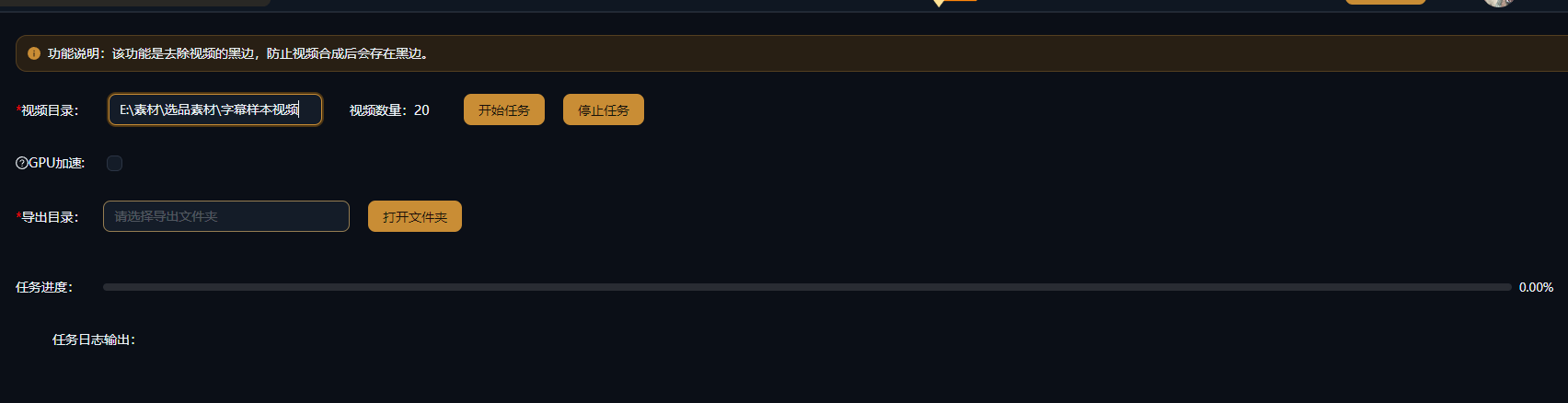
Remove black bars and switch aspect ratios in one click, with AI subject tracking that keeps faces in frame when converting between landscape and portrait. Batch processing is supported, so one piece of content fits Douyin, WeChat Channels, YouTube, and more.

AIMIX 다운로드

사용 방법

Post landscape footage to Douyin and the screen fills with black bars; upload a portrait video to YouTube and only a narrow strip survives — aspect ratio is the first hurdle of multi-platform distribution. Video Crop handles black-bar removal, free ratio switching, and AI subject tracking for smart reframing, so one video works everywhere.

01

Upload the video

Import the video whose aspect ratio needs adjusting, or queue multiple clips together in a batch task.

02

Choose a cropping method

Black-bar removal auto-detects and trims the top and bottom bars; ratio switching offers 9:16, 1:1, 16:9, and more; AI tracking keeps the subject centered so landscape-to-portrait never cuts off faces.

03

Preview and export

Preview the framing, then export — output several ratio versions at once so one piece of content covers every platform.

AIMIX 클라이언트 "스크립트 생성" 창: 영상 설명을 입력하면 AI가 스토리보드 표를 생성
AIMIX 클라이언트의 "스크립트 생성" 창: 설명으로 스토리보드를 생성한 뒤 길이와 문구를 바로 수정하고, 원클릭으로 더빙하거나 Excel로 내보낼 수 있습니다.

실제 사례

아래 5개의 스크립트는 AIMIX "AI 스크립트 생성"의 실제 결과입니다. 각 사례에 표기된 영상 설명을 입력해 생성했으며, 스토리보드 표는 수정 없이 그대로 옮겼고 길이는 생성값입니다. 화면 설명이 생성되지 않은 장면은 "—"로 표시했습니다.

Multi-platform distribution for landscape content: export three ratios in one pass

입력한 영상 설명

Best for: talking-head knowledge videos, courses, interviews · source footage in 16:9 landscape

结构Flow: landscape master → crop 9:16 / 1:1 / 16:9 versions → publish per platform

  • Landscape to portrait without cutting faces
  • One master, three versions, full coverage
  • Batch-process entire columns of footage

Multi-platform operation does not mean re-editing three times — it means cropping three times. AI tracking keeps the face centered in every landscape-to-portrait conversion, so the same content lands perfectly on each platform.

Three high-frequency cropping scenarios

Each one maps to a different distribution need:

Black-bar removal

Auto-detects the active picture area and trims the top and bottom bars — a lifesaver for old footage and screen recordings.

Aspect ratio switching

Switch between 9:16, 1:1, 16:9, 4:3, and more, with precise output to each platform spec.

AI smart tracking

Subject recognition plus dynamic framing keeps people inside the safe area of the frame when flipping between orientations.

For multi-platform distribution, export multiple ratio versions in one go and skip the repeated exports.

편집 결과의 주도권 유지

AI tracking keeps subjects intact

Landscape-to-portrait framing is judged by AI segment by segment, and the frame follows the subject as people move.

One master, many versions

Output the same video in multiple ratios at once and solve every platform spec in a single pass.

Batch aspect conversion

Convert an entire batch of footage to one target ratio — ideal for serialized, matrix-style production cadence.

자주 묻는 질문

Does cropping distort the picture?

No. Cropping trims an area of the frame at the same ratio without stretching the footage; pair it with background blur or similar effects when needed.

How does AI smart tracking work?

AI identifies the main subject in the frame (such as a face) segment by segment and dynamically adjusts the crop box, so the subject stays at the center of the composition after the ratio change.

Which aspect ratios are supported?

Common ratios including 9:16, 1:1, 16:9, and 4:3, plus custom crop regions.

Can it process videos in bulk?

Yes. Set one target ratio for multiple videos and export them all in a single run.

Does cropping reduce image quality?

Cropping only changes the visible area of the frame; resolution follows your export settings. Fewer effective pixels when cutting a portrait clip from landscape footage is normal.

Does Video Crop consume credits?

Billing is per task as shown in the in-app prompt; batch tasks display an estimated cost before running.

AIMIX 다운로드

AIMIX 다운로드