
Video to Prompt: Reverse-Engineer AI Video Prompts from Reference Videos
Date Published

The biggest blocker in AI video generation is not knowing how to describe the shot you want. Video to Prompt solves it directly: find a reference video with the right style, let AI reverse-engineer the prompt, then swap in your own subject to generate original footage in the same style.
사용 방법
Upload a reference video
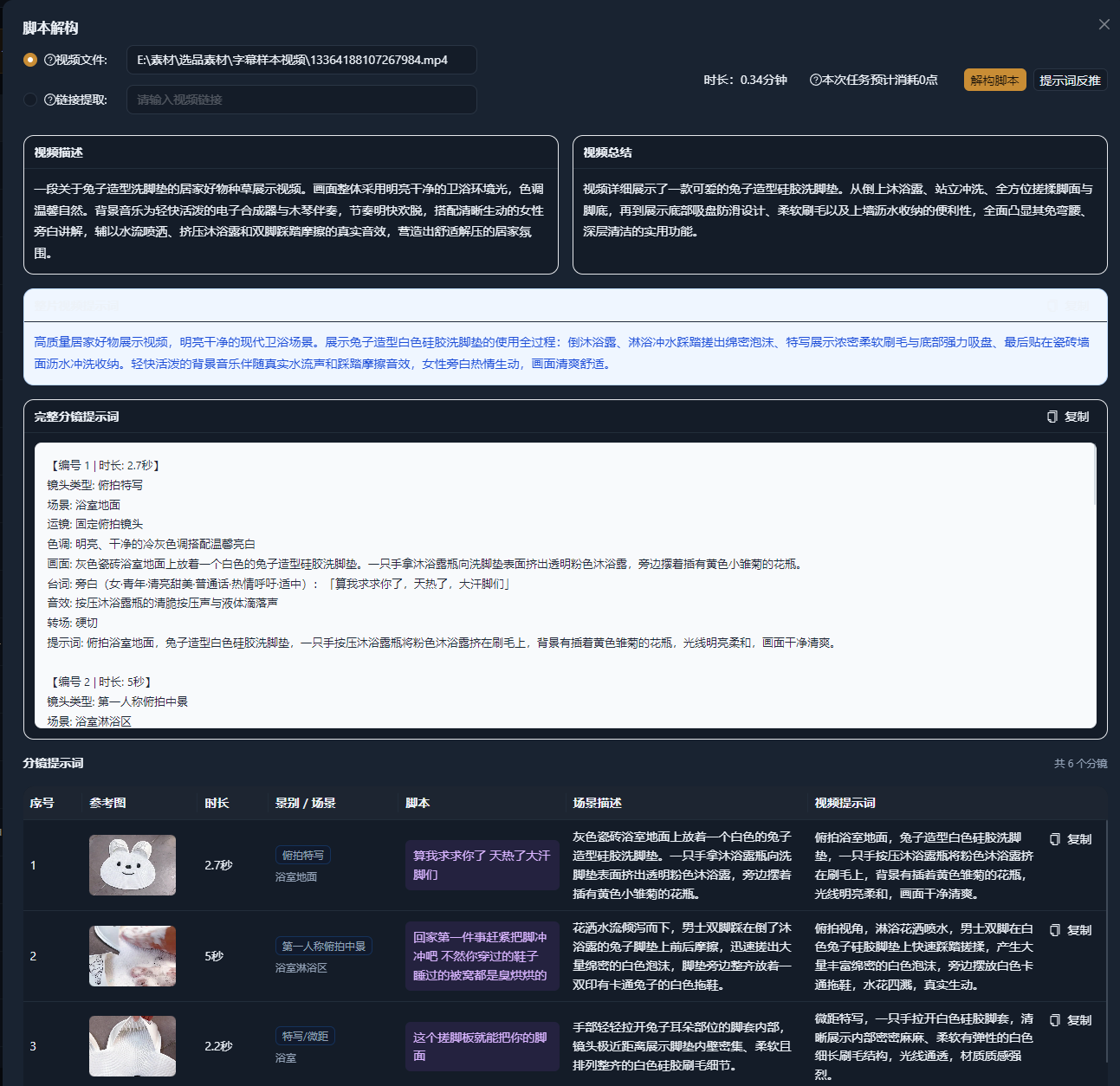
Upload a local video or paste a link, then choose what the prompt should focus on: visual description, camera language, or overall style.
AI reverse-engineers the prompt
AI analyzes the video segment by segment and outputs structured prompts: subject, scene, lighting, color tone, camera movement, and transitions.
Rewrite and generate
Keep the style and camera descriptions, replace the subject and scene with your own content, and use the result directly in AI Film Generation and other creation features.
실제 사례
아래 5개의 스크립트는 AIMIX "AI 스크립트 생성"의 실제 결과입니다. 각 사례에 표기된 영상 설명을 입력해 생성했으며, 스토리보드 표는 수정 없이 그대로 옮겼고 길이는 생성값입니다. 화면 설명이 생성되지 않은 장면은 "—"로 표시했습니다.
E-commerce Teams: Reference Competitor Ads to Get Same-Look AI Footage Fast
Best for: E-commerce ads, brand promos · Need to match a specific visual quality quickly
Workflow: Find a reference ad → Reverse-engineer the prompt → Swap in your product → Generate AI footage
Borrow the style, never the content · Build prompts into a team library · Seamless handoff to AI Film Generation
Matching visual quality used to take a videographer and a colorist; now one reference video plus a set of prompts gets you close — ad iteration cycles drop from weeks to days.
What the Reverse-Engineered Prompt Contains
The output is not one vague sentence but structured, ready-to-edit prompts:
Subject and scene
What is in the frame and in what setting — swap the subject to adapt it to your topic.
Camera language
Shot size, camera movement, and transition rhythm — the things that make a video feel professional.
Lighting and color
Light direction, color bias, and overall mood — the core variables of style transfer.
Pacing description
How fast the shots cut and how dense the information is; pair it with duration controls when generating.
Prompts can be saved and reused, gradually building your team's own style library.
편집 결과의 주도권 유지
Turn a feeling into keywords
When you cannot put the shot you want into words, reverse-engineer it from a reference video — communication cost drops to zero.
Align on style fast
Competitor analysis moves past "looks nice" to executable style parameters.
A closed loop with generation
Reverse-engineered prompts feed straight into AI Film Generation — from reference to final cut without switching tools.
자주 묻는 질문
What input formats are supported?
You can upload local video files or paste video links; short reference clips all work.
Are the reverse-engineered prompts accurate?
Recognition of subjects, camera work, and style is highly accurate; for fine details, we recommend a quick manual review and tweak before generating.
Can the prompts be used in other AI tools?
The prompts are plain natural-language descriptions — use them directly in AIMIX or copy them into other generation tools.
Will it generate content identical to the reference video?
It reverse-engineers style and camera descriptions, not the content itself; once you swap the subject, the result is your own original footage.
Does it work on long videos?
Yes, but we recommend trimming to the most representative segment so the prompts stay focused.
Is there a copyright issue with using someone else's video as a reference?
Reference videos are only used to extract style descriptions, and the output is original content; avoid directly replicating identifiable subjects and brand elements.