
Aus langen Videos Shorts erstellen: Eigenständige Clips auswählen und fertigstellen
Autor
Veröffentlicht

Um aus einem langen Video nützliche Shorts zu erstellen, wählen Sie Passagen aus, die eine Frage beantworten oder eine vollständige Handlung zeigen, und schneiden Sie jede Passage für Zuschauer, die das Original nicht gesehen haben. KI kann Kandidaten zusammenstellen, doch die finale Auswahl braucht weiterhin eine Kontext- und Vollständigkeitsprüfung. Dieser Leitfaden behandelt Livestreams, Interviews und Kurse vom Clip-Briefing bis zu den exportierten Dateien. Er erklärt auch, wann getrennte Ausschnitte gemeinsam eine Antwort verbessern und wann ein kürzerer Schnitt die ursprüngliche Aussage des Sprechers verändert.
Das Wichtigste
- Wählen Sie eine eigenständige Frage und bewahren Sie ihre Antwort, notwendige Bedingungen und Schlussfolgerung.
- Prüfen Sie Clip-Kandidaten im ursprünglichen Quellkontext, bevor Sie Schnittgrenzen oder zusammengesetzte Ausschnitte freigeben.
- Richten Sie das Ausgabeformat nach sichtbaren Informationen und den aktuellen Anforderungen des Ziels aus.
- Lesen Sie Untertitel Korrektur und spielen Sie jeden exportierten Clip ab. Mehr Dateien bedeuten nicht mehr vollständige Themen.
Ein vollständiges Thema vor einer Dauer wählen
Ein nützlicher Kurzclip hat eine klare Frage und eine vollständige Antwort. Schreiben Sie zuerst auf, was Zuschauer am Ende verstehen sollen. „Erklären Sie, warum sich die Einstellung bei einer geräuschvollen Aufnahme ändert“ liefert einen redaktionellen Prüfmaßstab. „Finden Sie die besten Momente“ erklärt nicht, was als nützlich gilt.
Verschiedene Quellformate legen unterschiedliche Einheiten nahe. Eine Kurspassage kann eine Vorführung mit einer Voraussetzung enthalten. Eine Interviewpassage kann eine Behauptung und deren Begründung umfassen. Eine Livestreampassage kann eine Produktfrage beantworten und dabei die Handlung zeigen. Behalten Sie die Teile, die gerade diese Antwort verständlich machen.
| Quelle | Mögliches eigenständiges Thema | Zu bewahrender Kontext |
|---|---|---|
| Kurs | Eine Einstellung konfigurieren | Eingangsbedingungen, Schritte und erwartetes Ergebnis |
| Interview | Eine Behauptung mit Erklärung | Die Frage, Belege und mögliche Einschränkungen |
| Livestream | Eine Produkthandlung oder Antwort | Das gezeigte Modell und was die Handlung vorführt |
Nutzen Sie die Übersicht zum Kürzen langer Videos, um den Workflow zu verstehen. Für wiederholte Versuche innerhalb einer einzigen gesprochenen Erklärung behandelt der Leitfaden zum Talking-Head-Schnitt die stärker fokussierten Rohschnittentscheidungen.
Die Aufnahme und ein redaktionelles Clip-Briefing vorbereiten
Halten Sie die Quelle verfügbar und legen Sie Zielgruppe, Thema und Ausgabeformat fest, bevor Sie Kandidaten anfordern. Wenn Spracherkennung den Auftrag unterstützt, prüfen Sie das Transkript rund um Passagen, deren Bedeutung von einem Namen, einer Zahl, einer Verneinung oder einer Bedingung abhängt.
Anforderungen formulieren, die Sie prüfen können
- Zielgruppe: Was wissen die Zuschauer bereits?
- Thema: Welche Frage soll jeder Clip beantworten?
- Wesentlicher Inhalt: Welche Frage, Handlung, Bedingung oder Schlussfolgerung muss erhalten bleiben?
- Gestaltung: Welches Gesicht, Produktdetail oder Bedienelement muss sichtbar bleiben?
- Ausgabe: Welches Seitenverhältnis und welche Daueranforderung gelten am Ziel?
Beispielbriefing: Stellen Sie aus diesem Kurs Clip-Kandidaten mit einer Frage pro Clip zusammen. Behalten Sie den erforderlichen Hintergrund, die Vorführung und die Schlussfolgerung. Bewahren Sie Bedingungen, die erklären, wann eine Antwort gilt. Kennzeichnen Sie Kandidaten, die früheren Kontext benötigen, bevor sie eigenständig funktionieren können.
Dieser Auftrag ist ein Planungsbeispiel, kein Versprechen, dass die App eine bestimmte Anzahl oder ein bestimmtes Format von Clips liefert. Prüfen Sie den unterstützten Workflow, die Auftragsverfügbarkeit und die Nutzungsinformationen in der App. Beginnen Sie mit repräsentativem Material, damit Sie den Auswahlansatz prüfen können, bevor Sie den Auftrag erweitern.
Clip-Kandidaten in der Schnittumgebung zusammenstellen
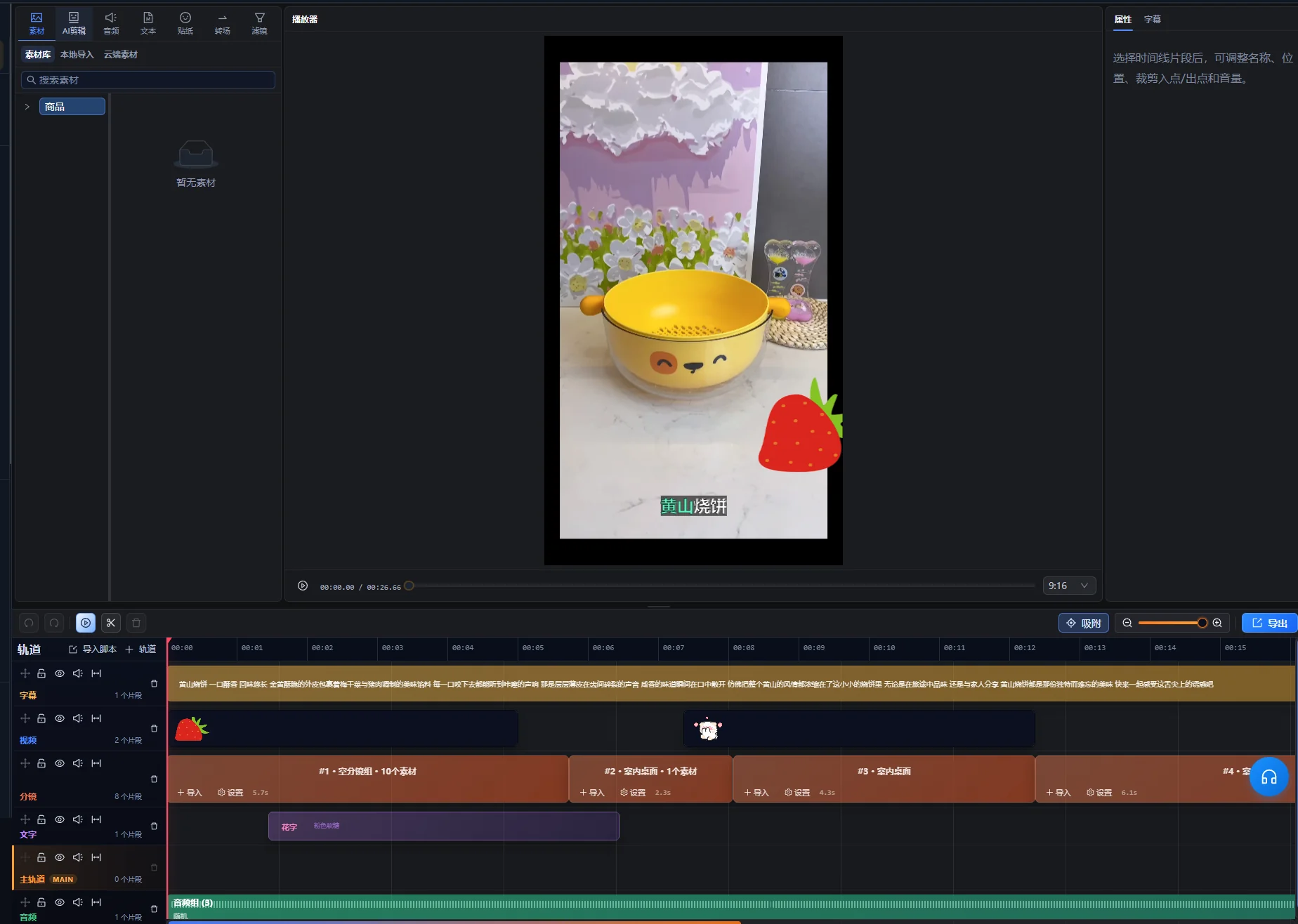
Fordern Sie mit dem KI-Assistenten in der Schnittumgebung Clip-Kandidaten an und behandeln Sie die Auswahl anschließend als Ausgangssammlung zur Prüfung. Der unterstützte Workflow für lange Videos kann Ausschnitte und bearbeitbare Timelines zusammenstellen, bei Bedarf auch aus nicht zusammenhängenden Passagen. Diese Flexibilität macht eine Bedeutungsprüfung nötig: Zwei Passagen mit demselben Schlüsselwort können trotzdem unterschiedliche Fragen beantworten.
- Importieren Sie die lange Aufnahme in die Schnittumgebung und öffnen Sie den KI-Assistenten.
- Geben Sie das Clip-Ziel und die Inhalte an, die erhalten bleiben müssen.
- Prüfen Sie die Kandidatenvorschau und benennen Sie jedes vorgeschlagene Thema.
- Spielen Sie die ausgewählten Passagen und ihren umgebenden Quellkontext ab.
- Fordern Sie einen überarbeiteten Vorschlag an, wenn Antwort oder Abfolge unvollständig sind.
- Erstellen Sie nach der Prüfung mit der Übernahmefunktion des Vorschlags den freigegebenen Schnitt und verfeinern Sie jeden Clip anschließend in der Schnittumgebung weiter.
Die Kandidatenvorschau ist ein ausstehender Vorschlag, kein bereits übernommener Timeline-Schnitt. Wenn Änderungen an Quelle oder Timeline den Vorschlag veralten lassen, erzeugen Sie eine neue Vorschau und prüfen Sie die neuen Kandidaten, bevor Sie sie übernehmen. Die genaue Bezeichnung der Bedienelemente hängt von der Oberflächensprache ab. Diese Anweisungen benennen die Aktionen und setzen keine englische Beschriftung voraus.
Bewahren Sie für jeden Kandidaten einen Quellverweis und einen kurzen Auswahlgrund auf. Ein einfaches Dokument kann Thema, Quellpositionen, erforderlichen Kontext und offene Punkte festhalten. Dieser Leitfaden setzt kein separates automatisiertes Dashboard zur Clip-Prüfung voraus.
Das Auswahlfeld für Kurzclips stellt Titel, Dauer und Quellpositionen des Kandidaten sowie eine Wiedergabefunktion für die Auswahl bereit. Lokalisieren Sie damit die Quelle und sehen Sie sich dann die tatsächliche Passage an. Betrachten Sie den vorgeschlagenen Titel als zu prüfende Bezeichnung und nicht als freigegebene Veröffentlichungsüberschrift.
Die erste Prüfung betrifft die Bedeutung: Können Sie Frage und Antwort benennen, ohne zu raten? Enthält ein Kandidat ein interessantes Zitat, aber keinen verständlichen Gegenstand, prüfen Sie früheren Kontext, bevor Sie über seine Beibehaltung entscheiden.
Einstiege, Einschränkungen und Abschlüsse im Kontext prüfen
Prüfen Sie über die vorgeschlagenen Anfangs- und Endpunkte hinaus. Ein fehlender Satz unmittelbar vor einem Clip kann die Bedeutung des gesamten verbleibenden Inhalts verändern. Eine unmittelbar folgende Schlussfolgerung kann notwendig sein, um die Antwort zu vervollständigen.
| Prüfung | Worauf Sie hören oder achten sollten | Entscheidung |
|---|---|---|
| Einstieg | „Dies“, „diese Option“ oder eine Antwort ohne Frage | Genug früheres Material behalten oder den Gegenstand eindeutig benennen |
| Bedingung | „Nur wenn“, „außer“ oder eine Einschränkung zur Aussage | Die Bedingung bei der Antwort behalten, die sie begrenzt |
| Vorführung | Eine Handlung ohne Vorbereitung oder Ergebnis | Die Teile bewahren, die zum Verständnis des Schritts nötig sind |
| Abschluss | Ein unvollendeter Gedanke oder eine ausgelassene Schlussfolgerung | Den Abschluss erweitern oder überarbeiten, um die Antwort zu vervollständigen |
| Zusammengesetzte Ausschnitte | Eine geänderte Frage, ein anderes Produkt, ein anderer Zeitraum oder Standpunkt des Sprechers | Prüfen, ob die zusammengestellte Sequenz die ursprüngliche Bedeutung bewahrt |
Prüfen Sie den Clip einmal, ohne sich auf Ihre Erinnerung an die lange Aufnahme zu stützen. Wenn Sie beim Ansehen erklären müssen, was „dieses hier“ bedeutet, braucht der Clip wahrscheinlich mehr Kontext. Ein zutreffender Titel kann das Thema benennen, sollte aber keine stärkere Aussage hinzufügen, als die Quelle belegt.
Sehen Sie sich getrennte Passagen beim Zusammensetzen sowohl im ursprünglichen Kontext als auch in der neuen Sequenz an. Lassen Sie eine Einschränkung bei der zugehörigen Aussage, selbst wenn eine einfachere Zusammenstellung kürzer wäre.
Praxisbeispiel: Aus einer Kursantwort einen Kurzclip erstellen
Diese fiktive Kurspassage veranschaulicht Auswahl und Prüfung. Sie ist weder ein echtes Clip-Ergebnis noch eine Leistungsfallstudie. Ein Lernender fragt, wie sich unerwünschte stille Lücken aus einer Aufnahme entfernen lassen, ohne leise Sprache zu verlieren.
Die Quelle vor dem Schnitt erfassen
| Quellbestandteil | Vermittelte Information | Redaktionelle Entscheidung |
|---|---|---|
| Frage | Die Aufnahme enthält Lücken und leise Wörter | Das Problem behalten oder es am Einstieg zutreffend benennen |
| Lange Einführung | Der Dozent spricht über unzusammenhängende frühere Übungen | Für diese Antwort unnötiges Material ausschließen |
| Vorführung | Der Dozent testet die Einstellung an einer repräsentativen Passage | Den Schritt und ausreichend Wiedergabe zur Beurteilung behalten |
| Bedingung | Eine aggressive Einstellung kann leise Sprache entfernen | Neben der Vorführung behalten |
| Schlussfolgerung | Die Probe anhören und anpassen, bevor mehr Material verarbeitet wird | Als vollständige Empfehlung beibehalten |
Eine Antwort mit Anfang und Ende aufbauen
Beginnen Sie mit dem Problem oder einer knappen Aufgabenbeschreibung und zeigen Sie dann den repräsentativen Test. Bewahren Sie die Bedingung des Dozenten zur leisen Sprache und enden Sie mit der Empfehlung, vor breiterer Anwendung der Einstellungen zuzuhören.
Liegen Vorführung und Schlussfolgerung an getrennten Quellpositionen, können sie nur dann eine sinnvolle Sequenz bilden, wenn sie dieselbe Einstellung und Eingabe betreffen. Prüfen Sie das dazwischenliegende Material auf eine geänderte Situation. Kombinieren Sie keinen Test an einer ruhigen Aufnahme mit einer Schlussfolgerung, die ausdrücklich eine geräuschvolle Aufnahme betraf.
Den Kurzclip aus Sicht neuer Zuschauer prüfen
Die Zuschauer sollten wissen, welches Problem gelöst wird, welches Bedienelement oder welche Handlung wichtig ist, worauf sie hören müssen und wie sie reagieren sollen, wenn die Einstellung nützliche Sprache entfernt. Sagt der Clip lediglich „erhöhen Sie diesen Wert“, behalten Sie die fehlende Benennung oder wählen Sie eine vollständigere Passage.
Der Abnahmetest lautet, ob die Antwort außerhalb des Kurses Bestand hat. Ihre Länge ergibt sich aus den Informationen, die zur Erklärung von Handlung und Bedingung erforderlich sind. Passt sie nicht zum Ziel, kürzen Sie unzusammenhängende Einleitung oder teilen Sie sie in tatsächlich getrennte Fragen auf, statt die Einschränkung zu löschen.
Das Ausgabeformat festlegen und jeden wichtigen Bildausschnitt prüfen
Wählen Sie den finalen Bildrahmen nach dem, was die Zuschauer sehen müssen. Ein vertikaler Ausschnitt, der das Gesicht des Präsentators behält, aber das vorgeführte Bedienelement entfernt, vermittelt nicht dieselbe Erklärung wie das Original.
Nach der Prüfung am 10.10.2026 erklärt YouTube in Informationen zu dreiminütigen YouTube Shorts, dass bei gewöhnlichen YouTube-Kanälen quadratische oder vertikale Videos mit einer Länge bis zu drei Minuten, die ab dem 15.10.2024 hochgeladen wurden, als Shorts eingestuft werden. Für Official Artist Channels gilt ein separater historischer Stichtag. Prüfen Sie bei der Ausgabevorbereitung die verlinkten Hinweise für Ihren Kanal und Ihr Upload-Datum. Diese Einstufungsregel ist keine Verarbeitungsgrenze der App.
Den Bildausschnitt über die vollständige Handlung hinweg prüfen
- Prüfen Sie die Bildgestaltung am Einstieg und identifizieren Sie das Motiv.
- Verfolgen Sie Gesichter, Hände, Produkte und vorgeführte Bedienelemente während ihrer Bewegung.
- Prüfen Sie Bildschirmaufnahmen auf Text, der nach dem neuen Bildausschnitt zu klein wird.
- Reservieren Sie Platz für Untertitel, ohne erforderliche Informationen zu verdecken.
- Prüfen Sie jeden Übergang zwischen Passagen mit unterschiedlichen Bildausschnitten.
Nutzen Sie den Workflow zum Zuschneiden und bei Bedarf manuelle Timeline-Anpassungen. Wenn ein Ausschnitt nicht zugleich eine Person und eine breite Vorführung zeigen kann, erwägen Sie ein anderes Layout oder eine Quellpassage, die die Erklärung bewahrt. Gehen Sie nicht davon aus, dass ein automatischer Zuschnitt entscheiden kann, welches winzige Bedienelement für die Lektion wichtig ist.
Den finalen Clip untertiteln und nützliche Bildinformationen bewahren
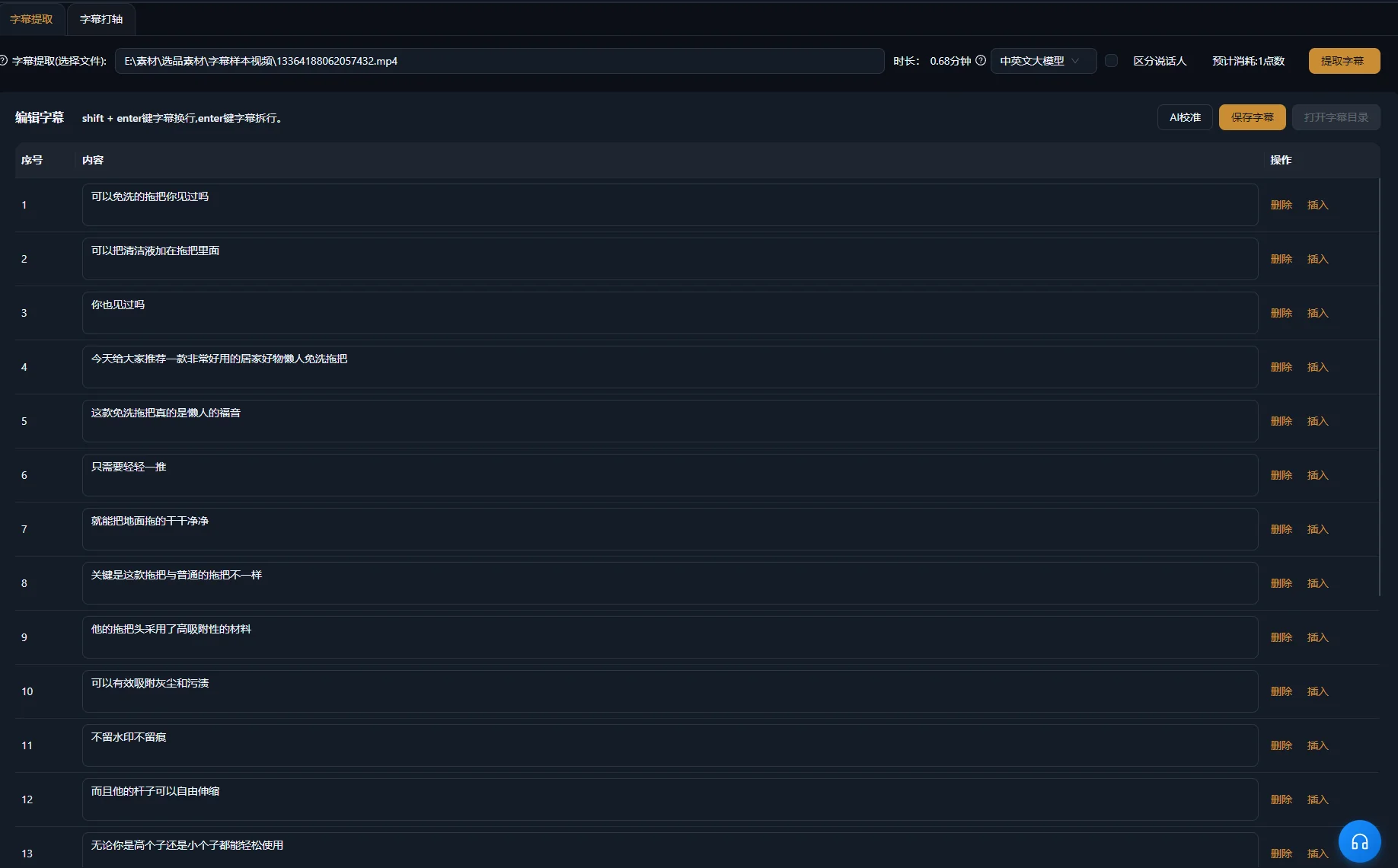
Erstellen oder überarbeiten Sie Untertitel für den final geschnittenen Clip und vergleichen Sie sie dann mit der Sprache. Quelluntertitel passen möglicherweise nicht mehr, nachdem Passagen entfernt oder umgeordnet wurden. Achten Sie besonders auf Produktnamen, Mengenangaben, Bedingungen und Verneinungen.
Die W3C-Hinweise zu Untertiteln erläutern, dass barrierefreie Untertitel auch relevante Geräusche außerhalb der Sprache und Sprecherinformationen vermitteln. In einem Interview kann die Sprecherkennzeichnung wichtig sein. In einer Vorführung kann ein hörbares Klicken bestätigen, dass eine Handlung abgeschlossen ist. Nehmen Sie die Informationen auf, die zum Verständnis erforderlich sind.
Die W3C-Hinweise zu Audio- und Videoinhalten empfehlen außerdem klaren Ton, lesbare eingeblendete Texte und Zeit zur Verarbeitung von Informationen. Wenden Sie diese Prüfungen auf den Kurzclip selbst an: Ein Zuschnitt oder eine schnelle Abfolge kann eine zuvor klare Vorführung schwer nachvollziehbar machen.
Text und Ton als getrennte Ebenen prüfen
- Lesen Sie die Untertitel anhand des finalen Tons Korrektur.
- Prüfen Sie Timing und lesbare Umbrüche.
- Kontrollieren Sie die Platzierung über Gesichtern, Bedienelementen und Produktdetails.
- Hören Sie an Übergängen auf abgeschnittene Wörter oder abrupte Tonwechsel.
- Reduzieren Sie konkurrierende Musik, wenn sie die Antwort verdeckt.
Die Übersicht zur Untertitelerstellung behandelt den zugehörigen Produktworkflow. Ein Untertitel sollte den gesprochenen Inhalt zutreffend wiedergeben. Seine Änderung kann eine falsche oder unvollständige gesprochene Antwort nicht reparieren.
Probleme bei Kandidaten beheben, die nicht eigenständig funktionieren
Überprüfen Sie die Auswahl erneut, wenn dem Clip eine vollständige Antwort fehlt. Gestaltung kann die Präsentation verbessern, aber keinen unpassenden Ausschnitt dazu bringen, fehlende Argumentation zu liefern.
| Symptom | Mögliche Ursache | Nächste Prüfung oder Korrektur |
|---|---|---|
| Der Einstieg beantwortet eine unbekannte Frage | Die Frage oder der Gegenstand wurde ausgeschlossen | Früheren Quellkontext prüfen und den erforderlichen Gegenstand behalten oder benennen |
| Die Behauptung klingt umfassender als in der Quelle | Eine Einschränkung wurde entfernt | Die Einschränkung neben der Behauptung wiederherstellen |
| Die Vorführung endet vor ihrem Ergebnis | Die Kandidatengrenze folgt der Sprache statt der Handlung | Den Abschluss erweitern oder überarbeiten, um das nützliche Ergebnis zu zeigen |
| Zusammengesetzte Ausschnitte widersprechen einander | Sie betreffen unterschiedliche Situationen oder Fragen | Ursprüngliche Kontexte vergleichen und die Themen bei Bedarf trennen |
| Der vertikale Clip verdeckt ein Bedienelement | Der Zuschnitt priorisiert den falschen Bereich | Den Bildausschnitt über die Vorführung hinweg anpassen oder ein geeignetes Layout nutzen |
| Untertitel entsprechen nicht mehr der Reihenfolge | Sie stammen aus der langen Quelle oder einem früheren Schnitt | Mit dem fertigen Clip abgleichen |
| Mehrere Clips wiederholen dieselbe Antwort | Die Auswahl bevorzugte ähnliche Passagen statt unterschiedlicher Themen | Frage und Kernaussage jedes Kandidaten vergleichen |
Benötigt ein Thema weiterhin zu viel frühere Erklärung, eignet sich die Passage möglicherweise besser für ein langes Video als für einen Kurzclip. Einen Kandidaten abzulehnen ist ein nützliches redaktionelles Ergebnis. Die Anzahl extrahierter Dateien belegt nicht, dass die Quelle ebenso viele unterschiedliche vollständige Antworten enthielt.
Exportierte Clips prüfen und ihren Quellkontext protokollieren
Geben Sie jede exportierte Datei einzeln frei. Gemeinsame Einstellungen können wiederholte Vorbereitung reduzieren, doch jeder Clip hat eigene Grenzen, eine eigene Bedeutung und eine eigene sichtbare Handlung. Ein sauberer erster Export belegt nicht, dass die übrigen vollständig sind.
Der unterstützte Clip-Workflow kann unabhängige Clips für separate Exporte vorbereiten. Bestätigen Sie, welche Ausgaben übergeben werden, und spielen Sie jede entstandene Datei ab. Halten Sie eigenständige Themenclips getrennt, sofern das Ausgabebriefing nicht ausdrücklich eine Zusammenstellung verlangt.
- Der Clip beantwortet eine erkennbare Frage.
- Der Einstieg funktioniert für Personen, die die Quelle nicht kennen.
- Die notwendige Einschränkung, Vorführung und Schlussfolgerung bleiben erhalten.
- Zusammengesetzte Ausschnitte bewahren die Bedeutung der Quelle.
- Das wichtige Motiv und die Handlung bleiben sichtbar.
- Untertitel, Sprache und ergänzender Ton sind in der exportierten Datei korrekt.
- Die Datei erfüllt die Anforderungen des gewählten Ziels.
Protokollieren Sie Thema, Quellpositionen, fertigen Dateinamen und redaktionelle Änderungen beim Projekt. Geben Sie dem Clip einen zutreffenden Titel auf Basis seiner tatsächlichen Antwort. Wenn Sie später Verbreitungsdaten prüfen, nutzen Sie diese Unterlagen, um die veröffentlichten Inhalte zu verstehen. Produktionsumfang allein zeigt nicht, dass die Auswahl wirksam war.
Wählen Sie für die nächste Quelle zunächst eine repräsentative Frage und führen Sie diese durch den gesamten Prozess. Sobald Sie Auswahl, Bildausschnitt, Untertitel und Export prüfen können, erweitern Sie auf weitere unterschiedliche Themen.
Häufige Fragen
Wie viele Shorts sollte ich aus einer Aufnahme erstellen?
Wählen Sie unterschiedliche Themen, die zu vollständigen eigenständigen Clips werden können. Manche Aufnahmen enthalten viele nutzbare Antworten; andere hängen stark von früherem Kontext ab. Bewerten Sie Themenüberschneidung und Vollständigkeit, statt aus der Aufnahmedauer eine Quote abzuleiten.
Kann ein Kurzclip Passagen aus unterschiedlichen Quellpositionen kombinieren?
Unterstützte Workflows können nicht zusammenhängende Ausschnitte zusammenstellen. Prüfen Sie jede Passage im ursprünglichen Kontext und kontrollieren Sie die zusammengesetzte Bedeutung. Bewahren Sie notwendige Bedingungen und kombinieren Sie Antworten zu verschiedenen Situationen nicht so, als wären sie eine einzige Aussage.
Sollte jeder Kurzclip mit der Schlussfolgerung beginnen?
Stellen Sie die Schlussfolgerung voran, wenn sie ohne frühere Einleitung verständlich und zutreffend ist. Manche Vorführungen brauchen das Problem oder die Bedingung vor der Antwort. Wählen Sie den Einstieg, der das tatsächliche Thema verdeutlicht, statt dieselbe Struktur auf jede Quelle anzuwenden.
Kann ich denselben Export für jede Plattform verwenden?
Prüfen Sie die aktuellen Formatanforderungen des Ziels und kontrollieren Sie, wie seine Betrachtungsoberfläche den Clip darstellt. Dieselbe Datei kann an mehreren Stellen nutzbar sein. Eine geeignete Dauer oder ein geeigneter Zuschnitt an einem Ziel belegt jedoch nicht, dass sie anderswo genauso gut funktioniert.