
Videos hochladen
Importieren Sie eines oder viele Videos mit eingebrannten Untertiteln, Wasserzeichen oder Logos; Batch-Aufgaben reihen sich einfach ein und laufen.
eingebrannte Untertitel, Wasserzeichen und Logos mit einem Klick per KI löschen
Die KI erkennt und entfernt automatisch eingebrannte Untertitel, Wasserzeichen und Kanal-Logos und stellt ein sauberes Bild wieder her. Batch-Verarbeitung wird unterstützt – ein unverzichtbarer Vorbereitungsschritt vor Synchronisation, Übersetzung und Remix.
AIMIX herunterladenFür eingebrannte Untertitel und Wasserzeichen hilft gewöhnlicher Schnitt nur mit Beschneiden oder Weichzeichnen – das Bild wird beschädigt, Spuren bleiben. Die Untertitel-Entfernung nutzt die KI, um die Auflage zu lokalisieren und den verdeckten Hintergrund Frame für Frame zu reparieren; nach der Entfernung ist das Ergebnis kaum sichtbar, und das Material ist wieder sauber nutzbar.
Importieren Sie eines oder viele Videos mit eingebrannten Untertiteln, Wasserzeichen oder Logos; Batch-Aufgaben reihen sich einfach ein und laufen.
Untertitel- und Wasserzeichen-Bereiche werden automatisch lokalisiert und der Hintergrund Frame für Frame repariert; verpasst die Erkennung etwas, markieren Sie den Bereich manuell und verarbeiten ihn erneut.
Vorschau, Bestätigung und Export – bereit für Übersetzungs-Synchronisation, Remix oder den nächsten Schritt in Ihrem Schnitt-Workflow.
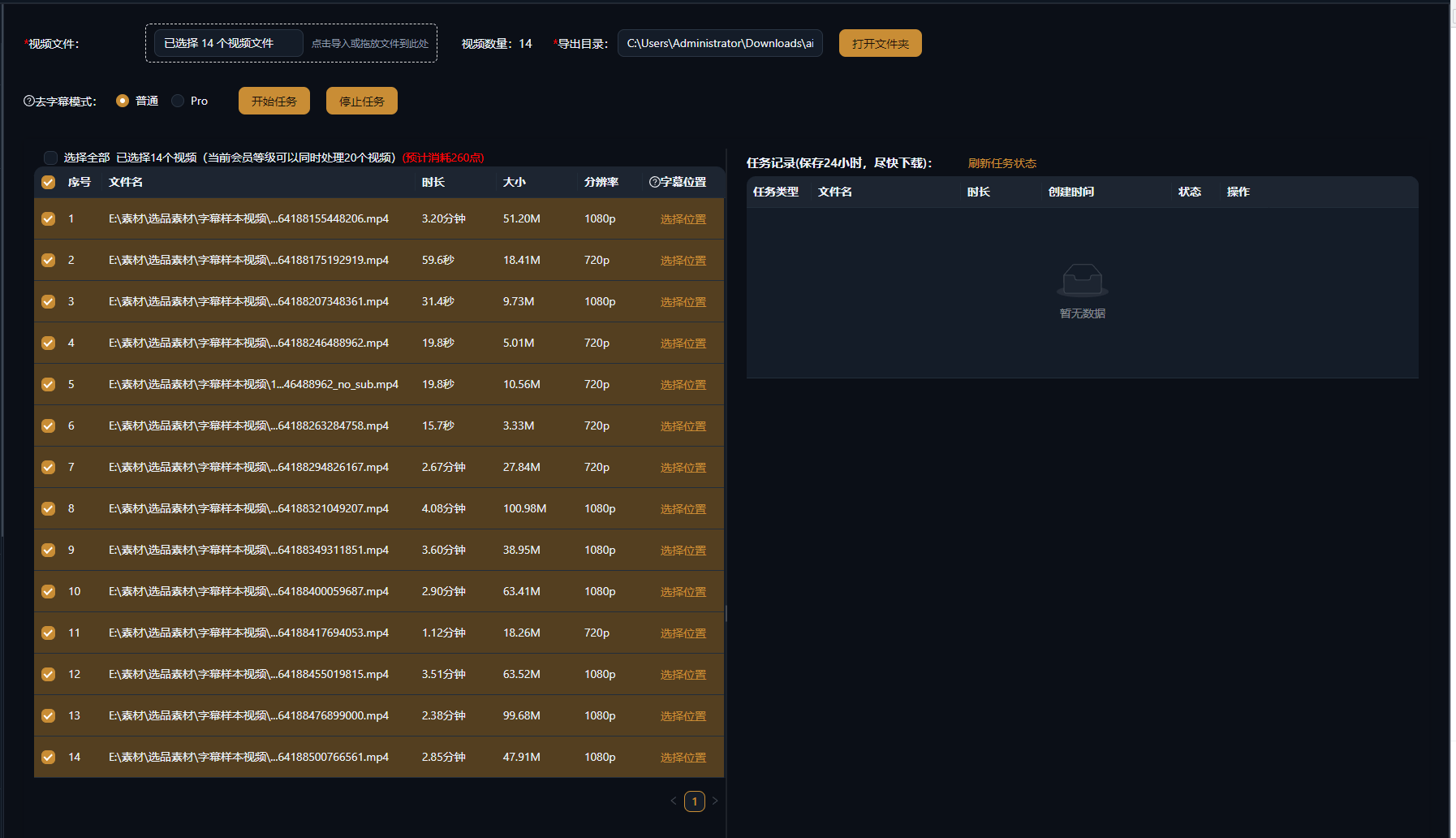
Die folgenden Fälle sind echte, unveränderte Anwendungsaufzeichnungen dieser Funktion in der AIMIX-App.
Ideal für: Übersetzung und Synchronisation, mehrsprachige Remakes · Quellvideos mit eingebrannten Untertiteln
结构Workflow: Quellvideo importieren → die KI löscht die Original-Untertitel → neu synchronisieren und neu untertiteln → exportieren
Der erste Schritt jeder Synchronisation ist immer das Löschen der originalen fest eingebrannten Untertitel. Ein einzelner manueller Clip dauert zig Minuten; mit der KI-Batch-Entfernung bekommen Synchronisation und neue Untertitel endlich eine saubere Leinwand.
Drei Szenarien mit hoher Frequenz:
Fest eingebrannte Untertitel löschen, um für Übersetzungs-Synchronisation oder Remix ein sauberes Bild zu hinterlassen.
Eck-Wasserzeichen und Kanal-Logos löschen – kleine, feste Bereiche liefern die stabilsten Ergebnisse.
Ganze Chargen zur Verarbeitung einreihen, ideal für die einmalige Vorbereitung über eine Account-Matrix oder einen Übersetzungskanal.
Testen Sie zuerst einen Clip, um das Ergebnis zu bestätigen, und verarbeiten Sie dann die ganze Bibliothek im Batch.
Keine schwarzen Kästen, kein Weichzeichnen – die KI baut den verdeckten Hintergrund wieder auf für ein natürlich wirkendes Bild.
Einen einzelnen Clip manuell markieren und feinjustieren oder eine ganze Bibliothek einreihen und die Wiederholungsarbeit überspringen.
Nach der Entfernung übernehmen Synchronisation und Untertitelgenerierung sofort – eine Pipeline vollendet die Lokalisierung.
Gelöschte Bereiche werden von der KI wieder aufgebaut, während der Rest des Bildes unberührt bleibt; statische Hintergründe sehen am besten aus, schnelle Bewegungen können leichte Spuren zeigen.
Ja. Die KI verfolgt die Untertitel-Position und löscht sie Frame für Frame; bei stark springenden Untertiteln zuerst mit einer manuellen Auswahl testen.
Markieren Sie den Bereich manuell und verarbeiten Sie ihn erneut; kombinieren Sie bei komplexen Bildern die automatische Erkennung mit manueller Feinjustierung.
Ja. Fügen Sie mehrere Videos zur Warteschlange hinzu und lassen Sie sie gemeinsam laufen – ideal, um ganze Serien oder eine Material-Bibliothek in einem Durchgang zu säubern.
Einen Versuch wert. Die KI baut den Hintergrund hinter dem Wasserzeichen wieder auf; tief in die Szene verwobene Wasserzeichen liefern begrenzte Ergebnisse.
Die Abrechnung erfolgt nach Dauer oder pro Aufgabe, wie im Programm angezeigt; Batch-Aufgaben zeigen vor dem Lauf eine Kostenschätzung an.