
Skript einfügen
Fügen Sie das Voiceover-Skript in das Synthese-Feld ein – eine Zeile oder eine ganze Reihe funktionieren; lange Skripte werden automatisch segmentiert.
KI-Voiceovers mit über 100 Stimmen, mehrsprachiger Output mit einem Klick
Hunderte Preset-Stimmen, die männliche und weibliche Stimmen, regionale Akzente und mehrere Sprachen abdecken. Fügen Sie Ihr Skript für die Ein-Klick-Voiceover-Synthese ein, justieren Sie Tempo und Tonhöhe fein und verwandeln Sie eine ganze Reihe von Skripten mit Batch-Aufgaben in Audio.
AIMIX herunterladenDas Voiceover ist der am meisten unterschätzte Schritt der Kurzvideo-Produktion: Sprecher zu buchen ist teuer, selbst aufnehmen ist inkonsistent, und freie Stimmbibliotheken klingen alle gleich. Die Sprachsynthese vereint Stimmbibliothek, Parameter-Justierung und Batch-Synthese in einer Oberfläche – in der Minute, in der Ihr Skript fertig ist, ist die Stimme bereit.
Fügen Sie das Voiceover-Skript in das Synthese-Feld ein – eine Zeile oder eine ganze Reihe funktionieren; lange Skripte werden automatisch segmentiert.
Filtern Sie Stimmen nach Geschlecht, Stil und Sprache; hören Sie sich die Vorschau an, vergleichen Sie und merken Sie die am häufigsten genutzten als Favoriten vor.
Feinjustieren Sie Tempo, Tonhöhe und Lautstärke, bis es richtig klingt, und synthetisieren Sie dann; Batch-Aufgaben rendern alles mit einem Klick.
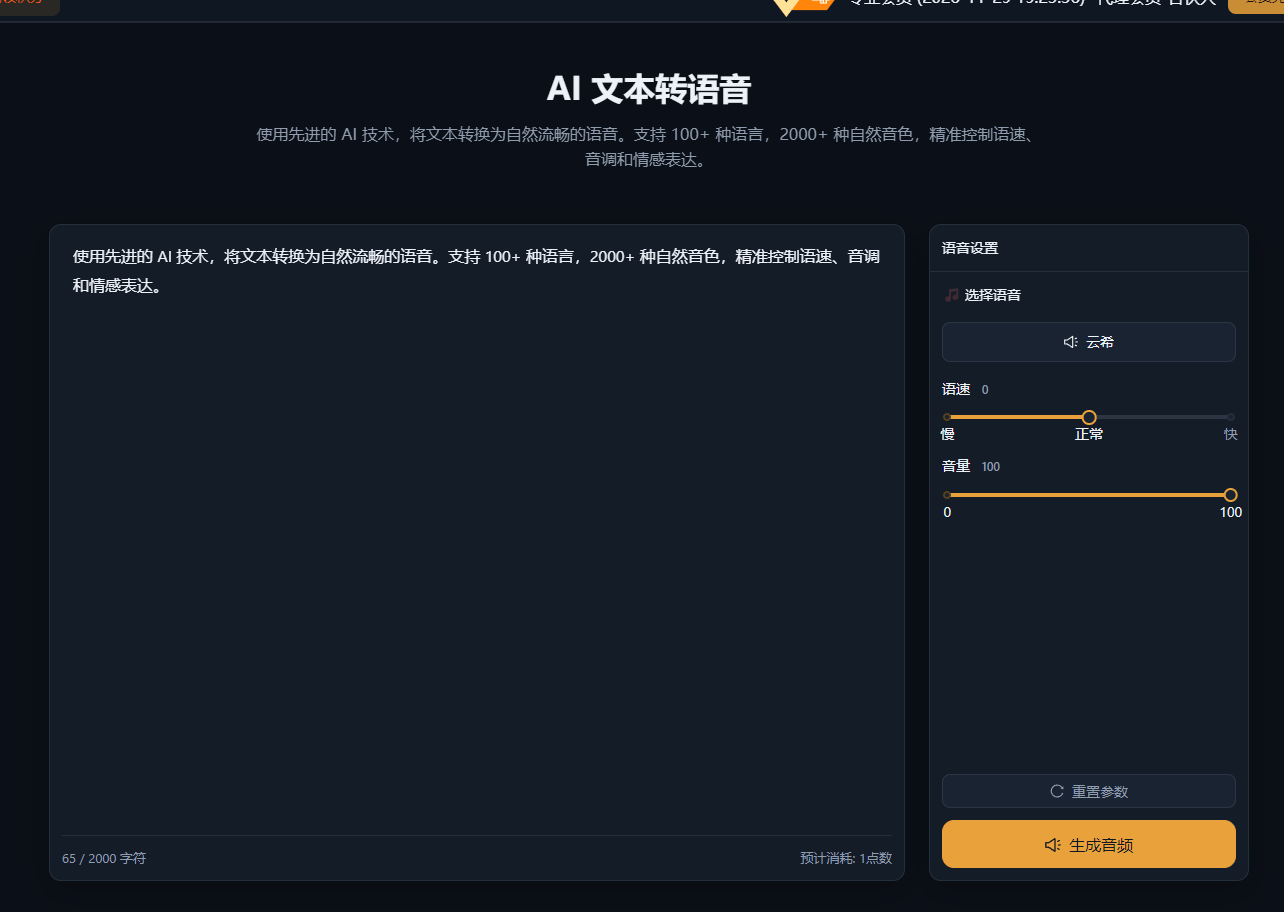
Die folgenden Fälle sind echte, unveränderte Anwendungsaufzeichnungen dieser Funktion in der AIMIX-App.
Ideal für: Lehrreiche Talking-Head-Videos, News- und Info-Konten, Produkt-Erklärvideos · hoher Voiceover-Bedarf
结构Workflow: Skript-Liste → Batch-Synthese → Clip für Clip prüfen → in den Schnitt importieren
Der Voiceover-Engpass war nie die Aufnahme selbst – es sind die endlosen Exporte und Vorschauen. Mit einer festen Stimme und Parameter-Vorlagen ist das Vertonen von 30 Skripten nur ein Klick.
Wenn die Stimme zum Ton des Contents passt, bleiben die Zuschauer konzentriert:
Wählen Sie eine ruhige, klare Stimme eines jungen Erwachsenen mit leicht flottem Tempo für ein stärkeres Gefühl von Informationsdichte.
Wählen Sie eine warme, gesprächige Stimme mit etwas mehr Tonhöhen-Variation, um das Gefühl einer persönlichen Empfehlung zu erzeugen.
Wählen Sie eine klassische Moderator-Stimme in stabilem, klarem Tempo, um Professionalität auszustrahlen.
Haben Sie sich einmal festgelegt, merken Sie die Stimme als Favorit vor und bleiben dabei – Ihre Stimme wird Teil der Identität Ihres Kontos.
Die Sprachsynthese ist die geteilte Stimmbibliothek; Voice Cloning ist Ihre exklusive Stimme:
Die Bibliothek funktioniert sofort für schnellen Output, während Sie Content-Richtungen validieren.
Vereinheitlichen Sie den Klang über alle Ihre Konten und schärfen Ihre persönliche Wiedererkennung.
Wenn Sie ein Skript in mehrere Sprachen synthetisieren, hält eine geklonte Stimme die Klangfarbe konsistent.
Wechseln Sie zwischen beiden in derselben Synthese-Oberfläche – ohne Workflow-Änderung.
Keine Sprecher, keine Studiozeit – Sie zahlen nur für die Credits, die Sie tatsächlich nutzen.
Verwandeln Sie ein Skript in mehrere Sprachversionen und rollen globalen Content gleichzeitig aus.
Eine ganze Reihe von Skripten wird mit einem Klick zu Audio – das Voiceover ist kein Engpass mehr für den Output.
Hunderte Preset-Stimmen, die gängige männliche und weibliche Stimmen, Stile und Sprachen abdecken; Details siehe Stimmbibliothek des Desktop-Clients.
Mainstream-Stimmen kommen echter menschlicher Sprache schon nahe; wählen Sie den passenden Stil und das passende Tempo, und Zuhörer brauchen keine Gewöhnungszeit.
Mehrsprachige Stimmen werden unterstützt – wählen Sie für fremdsprachige Voiceovers einfach die Stimme der jeweiligen Sprache.
Tempo, Tonhöhe und Lautstärke sind alle fein einstellbar; hören Sie sich vor dem Synthetisieren des vollständigen Skripts ein kurzes Segment in der Vorschau an.
Reichen Sie mehrere Skript-Zeilen als eine Batch-Aufgabe ein; jede Zeile wird generiert und gemeinsam exportiert.
Mit der Funktion Batch-Voiceover + Untertitel werden nach der Synthese automatisch ausgerichtete Untertitel generiert.