
Audio-Video-Trennung: Video- und Audiospur mit einem Klick trennen, komplett verlustfrei
Author
Date Published

Eingebautes Audio steht oft im Weg: Um Realaufnahmen neu zu vertonen, müssen Sie zuerst den Originalton entfernen, und um eine in einem Video gehörte BGM wiederzuverwenden, müssen Sie das Audio herausziehen. Die Audio-Video-Trennung teilt jedes Video mit einem Klick in unabhängige Bild- und Audiospuren – die Trennung erfolgt verlustfrei ohne Rekodierung, das Bild bleibt exakt so scharf wie zuvor, und das Audio wird unverändert erhalten. Nach der Trennung: Originalton entfernen, neues Voiceover einsetzen oder die BGM extrahieren und nach Belieben kombinieren.
Kernpunkte
- Verlustfreie Trennung ohne Rekodierung
- Batch-Verarbeitung spart Handarbeit
- Teile fließen direkt in Remixe
So funktioniert es
Material importieren
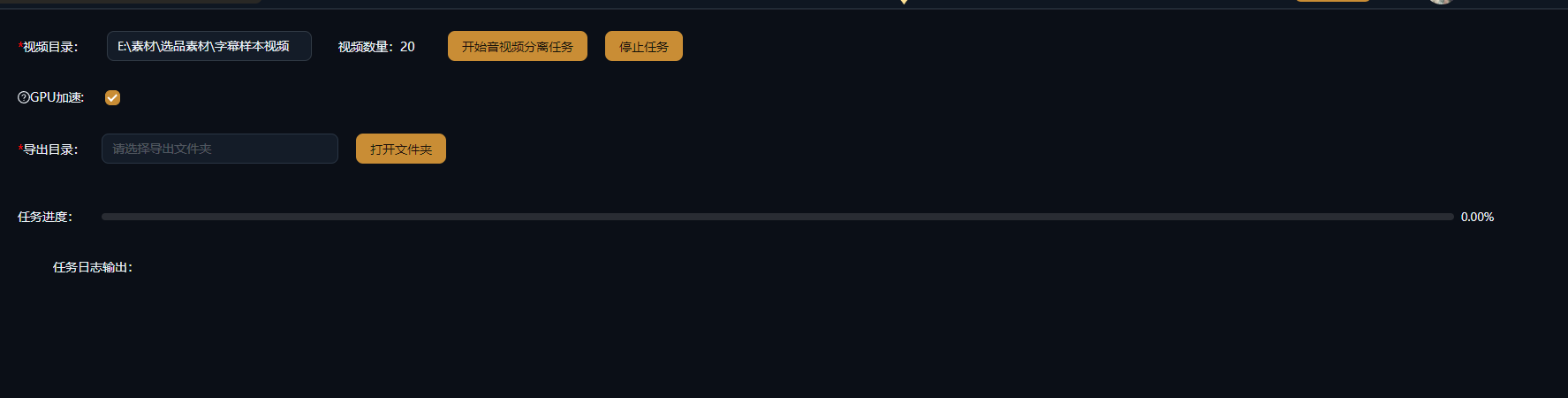
Laden Sie die Videos, die Sie trennen möchten, in die Audio-Video-Trennung: Realaufnahmen, heruntergeladene Clips oder veröffentlichte Videos, die Sie überarbeiten wollen – Batch-Verarbeitung wird unterstützt.
Mit einem Klick trennen
Klicken Sie auf Trennen, und das Video wird in eine unabhängige Videospur und eine Audiospur zerlegt: Es findet keine Rekodierung statt, sodass Bild und Ton ihre ursprüngliche Qualität behalten.
Jede Spur getrennt nutzen
Synchronisieren Sie die stumme Videospur neu oder unterlegen Sie sie mit neuer Musik; speichern Sie die extrahierte Audiospur (BGM, Stimme) in Ihrer Bibliothek und verwenden Sie sie in anderen Remix-Projekten wieder.
Praxisbeispiele
Die folgenden Fälle sind echte, unveränderte Anwendungsaufzeichnungen dieser Funktion in der AIMIX-App.
Material-Wiederverwendung: aus Originalton-Material eine kommentierte Version machen
Ideal für: E-Commerce-Realaufnahmen, Vlog-Material · Originalton-Material, das eine neue Erzählstimme braucht
Workflow: Realaufnahme-Video → in stumme Videospur trennen → neu synchronisieren und Untertitel hinzufügen → zum fertigen Video remixen
Originalton mit einem Klick entfernen · Verlustfreies Bild ohne Rekodierung · Audiospur getrennt für die Wiederverwendung aufgehoben
Frisch gedrehtes Material bringt Umgebungsgeräusche und Vor-Ort-Gerede mit, das Rohschnitte chaotisch wirken lässt. Schieben Sie es zuerst durch die Audio-Video-Trennung, um eine stumme Videospur in identischer Qualität zum Original zu erhalten; dann fügen Sie ein Voiceover hinzu, das aus Ihrem Skriptverwaltungs-Text generiert wurde, plus automatische Untertitel, und die kommentierte Version nimmt Gestalt an. Werfen Sie den entfernten Originalton auch nicht weg – er kann gelegentlich als Behind-the-Scenes-Material herhalten.
Häufige Verwendungen der getrennten Spuren
Jede der beiden Spuren hat ihr eigenes Ziel:
S
t
A
u
V
e
Wir empfehlen, die am häufigsten extrahierten BGMs und Ambient-Klänge an einem Ort zu archivieren und so nach und nach eine eigene Audio-Bibliothek aufzubauen.
Behalte die Kontrolle über den Schnitt
Verlustfreie Trennung ohne Rekodierung
Die Trennung rekodiert nie, sodass die Bildqualität mit dem Originalmaterial identisch bleibt.
Batch-Verarbeitung spart Handarbeit
Trennen Sie mehrere Clips in einem Batch – kein einzelnes Exportieren und erneutes Importieren mehr, um Audio zu entfernen.
Teile fließen direkt in Remixe
Die getrennten Video- und Audiospuren gehen direkt in Ihre Bibliothek und Storyboard-Gruppen und befeuern abgeleitete Kreationen.
Häufige Fragen
Verliert die Trennung Video- oder Audioqualität?
Nein. Die Trennung ist verlustfrei ohne Rekodierung, sodass Bild und Ton ihre ursprüngliche Qualität behalten.
Welches Format hat das extrahierte Audio?
Es wird direkt aus der ursprünglichen Audiospur gezogen, das Format entspricht also dem Quellmaterial – kein Transkodieren nötig.
Kann es BGM von der Stimme trennen?
Die Audio-Video-Trennung trennt nur das Bild von der Audiospur; um Gesang weiter vom Instrumental zu trennen, kombinieren Sie sie mit den Stimmtrennungs-Funktionen.
Wird Batch-Verarbeitung unterstützt?
Ja. Mehrere Videos können in einem Batch getrennt werden, und die Ergebnisse werden automatisch in Ihrer Bibliothek gespeichert – ideal für die Material-Vorverarbeitung.
Kann ich das Original-Audio wieder auf ein getrenntes Video legen?
Ja. Die Trennung nimmt nur die Spuren auseinander; das Original-Audio bleibt in Ihrer Bibliothek und kann jederzeit wieder kombiniert werden.
Verbraucht die Trennung KI-Credits?
Die Audio-Video-Trennung läuft als lokale Verarbeitung und verbraucht keine KI-Analyse-Credits; wenn Sie danach KI-Funktionen wie die Stimmtrennung darauf anwenden, werden diese nach ihren eigenen Regeln abgerechnet.