AIMIX デスクトップ動画エディター

Video Deduplication: Multiply One Source Clip Into Many the Platform Won’t Flag as Duplicates

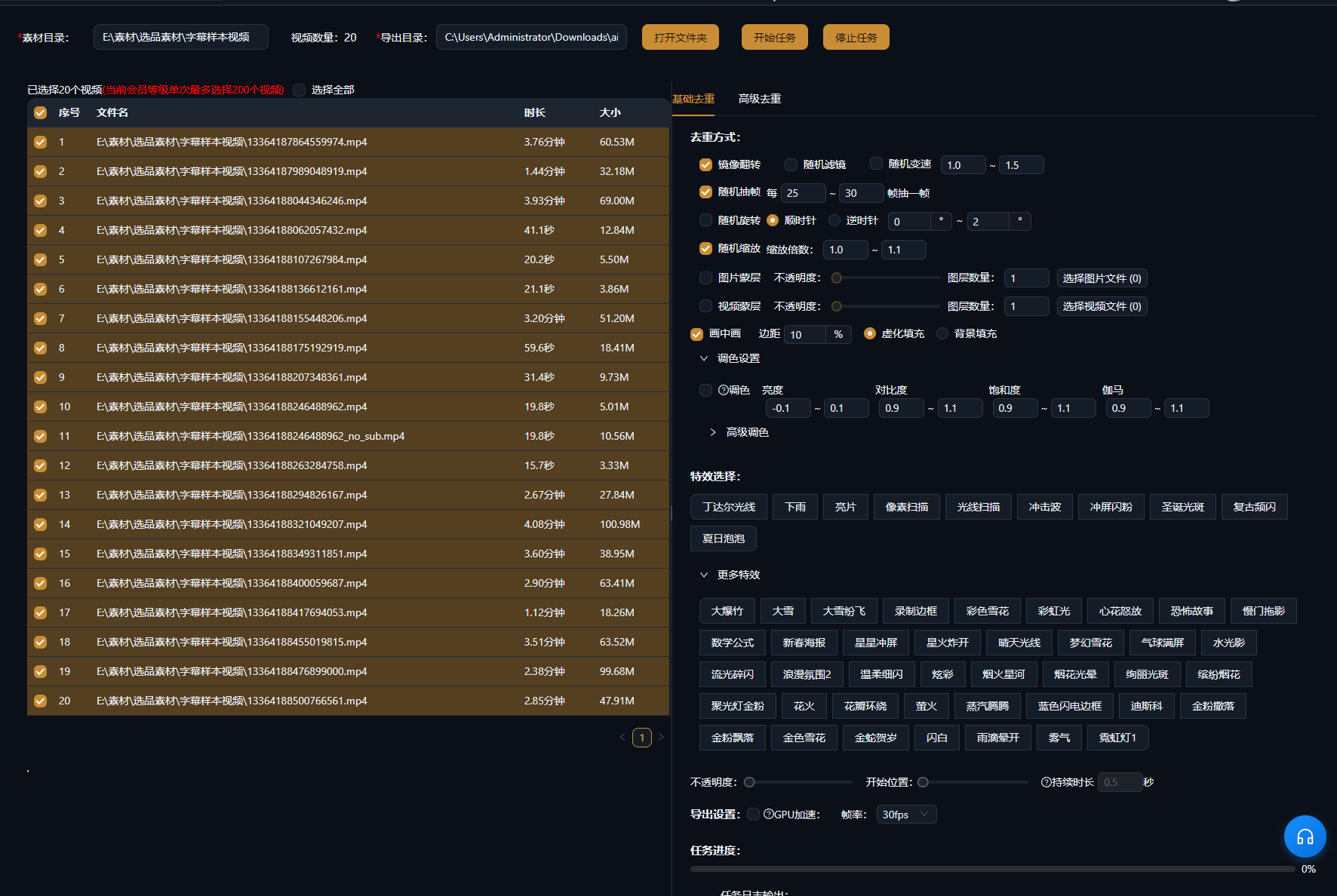
Fission your footage by altering visual elements across multiple dimensions: Basic dedup changes visual parameters, while Advanced dedup deeply rebuilds the video. Batch export auto-deduplicates to reduce repeated combinations. Ideal for content matrices and mass distribution.

AIMIXをダウンロード

使い方

The biggest fear in running a content matrix is "posting a hundred videos and having the platform flag them all as the same one." Video Deduplication alters video characteristics across multiple dimensions—from visual parameters to deep content—so one piece of footage can multiply into multiple versions the platform won’t flag as duplicates, working hand in hand with batch mixing’s auto-deduplication.

01

Choose a dedup mode

Basic dedup: alters visual parameters (mirror, crop, tone, frame rate, and more). Advanced dedup: deeply rebuilds the video frames for stronger deduplication.

02

Set dedup parameters

Choose which visual dimensions to change and how strongly. Basic mode lets you combine multiple parameters; Advanced mode rebuilds deeply in one click.

03

Batch process

Process a single clip or use it with batch mixing—exports are deduplicated automatically, ensuring every version combination differs enough.

AIMIXクライアント「脚本作成」ウィンドウ:動画説明を入力するとAIが絵コンテ表を生成
AIMIXクライアントの「脚本作成」ウィンドウ。動画説明から絵コンテ表を生成した後、尺と文案を直接編集し、ワンクリックでナレーション生成やExcel出力ができます。

実例

以下の5つの脚本は、AIMIX「AI脚本作成」の実際の生成結果です。入力は各事例に記載の動画説明どおりで、絵コンテ表は無編集、尺は生成時の値です。画面説明が生成されなかったカットは「—」と表示しています。

Content matrix: a hundred videos from one piece of footage

入力した動画説明

Best for: multi-platform distribution · one piece of footage that needs many non-duplicate versions

结构Workflow: source footage → multi-dimensional dedup → batch export with auto-dedup

  • Parameter changes give every video its own fingerprint
  • Advanced dedup rebuilds deeply for stronger results
  • Batch export auto-filters duplicate combinations

The core question of a content matrix isn’t "can I make a hundred videos"—it’s "will those hundred get flagged as duplicates." Video Deduplication gives every video enough distinct visual characteristics, and combined with batch mixing’s combination-level dedup, it greatly reduces the risk of platforms judging your videos as duplicates.

Basic dedup vs. Advanced dedup

The two modes suit different scenarios:

ModeHow it worksBest for
Basic dedupChanges visual parameters across dimensions (mirror/crop/tone, etc.)Light dedup, fast processing of large volumes
Advanced dedupDeeply rebuilds video frame contentHeavy dedup, for strict platform reviews

We recommend testing Basic dedup first to see how the platform reacts, then upgrading to Advanced if results fall short.

仕上がりを自分でコントロール

Multi-dimensional visual changes

Not just slapping on a filter—mirror, crop, tone, and deep rebuild independently alter visual characteristics across dimensions.

Auto-dedup on batch export

Batch mixing exports automatically filter duplicate combinations, reducing similarity between versions.

Basic + Advanced dual modes

Basic dedup when that is enough—no waste; Advanced dedup for strict reviews.

Seamless with batch mixing

Dedup is a built-in capability of batch mixing—no separate pass needed.

よくある質問

Will the platform definitely judge deduped videos as original?

No guarantee. Dedup reduces the risk of being flagged as duplicate; platform review standards keep changing, so combine it with content differentiation.

How much stronger is Advanced dedup than Basic?

Advanced dedup rebuilds frames deeply for bigger changes; actual results depend on your footage and the platform’s algorithm—testing first is recommended.

Does dedup affect video quality?

Basic dedup has minimal impact on quality; Advanced dedup may cause slight changes due to rebuilding—test with short clips first.

Do I need to run dedup separately during batch mixing?

No. Batch mixing exports have auto-deduplication built in, reducing duplicates at the combination level.