AIMIX デスクトップ動画エディター

Subtitle Generation: AI Recognizes the Voiceover and Auto-Calibrates the Subtitle Timeline

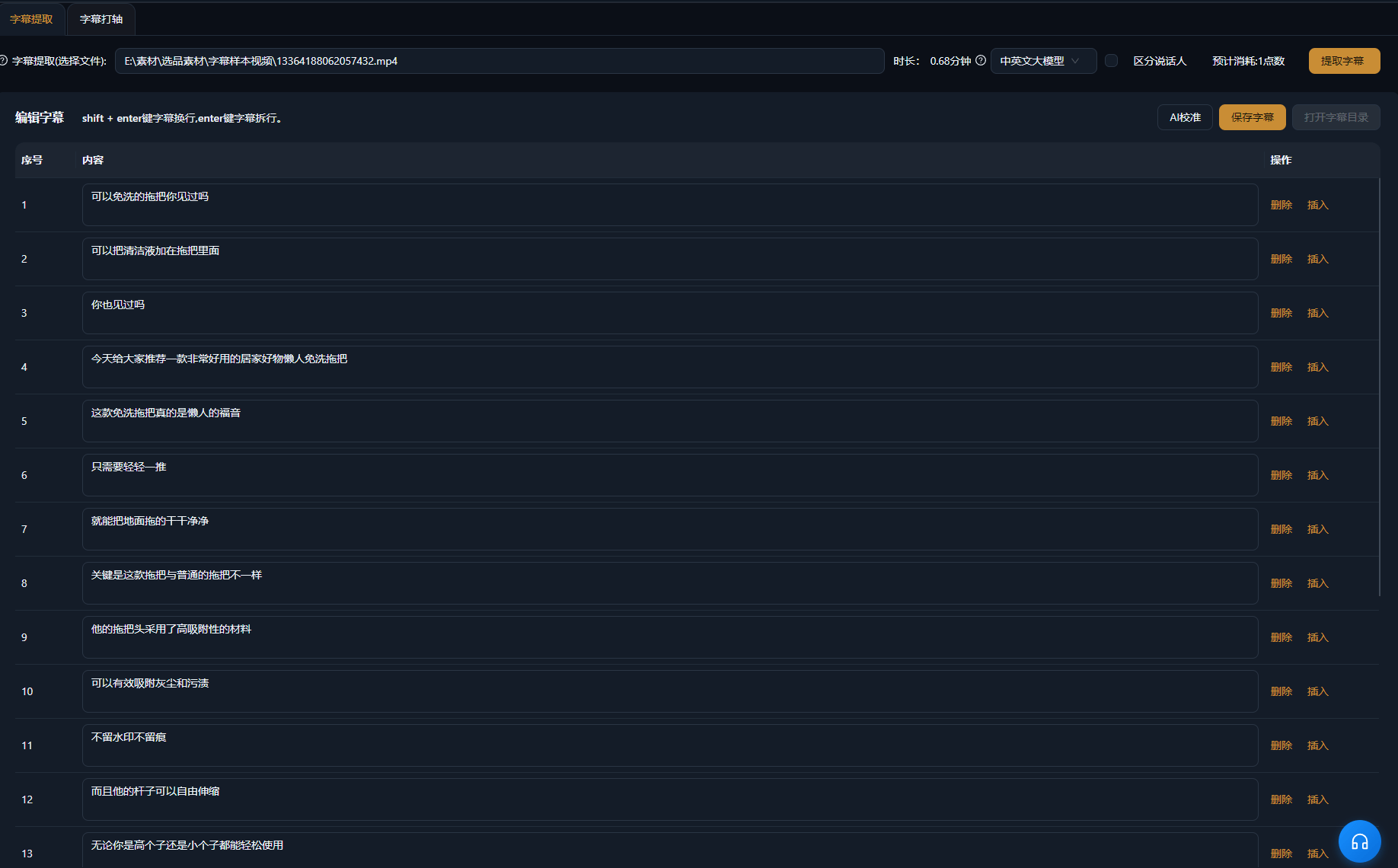
AI recognizes speech in your videos and generates subtitles automatically, aligned sentence by sentence with no manual timing. Multi-language recognition, style templates, and position adjustments are built in, batch tasks handle multiple videos at once, and the generated subtitles go straight onto the timeline for fine-tuning.

AIMIXをダウンロード

使い方

A short video without subtitles gets swiped away the moment viewers scroll past on mute—subtitles are table stakes now. But manual timing is the most tedious step of the workflow: listen to a line, type a line, sync a timestamp. Subtitle Generation hands it to AI: it recognizes the speech in the video, generates subtitles aligned sentence by sentence, calibrates the timeline, and after a quick style template you are ready to export. Subtitles for one video shrink from half an hour to one minute.

01

Import videos

Bring the videos that need subtitles into Subtitle Generation: talking-head clips, finished remixes, and course recordings all work, and batch tasks process several at once.

02

AI generation and calibration

AI recognizes the speech, generates the subtitle text, and times it automatically at sentence breaks—every subtitle line starts and ends in sync with the voice, with no manual alignment needed.

03

Apply a style and export

Pick a subtitle style template and adjust font, color, outline, and position (center, bottom, or title-safe). Once it looks right, export—or jump into the timeline for more polish.

AIMIXクライアント「脚本作成」ウィンドウ:動画説明を入力するとAIが絵コンテ表を生成
AIMIXクライアントの「脚本作成」ウィンドウ。動画説明から絵コンテ表を生成した後、尺と文案を直接編集し、ワンクリックでナレーション生成やExcel出力ができます。

実例

以下の5つの脚本は、AIMIX「AI脚本作成」の実際の生成結果です。入力は各事例に記載の動画説明どおりで、絵コンテ表は無編集、尺は生成時の値です。画面説明が生成されなかったカットは「—」と表示しています。

Finished talking-head videos: a full set of subtitles in one minute

入力した動画説明

Best for: knowledge talking-heads, selling videos · finished videos that need subtitles fast

结构Workflow: finished talking-head video → AI generates and times subtitles → apply a style template → export

  • Timeline auto-aligned to the voice
  • Style templates apply in one click
  • Batch tasks handle multiple videos

After cutting a talking-head video, subtitles are the last chore left. Drop it into Subtitle Generation: AI recognizes the speech, generates subtitles line by line, and aligns the timeline automatically—apply a style template that matches your channel and export directly. Half an hour of manual timing becomes one minute of work, and a batch run covers every video you posted today.

How to choose a subtitle style

Every platform leans toward a different subtitle look:

S

e

K

n

M

u

Pick one default subtitle template for your channel and reuse it on every video to keep the look consistent.

仕上がりを自分でコントロール

Timeline calibrated automatically

Subtitle in and out points align with the voice line by line, cutting out the most time-consuming manual timing.

Batch-generate for multiple videos

No more one at a time—batch tasks finish subtitles for every video of the day in a single run.

Style templates in one click

Font, color, outline, and position come as templates, keeping subtitle styling consistent with your channel identity.

よくある質問

Does subtitle generation cost points?

AI recognition consumes points based on video duration, as shown in the app; an estimated cost is displayed before generation starts.

How accurate are the generated subtitles?

Clear spoken voiceover reaches high accuracy; for content heavy on proper nouns, a quick proofread after generation is recommended.

Does the timeline need manual adjustment?

AI times subtitles automatically at sentence breaks, and most cases need no adjustment; the odd break can be refined on the timeline.

Which languages are supported?

Chinese, English, and more languages are recognized and turned into matching subtitles; the exact language list follows the app.

Can I customize the subtitle style?

Yes. Font, size, color, outline, and position are all adjustable, and can be saved as templates for reuse.

Can subtitles be exported as a separate file?

Burning subtitles into the exported video is supported; standalone subtitle file export depends on the current app version.

AIMIXをダウンロード

AIMIXをダウンロード