
Batchredigering af video: Praktisk guide til produktvariationer
Forfatter
Udgivet

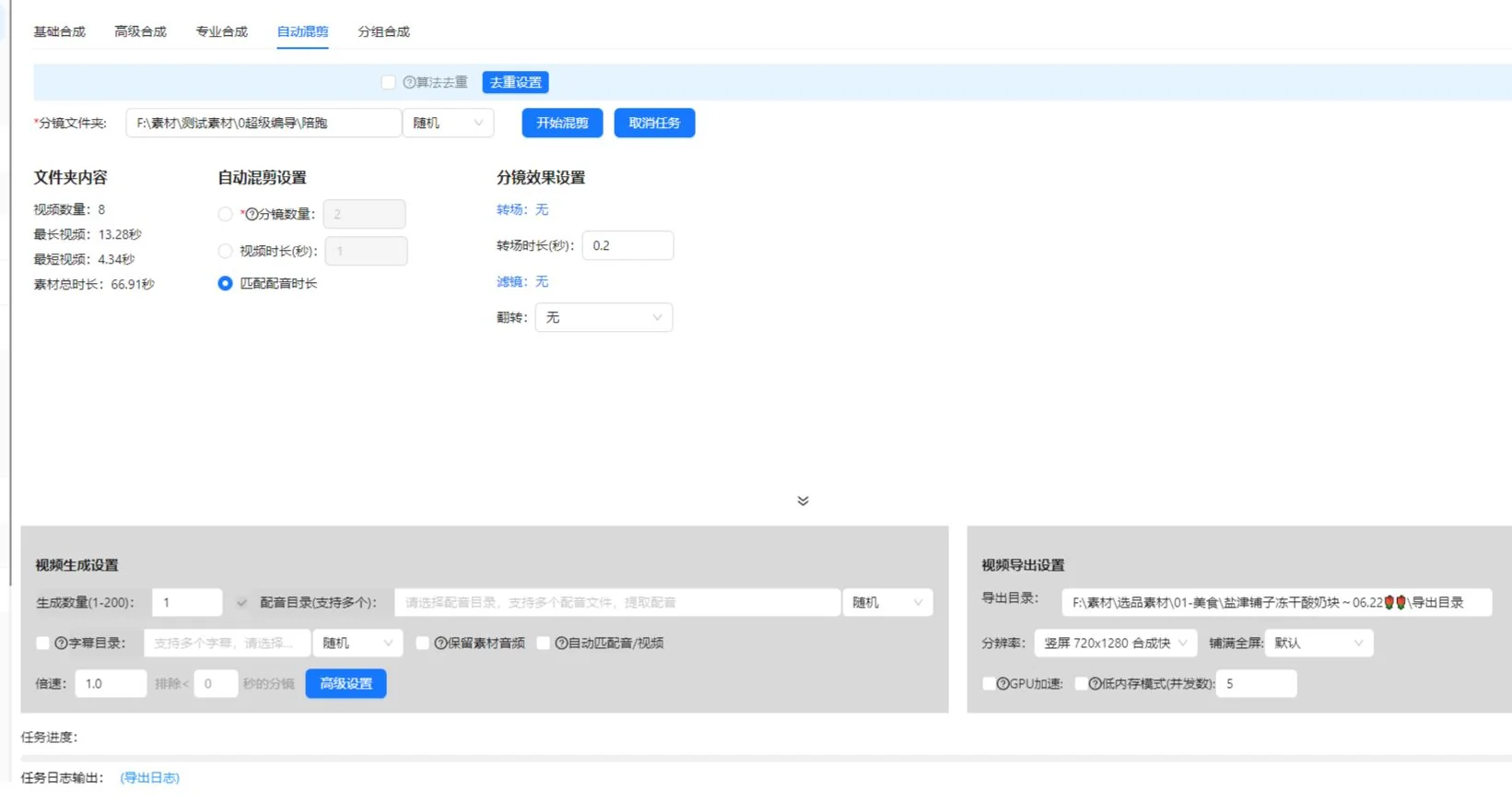
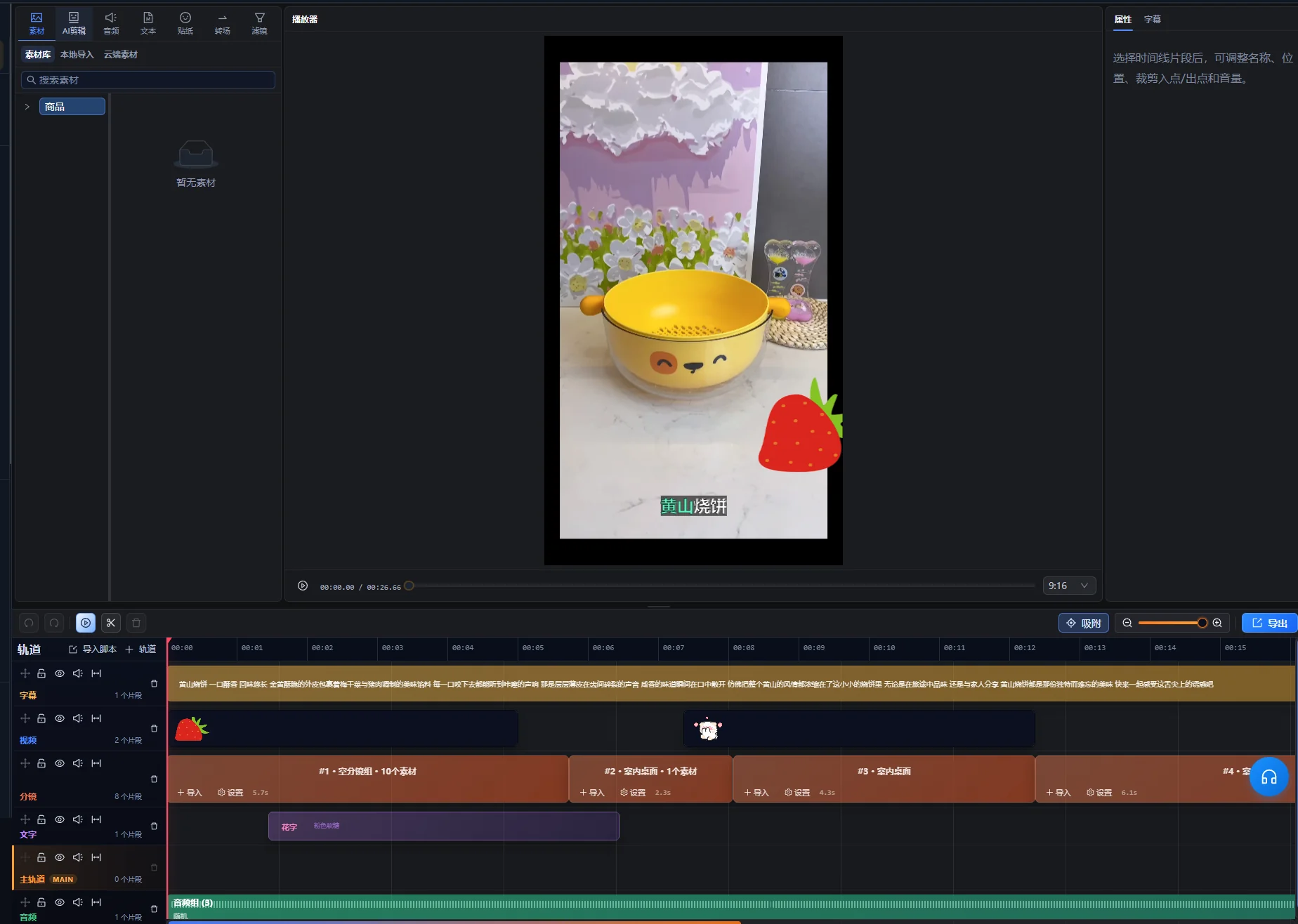
Det oprindelige reklamebillede er bevaret. Dets fremdriftsprocenter og videokø er illustrative værdier, ikke et optaget resultat fra denne vejledning. Etiketterne er på kinesisk.
Batchredigering fungerer, når en gentagelig struktur møder optagelser, der kan udskiftes uden at ændre betydningen. Det svære er at definere udskiftningerne: En anden åbning kan ændre løftet, længere speak kan vare længere end demonstrationen, og et produkt, der ligner, kan være den forkerte model. Vejledningen følger én produktvideobrief fra planlægning over en pilotredigering til batchgennemgang og filoverdragelse. Den forklarer, hvad du skal forberede, hvilke kombinationer du skal afvise, og hvordan du sporer et problem til det fælles element, der forårsagede det.
Vigtigste pointer
- Brug Grundlæggende komposition til en ordnet sekvens af optagelsesgrupper; Automatisk miksning starter fra en materialepulje og har andre varighedskontroller.
- Et forslag er kun udskifteligt, når produktidentitet, handling og timing forbliver korrekte under samme speak.
- Match hvert manuskript med dets faktiske lyd og undertekster, og undersøg risikable udskiftninger, før du udvider batchen.
- Gennemgå hver eksporteret fil, og gem en versionslog; produktionsvariationer alene dokumenterer ikke kampagneresultater.
Hvad batchredigering ændrer, og hvad den kræver af dig
Batchredigering kombinerer forberedte optagelser, en defineret sekvens og indholdsvariationer. Det er nyttigt, når flere videoer deler et kommunikationsmål, men kræver forskellige åbninger, demonstrationer eller afslutninger. Start med oversigten over batchredigering for at se funktionens plads i arbejdsgangen.
En batch er mere nyttig, når hver version har en identificerbar redaktionel forskel. Et andet baggrundsbillede kan give en ekstra fil, men giver ikke automatisk et andet budskab. Beslut, om du laver alternativer til én målgruppe, tilpasser samme forklaring til forskellig brug eller sammenligner et bestemt kreativt valg.
Input skal omfatte brugbare klip, et manuskript til hvert budskab og den tilhørende lyd, når speak er nødvendig. Output er et sæt videoer, der skal undersøges og leveres. Filantal er et produktionsmål; det dokumenterer ikke, at en version tiltrækker flere seere eller klarer sig bedre.
Arbejdsregel: En optagelse er kun udskiftelig, hvis den forbliver korrekt med ordene, timingen og de omkringliggende optagelser på den position.
Forbered en brief og en materialeliste, før du åbner opgaven
Definér én sætning, som alle versioner skal kommunikere, og adskil derefter faste krav fra de valg, du vil variere. Det giver et grundlag for at afvise en kombination, før du bruger tid på undertekster eller grafik.
- Fast: produktidentitet, nødvendig demonstration, godkendt faktuel ordlyd og destinationsformat.
- Variabelt: åbningsspørgsmål, rækkefølge af støtteoptagelser, tilgang til speak eller afsluttende scene.
- Udelukket: udgåede modeller, optagelser med forkert emballage, uvedkommende stockoptagelser og forældede tilbud.
Lav en materialeliste efter funktion: introducere produktet, vise en handling, forklare en detalje eller etablere en brugssituation. Notér kildefilnavn, et brugbart kildeområde og eventuelle begrænsninger. Hvis du kun har lange optagelser, skal du forberede forslag med arbejdsgangen til videoopdeling.
Organisering af materiale før redigering er en etableret praksis. Adobes oversigt over mediemapper forklarer gruppering af kildefiler og sekvenser. Du kan anvende samme princip uden at kopiere et andet redigeringsprograms grænseflade: Hold kildeoptagelser, speak og gennemgåede versioner adskillelige.
Forberedelseskontrollen er enkel: Kan du finde optagelser til alle nødvendige pointer, og kan en anden redaktør se, hvilket manuskript og hvilken lyd der hører sammen? Afklar begge usikkerheder, før du laver variationer.
Vælg kompositionstilstand og dens faktiske input
Det aktuelle kompositionsområde har fanerne Grundlæggende, Avanceret, Professionel og Automatisk miksning. Antag ikke, at de importerer samme mappestruktur eller accepterer lyd på samme måde. Opskriften med ordnede optagelser i denne vejledning starter med Grundlæggende komposition.
| Udgangspunkt | Aktuelle kontroller relevante for vejledningen | Inputkontrol |
|---|---|---|
| Grundlæggende komposition | Ordnede optagelsesrækker, kildemappe eller biblioteksimport pr. række, genereringsantal, valgfri speakfil og SRT-fil | Hver optagelsesrække skal have brugbart materiale. Indstil outputmappen. |
| Automatisk miksning | En optagelsesmappe, optagelsesantal, ønsket videovarighed eller matching af speakvarighed, flere speakfiler og en valgfri SRT-mappe | Materialet skal ligge direkte i den valgte mappe på første niveau. Vælg mindst én miksningsregel. |
Til Grundlæggende komposition skal du forberede én godkendt speak og dens undertekstfil til piloten. Hvis du har brug for et andet manuskript, skal du udtrykkeligt definere forholdet til lyd og undertekster i den valgte tilstand eller en separat opsætning. Det forhindrer, at en redaktionel variationstabel opfattes som et løfte om, at alle faner automatisk laver alle kombinationer.
Automatisk miksning behandler ønsket videovarighed og matching af speakvarighed som alternativer. Når optagelsesantal og speakmatching aktiveres sammen, siger den aktuelle grænseflade, at speakens varighed prioriteres, og at optagelser kan tilføjes for at dække den. Bevaring af kildelyd og gentagelse af optagelser er uforenelige indstillinger. Matching efter korteste lyd/video kræver speak og kan forkorte resultatet, så undersøg, om den fjerner den nødvendige afslutning.
Kontrollerne blev undersøgt i appens implementering den 10. oktober 2026. Bekræft deres navne og tilgængelighed i din installerede version. Aktuelle medlemsindstillinger bestemmer genereringsgrænser; vejledningen giver ikke én grænse for alle konti.
Byg optagelsesgrupper omkring et fælles visuelt formål
Gruppér alternativer efter det, de demonstrerer, frem for miniaturebilledernes lighed. Til en sætning om at åbne et låg skal alle forslag vise åbningen tydeligt. Et stemningsbillede af produktet hører til en anden gruppe.
Trin 1: Definér rollen for hver position
- Læs manuskriptsætningen til positionen.
- Skriv den visuelle dokumentation, seeren har brug for.
- Tilføj eller navngiv optagelsesrækken i den krævede rækkefølge i Grundlæggende komposition.
- Tildel optagelsesmappen, eller importér det relevante biblioteksmateriale. Mappeinput læser understøttet materiale direkte i mappen.
- Kontrollér, om hvert forslags brugbare handling passer til den talte sætning.
Medtag produktidentitet i gruppereglerne. To optagelser kan vise samme handling med forskellige farver, tilbehør eller produktgenerationer. Det kan være acceptabelt i en sammenligningsvideo, men er et fejlmatch i en redigering, der præsenterer ét bestemt produkt.
Trin 2: Fjern svage erstatninger
Afspil hvert forslag gennem hele handlingen. Afvis et klip, der starter efter handlingens begyndelse, slutter før afslutningen, skjuler mekanismen eller kræver sammenhæng, manuskriptet ikke giver. Bevar den oprindelige kildehenvisning, så en senere redaktør kan genskabe et bredere område.
Kontrollér gruppen ved at sætte hvert forslag sammen med samme speak. Hvis ét kræver en anden formulering for at give mening, skal du flytte det til en anden gruppe eller behandle det som en separat manuskriptvariation. Skjul ikke forskellen i en gruppe, der tilsyneladende er udskiftelig.
Planlæg en lille batch med en tydelig variationslog
Det følgende eksempel med et rejsekrus er en planlægningsøvelse, ikke et optaget opgaveresultat eller en kampagnecase. Antag, at materialet viser samme krus på et skrivebord, dets låg, der åbnes, hanken og en person, der drikker af det.
| Version | Åbningsvalg | Fælles demonstration | Afslutningsvalg | Gennemgangsspørgsmål |
|---|---|---|---|---|
| A | Introducér kruset på et skrivebord | Vis hele åbningen af låget | Vend tilbage til skrivebordsscenen | Etablerer åbningen produktet? |
| B | Start med lågets handling | Behold samme handlingsforklaring | Brug samme skrivebordsscene | Giver åbningen stadig nok sammenhæng? |
| C | Brug samme introduktion som A | Behold samme handlingsforklaring | Vis kruset i almindelig brug | Understøtter afslutningen budskabet? |
A og B ændrer åbningen. A og C ændrer afslutningen. Det er forståelige forskelle, du kan notere og undersøge. Hvis du ændrer åbning, stemme, musik og afslutning samtidig, kan resultatet være nyttigt, men det bliver sværere at forklare bidraget fra én ændring.
Skriv den tilsigtede forskel ved hver version, før du genererer filer. En minimal log indeholder versions-ID, manuskript-ID, speakfilnavn, valgte optagelser og begrundelse for ændringen. Det er en redaktionel log, du selv vedligeholder; den forudsætter ikke en automatisk rapport fra appen.
Undersøg kombinationer for afhængigheder. En afslutning med »brug den som vist« afhænger af den tidligere demonstration. En undertekst, som nævner én farve, skal passe til optagelserne. Hvor valgene afhænger af hinanden, skal du lave separate kompatible sæt frem for at tillade alle kombinationer.
Match manuskripter, speak og undertekster før dekoration
Hver manuskriptvariation skal have et kontrolleret forhold til sin lyd og sine undertekster. Lignende filnavne er ikke nok: Lyt til replikken, og sammenlign den med den godkendte tekst.
Trin 3: Kontrollér den længste og mest krævende speak
Identificér passager med flere ord, længere produktnavne eller en detaljeret demonstration. Afspil dem mod optagelserne. Hvis speaken fortsætter efter det brugbare billedes afslutning, skal du udvide dækningen med en relevant optagelse, justere redigeringen eller revidere ordlyden. Løs ikke problemet ved at sætte handlingens hastighed op, til seerne ikke kan forstå den.
Brug batcharbejdsgangen til speak og undertekster til den relaterede opgave. Gem en kopi af det godkendte manuskript uden for videoen, så tekstrevisioner kan sammenlignes med det.
Trin 4: Læs korrektur på undertekster som en separat opgave
Undertekstkontrol omfatter talenøjagtighed, timing og information formidlet gennem lyd. W3C's vejledning til optagne undertekster omfatter meningsbærende information uden tale og taleridentifikation efter behov. Kontrollér i dette produkteksempel produktnavnet, og om lågets lyd er vigtig for forklaringen.
Godkend først grundsekvensen, og tilføj derefter fælles musik, tekst eller klistermærker. Ellers kan en poleret præsentation distrahere fra en forkert optagelse eller et forkert stemmespor.
Kør en pilot, der dækker risikable kombinationer
En pilot bør afprøve de valg, som lettest ændrer betydning, timing eller præsentation. Hvis du kun ser den første kombination, er de øvrige udskiftninger stadig uprøvede.
- Kontrollér optagelsesrækkernes rækkefølge, navne og materialeantal i Grundlæggende komposition.
- Angiv et lille genereringsantal, og vælg outputmappe.
- Hvis speak eller undertekster er aktiveret, skal du vælge den faktiske speakfil og dens SRT-fil.
- Undersøg en version med standardspeak og den tydeligste demonstration.
- Ved andre manuskriptopsætninger skal du undersøge længste speak med det korteste brugbare demonstrationsforslag.
- Undersøg hver åbning, der ændrer sammenhængen for næste sætning.
- Kontrollér forslag med anderledes indramning eller tekstplacering.
- Ret fælles indstillinger og forslag, før du udvider batchen.
Det er en gennemgangsstrategi, ikke en påstand om, at appen tilbyder en automatisk kompatibilitetstest. Brug forhåndsvisninger og kontroller i din installerede version. Kontrollér opgavetilgængelighed, forbrugspriser og grænser i appen, når du forbereder et større arbejde.
Gem en kort fejlliste: versions-ID, berørt position, observeret problem og ønsket rettelse. »B starter med et uidentificeret nærbillede« kan handles på. »B virker forkert« er sværere at løse. Efter en rettelse skal du afspille den ændrede passage og de tilstødende overgange igen.
Piloten er klar, når de valgte versioner opfylder briefen, de fælles lyd- og undertekstforbindelser fungerer, og hvert resterende forslag har et tydeligt formål. Den erstatter stadig ikke gennemgang af hver færdig video.
Find årsagen til fælles og enkeltstående batchproblemer
Start med at afgøre, om fejlen påvirker flere versioner eller én bestemt kombination. Gentagne problemer peger på et fælles element; enkeltstående problemer peger på et forslag eller en afhængighed, som gruppereglerne overså.
| Symptom | Hvad du skal undersøge | Praktisk rettelse |
|---|---|---|
| Alle versioner viser den forkerte produktdetalje | Den fælles optagelsesgruppe eller manuskriptpåstand | Udskift gruppen, eller ret det godkendte manuskript, og gennemgå berørte versioner. |
| Én video skifter produktfarve halvvejs | Identitetsregler for de valgte klip | Fjern det uforenelige forslag, eller lav et separat produktsæt. |
| Speaken varer længere end demonstrationen | Længden af den brugbare handling og replikken | Tilføj relevant dækning, justér timing, eller forkort ordlyden uden at miste forklaringen. |
| Undertekster har ordlyd fra en anden version | Forbindelsen fra manuskript til lyd til undertekst | Ret forbindelsen, og læs korrektur på den berørte eksport. |
| En ny åbning gør næste sætning forvirrende | Manglende introduktion eller henvisning | Tilføj sammenhæng, ændr sætningen, eller afvis åbningskombinationen. |
| Første output er korrekt, men senere output fejler gennemgangen | Udskiftninger, piloten ikke dækkede | Undersøg hvert forslag, og indsnævr de kompatible valg. |
Ret kilden til en fælles fejl, før du reparerer mange separate filer. Hvis samme undertekstfejl findes overalt, skal du først rette den fælles tekst eller forbindelse. Hvis kun én optagelse er uegnet, skal du ikke omskrive alle manuskripter for at passe til den.
Gennemgå hver eksport efter en godkendelsesliste
En batch er klar til overdragelse, når hver fil selvstændigt opfylder briefen. Kontrollér den faktiske eksportfil, fordi tidslinjeforhåndsvisning alene ikke bekræfter den leverede container, lydspor eller tekstgengivelse.
- Åbningen identificerer motivet eller giver nok sammenhæng til næste replik.
- Det rigtige produkt vises hele vejen, inklusive detaljer og tilbehør.
- Alle demonstrationer starter tidligt nok og slutter, efter handlingen er tydelig.
- Speaken matcher det valgte manuskript og er forståelig under musikken.
- Undertekster er korrekte, følger den rigtige lyd og skjuler ikke vigtige detaljer.
- Afslutningen fuldender budskabet uden en udokumenteret påstand.
- Filen afspilles fra start til slut i det tilsigtede visningsformat.
- Filnavn og versionslog henviser til de samme kreative valg.
Brug destinationens tekniske krav ved valg af eksportindstillinger. Til YouTube skal du se YouTubes anbefalede indstillinger for uploadkodning, inklusive anbefalingen om at bevare optagelsens billedfrekvens. Det er destinationsvejledning, ikke en beskrivelse af de eksportvalg, appen tilbyder.
Til detaljerede tidslinjerettelser skal du fortsætte i Super Editor. Notér, om en fil er godkendt, kræver rettelse eller er erstattet. En gennemgangsstatus gør overdragelsen tydeligere end en mappe med flere filer kaldet »færdig«.
Hold produktionsoplysninger adskilt fra resultatpåstande
Versionsloggen skal forklare, hvad der ændredes i videoen. En senere sammenligning af resultater kræver også information om distribution, målgruppe, datoer og den metrik, der sammenlignes.
Hvis version B eksempelvis får flere visninger efter at være vist til et større publikum, dokumenterer visningstallet alene ikke, at åbningen skabte forskellen. Hvis du vil sammenligne åbninger, skal du planlægge distribution og måling separat frem for at betragte batchen som et færdigt eksperiment.
Notér platform, placering, udgivelsesperiode og tilgængelige resultater sammen med den kreative versions ID. Bevar definitionerne: En visning, en fuldført afspilning og et klik er forskellige resultater. Gør ikke et produktionseksempel til en påstået succeshistorie uden de underliggende oplysninger og en forsvarlig sammenligning.
Når et nyt manuskript kræver valg af optagelser, før du kan definere udskiftelige grupper, skal du bruge vejledningen til filmproduktion fra eksisterende materiale. Batchredigering følger det strukturelle arbejde, når du har pålidelige erstatninger.
Start med én godkendt struktur
Vælg ét produkt, ét fuldstændigt budskab og et lille sæt kompatible alternativer. Godkend piloten, ret gruppereglerne, og udvid derefter kun de ændringer, du kan identificere og gennemgå. En håndterbar batch med sporbare valg er lettere at levere end en stor mappe med uforklarede kombinationer.
Redaktionelt grundlag: AIMIX Editorial Team har udarbejdet vejledningen ud fra appens aktuelle arbejdsgang og den tilknyttede primære dokumentation. Rejsekrusplanen og gennemgangsprocessen er illustrative anbefalinger. Der påstås ingen målt behandlingshastighed, kampagnetest eller kunderesultat.
Ofte stillede spørgsmål
Kan jeg bruge flere produkter i samme batch?
Ja, hvis manuskripternes og optagelsernes forhold holder produkterne entydige. Adskil de kompatible sæt for hvert produkt, medmindre videoen bevidst sammenligner dem. Kontrollér modelnavne, farver, tilbehør og undertekster i hver version.
Hvor mange versioner bør jeg forberede?
Forbered versioner, der repræsenterer nyttige ændringer, som kan gennemgås. Tilgængelige optagelser, redaktionelt mål og gennemgangskapacitet bestemmer det nyttige antal. Kontrollér aktuelle opgavegrænser i appen frem for at antage et fast antal fra vejledningen.
Kan ét speakspor fungere til alle variationer?
Det kan det, når hver valgt optagelse forbliver korrekt med samme ord og timing. Hvis et forslag kræver en anden forklaring, skal du bruge en separat manuskript- og lydforbindelse eller fjerne det fra den udskiftelige gruppe.
Opretter batchredigering automatisk en A/B-test?
Nej. Den forbereder kreative variationer. En meningsfuld resultatsammenligning kræver også en defineret hypotese, distributionsplan og ensartet måling. Gem de kreative oplysninger, så senere resultater kan kobles til de faktiske ændringer.