
Upload dine medier
Træk den video eller lyd, du vil udtrække, ind i Tekstudtrækning: Almindelige video- og lydformater understøttes, lange videoer, livestream-optagelser og podcastlyd virker alle, og du kan uploade flere filer, der kører sammen.
Konvertér video eller lyd til tekst med ét klik, og få speakmanuskripter på sekunder
Upload en video- eller lydfil, og AI transskriberer talen til et komplet tekstmanuskript. Flere sprog og dialekter understøttes — kinesisk, engelsk, japansk og flere — med automatisk adskillelse af talere. Funktionen genkender speakmanuskripter, interviews og kursusindhold, og resultaterne kan redigeres, eksporteres og føres direkte videre til klipning.
Download AIMIXHar du fundet en viral video og vil låne dens speakmanuskript, men at transskribere den linje for linje tager en halv time? Tekstudtrækning komprimerer det til cirka ét minut: Upload videoen eller lyden, AI konverterer talen til et tekstmanuskript, og hvert talt ord lander som redigerbar tekst — kopiering af virale strukturer, organisering af kursusnoter eller udarbejdelse af interviews går fra manuel transskription til upload-og-færdig.
Træk den video eller lyd, du vil udtrække, ind i Tekstudtrækning: Almindelige video- og lydformater understøttes, lange videoer, livestream-optagelser og podcastlyd virker alle, og du kan uploade flere filer, der kører sammen.
AI transskriberer talen automatisk, tilføjer sætningsopdeling og tegnsætning, og blandet sprogindhold genkendes også. Talking-head-videoer, interviews og kursusoptagelser med klar tale opnår høj præcision.
Forfin den udtrukne tekst online, og eksportér den som en tekstfil, eller gem den med ét klik i Manuskriptstyringen som materiale til viral dekonstruktion eller nye manuskripter.
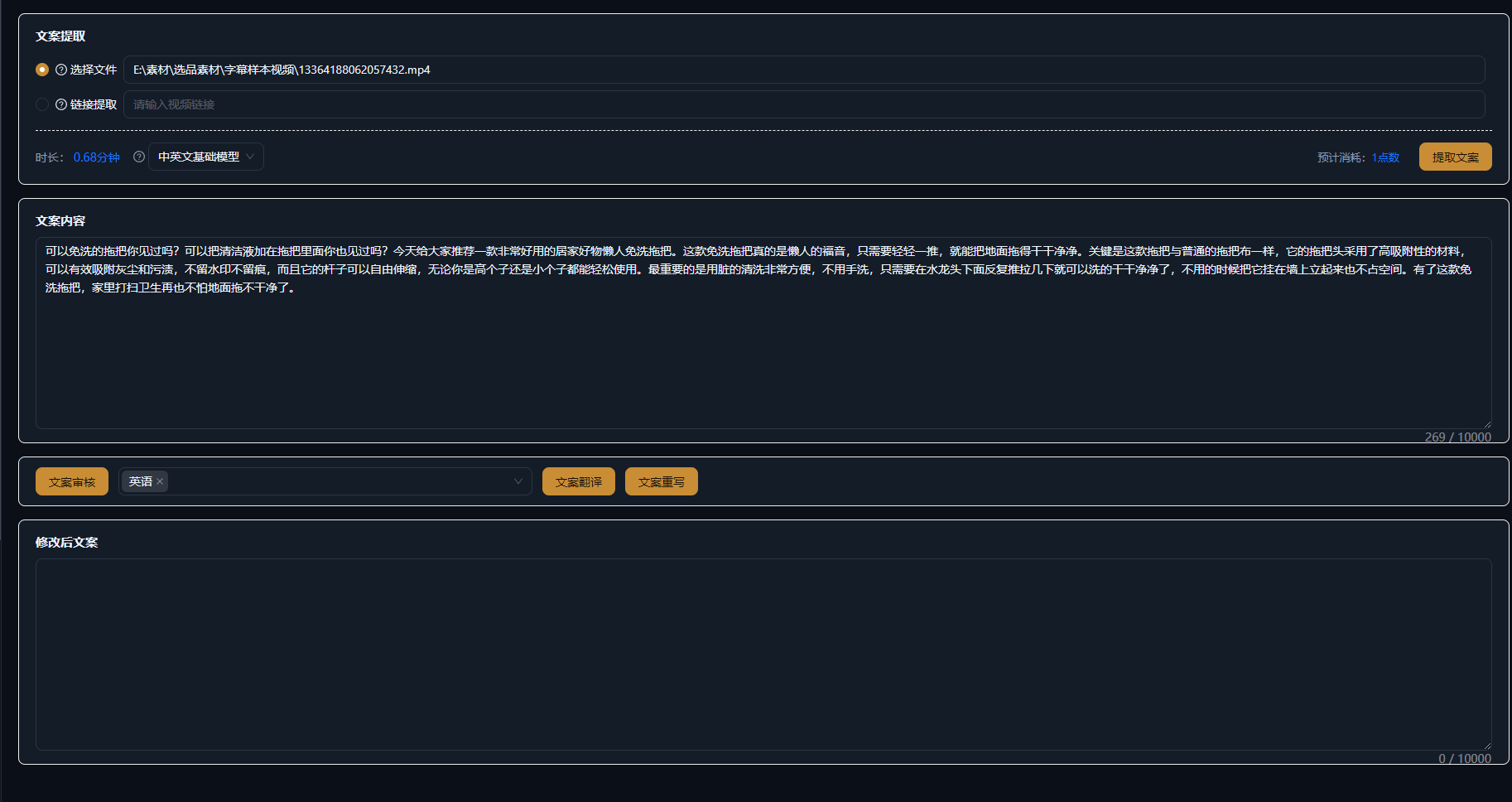
Nedenstående cases er ægte, uændrede brugsregistreringer af denne funktion i AIMIX-appen.
Bedst til: Indholdsplanlæggere og betalt-trafik-teams · systematisk dekonstruktion af benchmark-hits
结构Forløb: saml benchmark-videoer → udtræk manuskripter i batch → analysér struktur og hooks → destillér manuskriptskabeloner
Du kan ikke dekonstruere en viral video uden dens manuskript. Smid de bedst performende videoer fra benchmark-konti ind i Tekstudtrækning, og inden for minutter har du alle speakmanuskripter i hånden — analysér, hvordan åbnings-hooken er skrevet, hvordan sæljpunkterne er ordnet, og hvordan afslutningen driver engagement, destillér derefter fundene til din egen manuskriptskabelon, og udfyld blot tomrummene med nyt indhold.
Den samme udtrukne tekst betjener forskellige faser af din arbejdsgang:
i
e
n
Gem udtræksresultaterne fra dine foretrukne benchmark-konti i Manuskriptstyringen, og opbyg gradvist dit eget bibliotek af afprøvede manuskripter.
Ikke mere transskription linje for linje — upload, og udtræk; selv lange videoer giver manuskripter på sekunder, mange gange hurtigere.
Ikke én fil ad gangen — udtræk flere videoer og lydfiler i bulk, dekonstruér benchmarks og organisér materialet i ét trin.
Gem resultaterne i Manuskriptstyringen til videre arbejde, eller brug dem direkte til dubbing, undertekster og andre efterfølgende trin.
AI-genkendelsescredits afregnes efter mediets længde; den præcise pris fremgår af prompten i appen, og et estimat vises før udtrækningen.
Kinesisk, engelsk, japansk og andre sprog samt en række dialekter; blandet kinesisk-engelsk indhold genkendes også.
Klar tale som talking-head-videoer og kurser opnår høj præcision; ved kraftig baggrundsstøj eller overlappende talere bør du først reducere støjen eller læse korrektur manuelt.
Lange videoer og livestream-optagelser understøttes; længdegrænsen fremgår af prompten i appen, og ekstra lange medier kan uploades i segmenter.
Ja. Resultaterne kan redigeres online og eksporteres som tekst eller gemmes med ét klik i Manuskriptstyringen.
Ja, talere skelnes automatisk, så interviews og samtaler kan opdeles pr. person; den faktiske ydeevne afhænger af lydkvaliteten.