
Montaż seryjny wideo: praktyczny poradnik wariantów filmów produktowych
Autor
Data publikacji

Zachowano oryginalną okładkę promocyjną. Widoczne procenty postępu i kolejka wideo mają wartości ilustracyjne, a nie przedstawiają zarejestrowanego wyniku z tego poradnika. Etykiety są w języku chińskim.
Montaż seryjny wideo sprawdza się, gdy powtarzalna struktura łączy się z materiałami, które można wymieniać bez zmiany znaczenia. Trudność polega na określeniu tych zamian: inny początek może zmienić obietnicę, dłuższa narracja może trwać dłużej niż demonstracja, a podobnie wyglądający produkt może być niewłaściwym modelem. Poradnik prowadzi jeden brief filmu produktowego od planowania przez montaż próbny i kontrolę serii do przekazania plików. Wyjaśnia, co przygotować, które kombinacje odrzucić i jak dotrzeć od problemu do wspólnego elementu, który go spowodował.
Najważniejsze informacje
- Użyj kompozycji podstawowej do uporządkowanej sekwencji grup ujęć; automatyczne mieszanie zaczyna się od puli materiałów i ma inne ustawienia czasu.
- Propozycja jest zamienna tylko wtedy, gdy tożsamość produktu, czynność i czas pozostają poprawne pod tą samą narracją.
- Dopasuj każdy scenariusz do jego rzeczywistego dźwięku i napisów, a potem sprawdź ryzykowne zamiany przed rozszerzeniem serii.
- Sprawdź każdy wyeksportowany plik i zachowaj rejestr wersji; same warianty produkcyjne nie dowodzą skuteczności kampanii.
Co zmienia montaż seryjny wideo i czego wymaga od ciebie
Montaż seryjny łączy przygotowane ujęcia, określoną sekwencję i warianty treści. Przydaje się, gdy kilka wideo ma ten sam cel komunikacyjny, ale potrzebuje innych początków, demonstracji lub zakończeń. Zacznij od przeglądu montażu seryjnego wyjaśniającego miejsce funkcji w procesie.
Seria jest bardziej przydatna, gdy każda wersja ma rozpoznawalną różnicę redakcyjną. Zmiana ujęcia tła może dać kolejny plik, ale nie tworzy automatycznie innego przekazu. Ustal, czy tworzysz alternatywy dla jednej grupy odbiorców, dostosowujesz to samo objaśnienie do różnych zastosowań czy porównujesz konkretny wybór twórczy.
Dane wejściowe powinny obejmować przydatne klipy, scenariusz każdego przekazu i odpowiedni dźwięk, gdy wymagana jest narracja. Wynikiem jest zbiór wideo do sprawdzenia i dostarczenia. Liczba plików to miara produkcji; nie potwierdza, że wersja przyciąga więcej widzów lub jest skuteczniejsza.
Zasada pracy: Ujęcie jest zamienne tylko wtedy, gdy pozostaje poprawne względem słów, czasu i sąsiednich ujęć na tej pozycji.
Przygotuj brief i spis materiałów przed otwarciem zadania
Określ jedno zdanie, które każda wersja musi przekazać, a potem oddziel stałe wymagania od wyborów, które chcesz zmieniać. Daje to podstawę do odrzucenia kombinacji przed poświęceniem czasu na napisy lub grafikę.
- Stałe: tożsamość produktu, wymagana demonstracja, zatwierdzone informacje rzeczowe i format docelowy.
- Zmienne: pytanie początkowe, kolejność ujęć pomocniczych, sposób narracji lub scena końcowa.
- Wykluczone: wycofane modele, ujęcia z niewłaściwym opakowaniem, niepowiązane materiały stockowe i nieaktualne oferty.
Sporządź spis ujęć według ich zadania: przedstawienie produktu, pokazanie czynności, objaśnienie szczegółu lub sytuacji użycia. Zapisz nazwę pliku źródłowego, przydatny zakres i ograniczenia. Jeśli masz tylko długie nagrania, przygotuj propozycje za pomocą procesu podziału wideo.
Porządkowanie materiałów przed montażem to utrwalona praktyka. Przegląd Adobe dotyczący pojemników na materiały wyjaśnia grupowanie plików źródłowych i sekwencji. Możesz zastosować tę samą zasadę organizacji bez kopiowania interfejsu innego edytora: oddzielaj źródłowe ujęcia, narrację i sprawdzone wersje.
Kontrola przygotowania jest prosta: czy możesz znaleźć ujęcia dla każdego wymaganego punktu i czy inny montażysta rozpozna, który scenariusz i dźwięk pasują do siebie? Rozstrzygnij obie niepewności przed tworzeniem wariantów.
Wybierz tryb kompozycji i jego rzeczywiste dane wejściowe
Obecny obszar kompozycji ma zakładki podstawową, zaawansowaną, profesjonalną i automatycznego mieszania. Nie zakładaj, że importują tę samą strukturę folderów lub przyjmują dźwięk w ten sam sposób. Opis uporządkowanych ujęć w tym poradniku zaczyna się od kompozycji podstawowej.
| Punkt wyjścia | Obecne elementy sterowania istotne dla poradnika | Kontrola wejścia |
|---|---|---|
| Kompozycja podstawowa | Uporządkowane wiersze ujęć, folder źródłowy lub import z biblioteki dla każdego wiersza, liczba generacji, opcjonalny plik narracji i plik SRT | Każdy wiersz ujęcia potrzebuje przydatnego materiału. Ustaw katalog wynikowy. |
| Automatyczne mieszanie | Folder ujęć, liczba ujęć, docelowa długość wideo lub dopasowanie do długości narracji, wiele plików narracji i opcjonalny katalog SRT | Materiały muszą znajdować się bezpośrednio w wybranym folderze pierwszego poziomu. Wybierz co najmniej jedną regułę mieszania. |
Dla kompozycji podstawowej przygotuj jedną zatwierdzoną narrację i jej plik napisów do próby. Jeśli potrzebujesz innego scenariusza, jawnie określ relację odpowiedniego dźwięku i napisów w wybranym trybie lub oddzielnej konfiguracji. Zapobiega to uznaniu redakcyjnej tabeli wariantów za obietnicę, że każda zakładka automatycznie tworzy wszystkie kombinacje.
Automatyczne mieszanie traktuje docelową długość wideo i dopasowanie do długości narracji jako alternatywy. Gdy liczba ujęć i dopasowanie narracji są włączone jednocześnie, obecny interfejs informuje, że priorytet ma długość narracji i może dodać ujęcia, aby ją pokryć. Zachowanie źródłowego dźwięku i zapętlanie ujęć to niezgodne ustawienia. Opcja dopasowania do krótszego dźwięku lub wideo wymaga narracji i może skrócić wynik, więc sprawdź, czy nie usuwa potrzebnego zakończenia.
Te elementy sterowania sprawdzono względem implementacji klienta 10.10.2026. Potwierdź ich nazwy i dostępność w zainstalowanej wersji. Obecne uprawnienia konta określają limity generacji; poradnik nie przypisuje jednego limitu każdemu kontu.
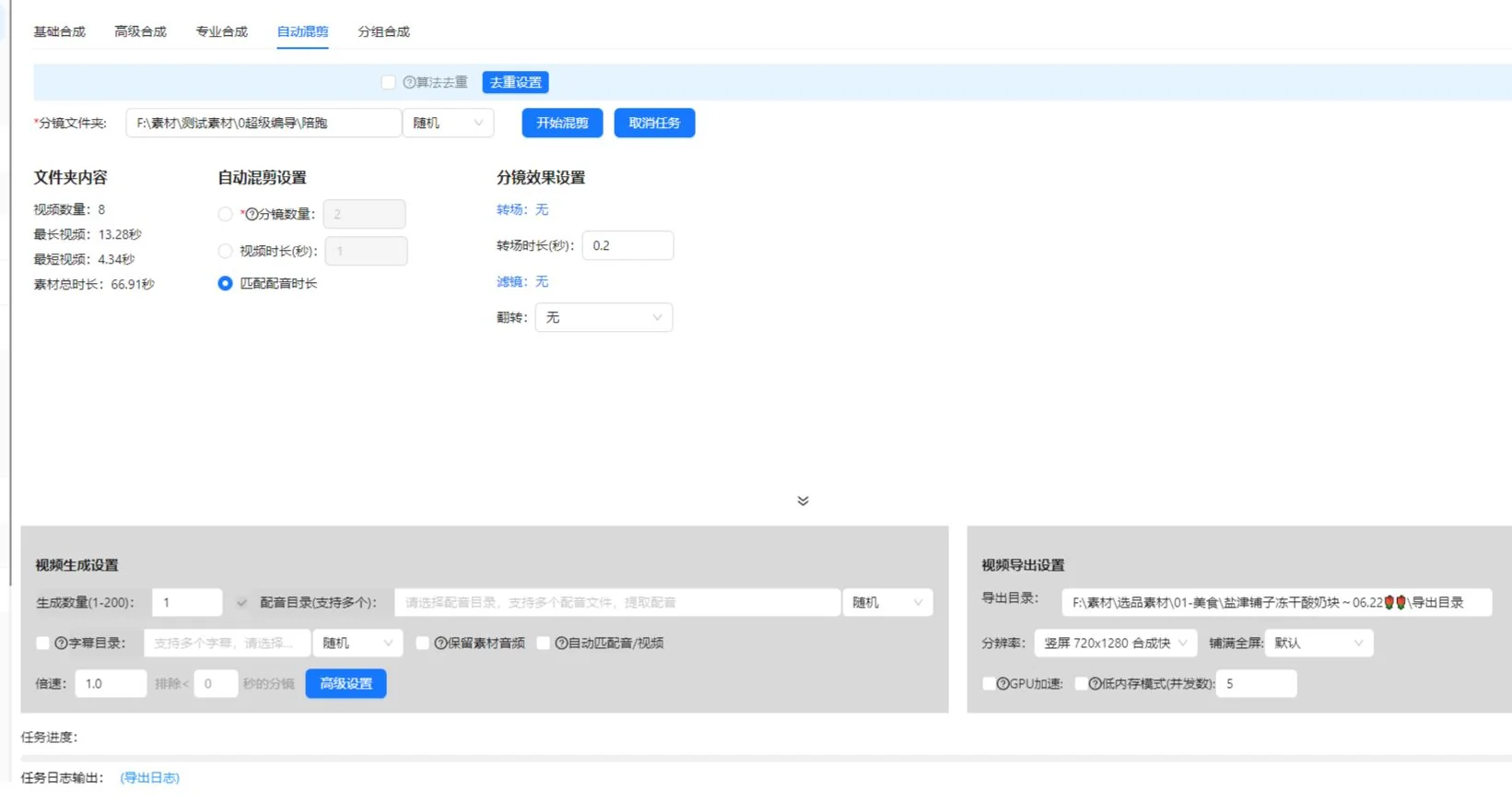
Twórz grupy ujęć wokół wspólnego celu wizualnego
Grupuj alternatywy według tego, co pokazują, a nie podobieństwa miniatur. Dla zdania o otwieraniu pokrywki każda propozycja musi wyraźnie pokazywać otwieranie. Estetyczne ujęcie produktu należy do innej grupy.
Krok 1: określ rolę każdej pozycji
- Przeczytaj zdanie scenariusza dla tej pozycji.
- Zapisz wizualny dowód potrzebny widzowi.
- W kompozycji podstawowej dodaj lub nazwij wiersz ujęcia w wymaganej kolejności.
- Przypisz folder ujęć lub zaimportuj odpowiednie materiały biblioteki. Wejście folderowe odczytuje obsługiwane materiały bezpośrednio z tego katalogu.
- Sprawdź, czy przydatna czynność każdej propozycji pasuje do wypowiedzianego zdania.
Uwzględnij tożsamość produktu w zasadach grupy. Dwa ujęcia mogą pokazywać tę samą czynność z różnymi kolorami, akcesoriami lub generacjami produktu. Może to pasować do filmu porównawczego, ale jest niedopasowaniem w montażu przedstawiającym jeden konkretny przedmiot.
Krok 2: usuń słabe zamienniki
Odtwórz każdą propozycję przez całą czynność. Odrzuć klip, który zaczyna się po rozpoczęciu czynności, kończy przed jej zakończeniem, zasłania mechanizm lub wymaga kontekstu niedostarczonego przez scenariusz. Zachowaj odniesienie do oryginalnego źródła, aby późniejszy montażysta mógł odzyskać szerszy zakres.
Sprawdź grupę, łącząc każdą propozycję z tą samą narracją. Jeśli jedna wymaga innego tekstu, aby miała sens, przenieś ją do innej grupy lub potraktuj jako osobny wariant scenariusza. Nie ukrywaj tej różnicy w pozornie zamiennym zbiorze.
Zaplanuj małą serię z jasnym rejestrem wariantów
Poniższy przykład kubka podróżnego jest ćwiczeniem planowania, a nie zarejestrowanym wynikiem zadania lub studium kampanii. Załóżmy, że dostępne ujęcia pokazują ten sam kubek na biurku, otwieranie pokrywki, uchwyt i osobę pijącą z kubka.
| Wersja | Wybór początku | Wspólna demonstracja | Wybór zakończenia | Pytanie kontrolne |
|---|---|---|---|---|
| A | Przedstaw kubek na biurku | Pokaż pełne otwieranie pokrywki | Wróć do sceny przy biurku | Czy początek przedstawia produkt? |
| B | Zacznij od otwierania pokrywki | Zachowaj to samo objaśnienie czynności | Użyj tej samej sceny przy biurku | Czy początek nadal daje dość kontekstu? |
| C | Użyj tego samego wprowadzenia co A | Zachowaj to samo objaśnienie czynności | Pokaż zwykłe używanie kubka | Czy zakończenie wspiera przekaz? |
A i B zmieniają początek. A i C zmieniają zakończenie. To zrozumiałe różnice, które możesz zapisać i sprawdzić. Jeśli jednocześnie zmienisz początek, głos, muzykę i zakończenie, wynikowe wideo może być przydatne, ale trudniej wyjaśnić wkład jednej zmiany.
Przed generowaniem plików zapisz zamierzoną różnicę obok każdej wersji. Minimalny zapis obejmuje identyfikator wersji, identyfikator scenariusza, nazwę pliku narracji, wybrane propozycje ujęć i powód zmiany. To prowadzony przez ciebie zapis redakcyjny; nie zakłada automatycznego raportu aplikacji.
Sprawdź zależności kombinacji. Zakończenie mówiące „użyj tak, jak pokazano” zależy od wcześniejszej demonstracji. Napis wspominający jeden kolor musi pasować do ujęć. Gdy wybory zależą od siebie, przygotuj oddzielne zgodne zestawy zamiast dopuszczać każdą kombinację.
Dopasuj scenariusze, narrację i napisy przed dodaniem ozdób
Każdy wariant scenariusza potrzebuje sprawdzonej relacji z dźwiękiem i napisami. Podobne nazwy plików nie wystarczają: posłuchaj wypowiedzianego zdania i porównaj je z zatwierdzonym tekstem.
Krok 3: sprawdź najdłuższą i najbardziej wymagającą narrację
Wskaż fragmenty z większą liczbą słów, dłuższymi nazwami produktów lub szczegółową demonstracją. Odtwórz je z ujęciami. Jeśli narracja trwa po końcu przydatnego obrazu, dodaj odpowiednie ujęcie, popraw montaż lub tekst. Nie rozwiązuj problemu przez przyspieszanie czynności do momentu, w którym widzowie jej nie rozumieją.
Użyj procesu seryjnego tworzenia lektora i napisów do powiązanego zadania. Zachowaj kopię zatwierdzonego scenariusza poza wideo, aby można było porównać z nią zmiany tekstu.
Krok 4: sprawdź napisy jako oddzielne zadanie
Kontrola napisów obejmuje dokładność mowy, czas i informacje przekazywane dźwiękiem. Wytyczne W3C dotyczące napisów do nagrań obejmują istotne informacje pozasłowne i identyfikację mówiącego w razie potrzeby. W tym przykładzie produktu sprawdź nazwę produktu oraz znaczenie odgłosu pokrywki dla objaśnienia.
Najpierw zatwierdź podstawową sekwencję, a potem dodaj wspólną muzykę, tekst lub naklejki. W przeciwnym razie dopracowana prezentacja może odwrócić uwagę od błędnego ujęcia lub niedopasowanej ścieżki głosu.
Wykonaj próbę obejmującą ryzykowne kombinacje
Próba powinna sprawdzać wybory najczęściej zmieniające znaczenie, czas lub prezentację. Obejrzenie tylko pierwszej kombinacji pozostawia inne zamiany niesprawdzone.
- W kompozycji podstawowej sprawdź kolejność, nazwy i liczbę materiałów w wierszach ujęć.
- Ustaw małą liczbę generacji i wybierz katalog wynikowy.
- Jeśli narracja lub napisy są włączone, wybierz rzeczywisty plik narracji i jego plik SRT.
- Sprawdź wersję ze standardową narracją i najczytelniejszą demonstracją.
- Dla innych konfiguracji scenariusza sprawdź najdłuższą narrację z najkrótszą przydatną propozycją demonstracji.
- Sprawdź każdy początek zmieniający kontekst następnego zdania.
- Sprawdź propozycje z innym kadrowaniem lub położeniem tekstu.
- Popraw wspólne ustawienia i propozycje przed rozszerzeniem serii.
To strategia kontroli, a nie twierdzenie, że klient oferuje automatyczny test zgodności. Korzystaj z podglądów i elementów sterowania dostępnych w zainstalowanej wersji. Przy większym zadaniu sprawdź w aplikacji dostępność zadania, koszty użycia i limity.
Zachowaj krótką listę usterek: identyfikator wersji, pozycja, zauważony problem i zamierzona poprawka. „B zaczyna się od niezidentyfikowanego zbliżenia” wskazuje działanie. „B wygląda źle” trudniej rozwiązać. Po poprawce odtwórz zmieniony fragment i sąsiednie przejścia.
Próba jest gotowa, gdy wybrane wersje spełniają brief, wspólne relacje dźwięku i napisów działają, a każda pozostała propozycja ma jasny cel. Nadal nie zastępuje kontroli każdego gotowego wideo.
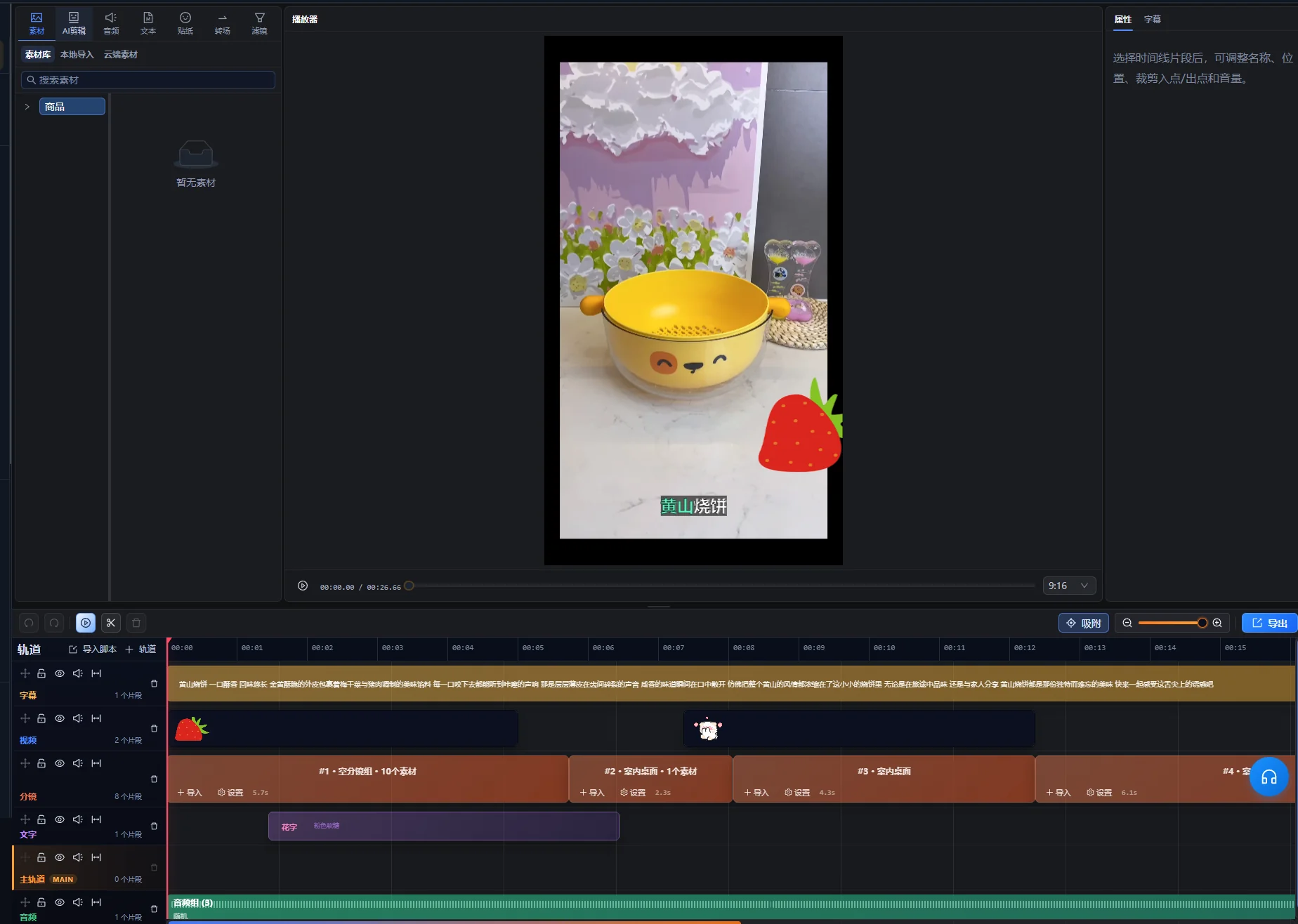
Rozwiązuj powtarzające się i pojedyncze problemy serii
Najpierw ustal, czy usterka dotyczy kilku wersji czy jednej konkretnej kombinacji. Powtarzające się problemy sugerują wspólny element; pojedyncze sugerują propozycję lub zależność pominiętą w zasadach grupy.
| Objaw | Co zbadać | Praktyczna poprawka |
|---|---|---|
| Każda wersja pokazuje niewłaściwy szczegół produktu | Wspólną grupę ujęć lub twierdzenie scenariusza | Zastąp grupę lub popraw zatwierdzony scenariusz, a potem sprawdź dotknięte wersje. |
| Jedno wideo zmienia kolor produktu w połowie | Zasady tożsamości wybranych klipów | Usuń niezgodną propozycję lub utwórz oddzielny zestaw produktu. |
| Narracja trwa dłużej niż demonstracja | Długość przydatnej czynności i wypowiedziane zdanie | Dodaj odpowiedni materiał, zmień czas lub skróć tekst bez utraty objaśnienia. |
| Napisy zawierają tekst innej wersji | Powiązanie scenariusza, dźwięku i napisów | Popraw powiązanie i skoryguj właściwy eksport. |
| Nowy początek utrudnia zrozumienie następnego zdania | Brak wprowadzenia lub odniesienia | Dodaj kontekst, zmień zdanie lub odrzuć tę kombinację początku. |
| Pierwszy wynik jest poprawny, ale późniejsze nie przechodzą kontroli | Zamiany nieobjęte próbą | Sprawdź każdą propozycję i zawęź zgodne wybory. |
Popraw źródło wspólnego błędu przed naprawianiem wielu oddzielnych plików. Jeśli ten sam błąd napisów występuje wszędzie, najpierw popraw wspólny tekst lub powiązanie. Jeśli tylko jedno ujęcie jest niewłaściwe, nie przepisuj wszystkich scenariuszy, aby je uwzględnić.
Sprawdź każdy eksport według listy kryteriów odbioru
Seria jest gotowa do przekazania, gdy każdy plik samodzielnie spełnia brief. Sprawdź rzeczywisty wyeksportowany plik, ponieważ sam podgląd osi czasu nie potwierdza dostarczonego kontenera, ścieżki dźwięku ani renderowania tekstu.
- Początek identyfikuje temat lub daje dość kontekstu dla następnego zdania.
- Właściwy produkt pojawia się przez cały film, łącznie ze szczegółami i akcesoriami.
- Każda demonstracja zaczyna się wystarczająco wcześnie i kończy po czytelnym pokazaniu czynności.
- Narracja pasuje do wybranego scenariusza i pozostaje zrozumiała na tle muzyki.
- Napisy są poprawne, zsynchronizowane z właściwym dźwiękiem i nie zasłaniają ważnych szczegółów.
- Zakończenie domyka przekaz bez dodawania niepotwierdzonego twierdzenia.
- Plik odtwarza się od początku do końca w docelowym formacie oglądania.
- Nazwa pliku i rejestr wersji odnoszą się do tych samych wyborów twórczych.
Wybierając ustawienia eksportu, stosuj wymagania techniczne miejsca docelowego. Przy dostarczeniu na YouTube zajrzyj do zalecanych ustawień kodowania przesyłanych plików YouTube, w tym wskazówki zachowania liczby klatek na sekundę w nagraniu. To wytyczne miejsca docelowego, a nie stwierdzenie, które opcje eksportu udostępnia klient.
Szczegółowe naprawy osi czasu kontynuuj w narzędziu Super Editor. Zapisz, czy plik przeszedł kontrolę, wymaga poprawki czy został zastąpiony. Stan kontroli ułatwia przekazanie bardziej niż folder z kilkoma plikami o nazwie „ostateczny”.
Oddziel zapisy produkcyjne od twierdzeń o skuteczności
Rejestr wersji powinien wyjaśniać, co zmieniło się w wideo. Późniejsze porównanie skuteczności wymaga też informacji o dystrybucji, odbiorcach, datach i porównywanej mierze.
Na przykład jeśli wersja B otrzyma więcej wyświetleń po pokazaniu większej grupie odbiorców, sama ich liczba nie dowodzi, że różnicę spowodował początek. Jeśli chcesz porównać początki, zaplanuj dystrybucję i pomiar oddzielnie, zamiast traktować serię jako gotowy eksperyment.
Zapisz platformę, umiejscowienie, okres publikacji i dostępne wyniki przy identyfikatorze kreacji. Zachowaj definicje: wyświetlenie, pełne odtworzenie i kliknięcie to różne wyniki. Nie zamieniaj przykładu produkcyjnego w deklarowaną historię sukcesu bez danych źródłowych i uzasadnionego porównania.
Gdy nowy scenariusz wymaga wyboru ujęć przed określeniem grup zamiennych, użyj poradnika tworzenia filmów z materiałów. Montaż seryjny następuje po pracy nad strukturą, gdy masz sprawdzone zamienniki.
Zacznij od jednej zatwierdzonej struktury
Wybierz jeden produkt, jeden pełny przekaz i mały zestaw zgodnych alternatyw. Zatwierdź próbę, popraw zasady grup i rozszerzaj tylko zmiany, które możesz rozpoznać i sprawdzić. Przystępną serię z udokumentowanymi wyborami łatwiej dostarczyć niż duży folder nieopisanych kombinacji.
Podstawa redakcyjna: AIMIX Editorial Team przygotował ten poradnik na podstawie obecnego procesu w kliencie i podlinkowanej dokumentacji pierwotnej. Plan kubka podróżnego i proces kontroli to przykładowe zalecenia. Nie deklaruje się pomiaru szybkości przetwarzania, testu kampanii ani wyniku klienta.
Często zadawane pytania
Czy mogę użyć kilku produktów w tej samej serii?
Tak, jeśli relacje scenariuszy i ujęć pozwalają jednoznacznie odróżnić produkty. Oddziel zgodne zestawy dla każdego produktu, chyba że wideo celowo je porównuje. Sprawdź nazwy modeli, kolory, akcesoria i napisy w każdej wersji.
Ile wersji przygotować?
Przygotuj wersje reprezentujące przydatne, możliwe do sprawdzenia zmiany. Dostępne ujęcia, cel redakcyjny i możliwości kontroli określają sensowną liczbę. Sprawdź aktualne limity zadania w aplikacji zamiast zakładać stałą liczbę z poradnika.
Czy jedna ścieżka narracji może pasować do każdego wariantu?
Tak, gdy każde wybrane ujęcie pozostaje poprawne pod tymi samymi słowami i czasem. Jeśli propozycja wymaga innego objaśnienia, użyj osobnego powiązania scenariusza i dźwięku lub usuń ją z zamiennej grupy.
Czy montaż seryjny automatycznie tworzy test A/B?
Nie. Przygotowuje warianty kreacji. Sensowne porównanie skuteczności wymaga też określonej hipotezy, planu dystrybucji i spójnego pomiaru. Zachowaj zapisy kreacji, aby późniejsze wyniki można było połączyć z rzeczywistymi zmianami.