
Montaggio su timeline multitraccia
Video, audio, sottotitoli e adesivi stanno su tracce separate a livelli, con rifinitura fotogramma per fotogramma, cambi di velocità, transizioni e keyframe.
montaggio professionale multitraccia + accelerazione IA + remix in batch
Una timeline multitraccia, montaggio IA e remix in batch in uno: rifinisci su più tracce, affida all'IA il lavoro ripetitivo e scala l'output con il remix in batch: un unico strumento per l'intero flusso.
Scarica AIMIXIl dolore più grande nel montaggio sono gli strumenti sparpagliati: un'app per i tagli di precisione, un'altra per i sottotitoli, una terza per il remix. Super Editor riunisce montaggio multitraccia, montaggio IA e remix in batch su un'unica timeline: rifinitura e produzione in serie senza cambiare strumento.
Video, audio, sottotitoli e adesivi stanno su tracce separate a livelli, con rifinitura fotogramma per fotogramma, cambi di velocità, transizioni e keyframe.
Taglia automaticamente le pause dei talking-head, genera sottotitoli e doppia con un clic; gli script guidano l'allineamento del girato a raddoppiare l'efficienza.
Il girato dei gruppi di inquadrature più le regole di remix produce più video finiti in un passaggio, con deduplica automatica all'esportazione: è qui che inizia l'output su scala di rete.
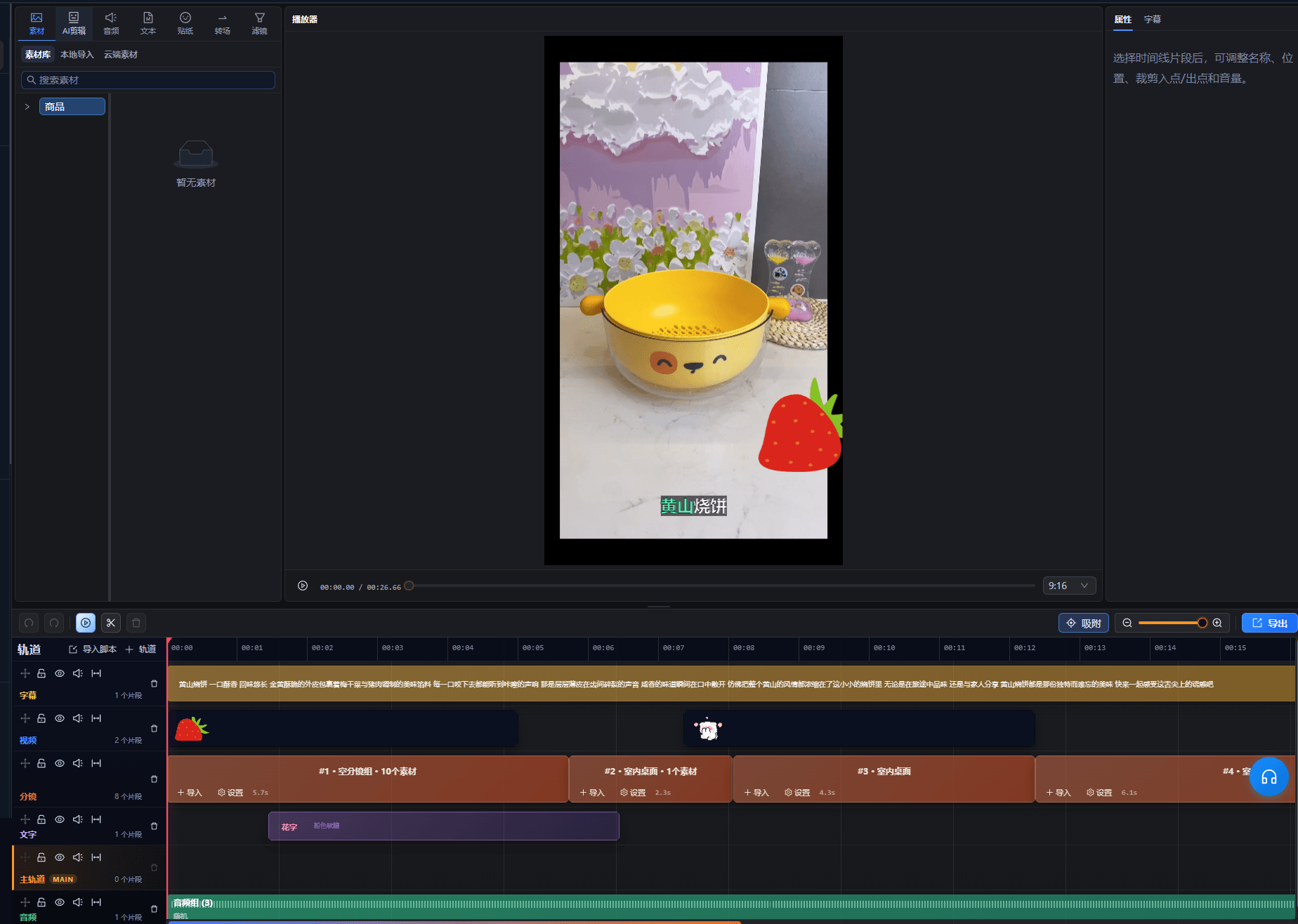
I casi seguenti sono registrazioni reali di questa funzione nell'app AIMIX, non modificati.
Ideale per: team di video brevi e operatori di reti di account · bilanciare qualità e volume
结构Flusso: montaggio master multitraccia → girato nei gruppi di inquadrature → remix in batch → distribuzione multipiattaforma
La qualità nasce dal montaggio di precisione, la scala nasce dal remix: entrambi avvengono nello stesso spazio di lavoro, senza cambi strumento né spostamenti di girato.
Dalla rifinitura alla produzione di massa, usa ciò che ti serve:
Gestisci video, audio, sottotitoli e adesivi su livelli separati; rifinisci fotogramma per fotogramma, regola la velocità, aggiungi transizioni: il lavoro dettagliato vive qui.
Automatizza il taglio delle pause, l'aggiunta di sottotitoli, il doppiaggio e l'allineamento tra script e girato, liberando il tuo tempo per la creatività.
I gruppi di inquadrature si combinano e moltiplicano in molti video finiti con deduplica automatica: la catena di approvvigionamento quotidiana per le reti di account.
Rifinisci prima un modello con multitraccia + IA, poi accumula girato nei gruppi di inquadrature per il remix in batch.
Tagli di precisione, sottotitoli, doppiaggio e remix nello stesso spazio di lavoro: niente più esportazioni di girato avanti e indietro.
La multitraccia gestisce il lavoro fine mentre l'IA assorbe la ripetitività: risultati professionali senza ore di maratona.
Il remix in batch è una capacità nativa e non un'aggiunta, così il riutilizzo dei modelli genera direttamente più versioni.
L'interfaccia multitraccia segue le convenzioni di montaggio più diffuse; i principianti possono appoggiarsi prima all'automazione IA e poi prendere il controllo fine.
Gli strumenti ordinari gestiscono solo il taglio. Qui sottotitoli IA, doppiaggio e remix in batch sono integrati, coprendo tutto dal girato grezzo all'output di massa.
Per i formati comuni come video talking-head, remix e video con foto e testo, assolutamente sì; per plug-in speciali o color grading cinematografico funziona da complemento.
Dipende dalla quantità di girato nei gruppi di inquadrature e dalle regole di combinazione: più girato ricco rende più versioni e i duplicati vengono filtrati automaticamente all'esportazione.
Sono supportati i formati principali di video, audio e immagini; segui le indicazioni di importazione per i dettagli.
I progetti vengono salvati nello spazio del tuo account e si possono riprendere in qualsiasi momento; le capacità di collaborazione seguono la versione attuale.