
Montaggio talking head con l'IA: un flusso completo per il primo taglio
Autore
Pubblicato il

Un montaggio talking head chiaro parte dall'argomentazione parlata: conserva la ripresa completa, elimina ripetizioni inutili e organizza la spiegazione in un ordine comprensibile a un nuovo spettatore. Un assistente di montaggio IA può aiutare con queste modifiche, ma devi comunque controllare la timeline risultante. Questa guida mostra come preparare la sorgente, scrivere richieste verificabili, rifinire i tagli del parlato e aggiungere poi immagini di supporto, sottotitoli e audio. Include un primo montaggio illustrativo e una lista pratica di accettazione per il file finito.
Punti chiave
- Scegli la ripresa completa e corretta prima di rifinire il ritmo.
- Rendi ogni richiesta IA abbastanza specifica da poterla verificare, indicando anche i contenuti da conservare.
- Controlla significato, confini udibili e pause utili dopo ogni modifica dei contenuti.
- Aggiungi riprese di supporto e sottotitoli al montaggio parlato stabile, poi verifica l'esportazione effettiva.
Separa il montaggio dei contenuti dalla rimozione dei silenzi e dalla presentazione
Decidi cosa conservare in base al messaggio parlato. Una spiegazione ripetuta, un intervallo silenzioso e una dimostrazione di prodotto mancante sono problemi diversi. Eliminare ogni pausa non stabilisce quale ripresa sia completa e aggiungere grafica non corregge una spiegazione contraddittoria.
| Attività | Decisione presa | Cosa va ancora verificato |
|---|---|---|
| Montaggio dei contenuti | Quali passaggi parlati conservare e in quale ordine | Significato, contesto e ragionamento completo |
| Rimozione dei silenzi | Quali intervalli silenziosi soddisfano la soglia audio scelta | Parlato debole, respirazione e pause utili |
| Presentazione visiva | Come riprese di supporto, testo e audio presentano la spiegazione | Accuratezza, leggibilità e distrazioni |
La panoramica sul montaggio talking head descrive il flusso dei contenuti. Considera separatamente nella pianificazione gli strumenti di elaborazione della guida al prodotto: un'operazione basata su una soglia non sostituisce una decisione editoriale.
Questo ordine ha anche un vantaggio pratico. Finché la sequenza parlata cambia, sottotitoli e riprese di supporto possono essere associati a passaggi che poi si spostano o scompaiono. Stabilizza il primo montaggio prima di rifinire queste relazioni.
Prepara sorgente, trascrizione e obiettivo del montaggio
Parti dalla registrazione originale e da un obiettivo di una frase per il video montato. Un obiettivo utile indica pubblico e risposta: «Mostra a chi lo usa per la prima volta come aprire la tazza da viaggio e spiega quando occorre sbloccare il fermo». Mantieni accessibile la sorgente mentre lavori al montaggio.
Importa e verifica il materiale parlato
- Importa le riprese nell'ambiente di montaggio e apri l'assistente IA.
- Completa la trascrizione quando l'attività dipende dai contenuti parlati.
- Ascolta le parole che determinano il significato: nomi, numeri, negazioni, condizioni e termini tecnici.
- Individua le riprese ripetute e decidi quale contiene la spiegazione completa.
- Annota le azioni visive che devono restare accanto alle istruzioni pronunciate.
Usa la trascrizione per navigare e pianificare, ma verifica i passaggi importanti con l'audio. Le indicazioni W3C su sottotitoli e didascalie affermano che i sottotitoli generati automaticamente richiedono una verifica dell'accuratezza. Controlla le parole che influenzano questo montaggio, senza considerare un testo scorrevole una prova di correttezza.
Prima della prima richiesta, il piano deve identificare l'apertura desiderata, la spiegazione essenziale e la sua conclusione. Se non sai indicare cosa deve restare, un'istruzione generica come «rendilo più serrato» sarà difficile da valutare.
Scrivi richieste di montaggio IA verificabili sulla timeline
Una richiesta utile identifica un passaggio, un'azione e una regola di conservazione. Indica all'assistente cosa tenere o eliminare, poi specifica la condizione che deve sopravvivere alla modifica. Verifica un tipo di intervento prima di aggiungerne un altro.
| Intenzione di montaggio | Richiesta illustrativa | Verifica |
|---|---|---|
| Scegliere tra tentativi | Conserva la seconda spiegazione completa dell'apertura del coperchio. Elimina il primo tentativo che si interrompe a metà frase. | Il tentativo selezionato include l'azione e la conclusione complete |
| Cambiare l'apertura | Inizia con la risposta, poi conserva la dimostrazione e la condizione sullo sblocco del fermo. | L'apertura è comprensibile prima della dimostrazione |
| Eliminare ripetizioni | Elimina il riepilogo ripetuto dopo la dimostrazione. Conserva il primo riepilogo e la condizione d'uso. | Nessuna precisazione necessaria scompare insieme alle parole ripetute |
Evita di combinare «riordina tutto, elimina ogni pausa, aggiungi B-roll e completa i sottotitoli» nella prima richiesta. Modifiche separate permettono di capire quale azione ha causato un taglio indesiderato. Se il passaggio previsto è ambiguo, cita le sue parole distintive o la posizione sorgente invece di affidarti a «la parte noiosa».
Per una proposta di pulizia del parlato, esamina l'anteprima prima di applicare il montaggio. Una proposta in sospeso non ha ancora modificato la timeline. L'interfaccia verificata raggruppa modifiche proposte come pause, intercalari, ripetizioni, false partenze e autocorrezioni, con intervalli temporali sorgenti e voci da verificare manualmente. Controlla gli intervalli nella registrazione, poi usa il comando di applicazione soltanto dopo aver approvato le modifiche. Se l'interfaccia segnala la proposta come obsoleta, usa il comando di rigenerazione dell'anteprima per preparare una nuova proposta sulla timeline attuale prima di applicarla.
Dopo una richiesta, esamina la timeline effettiva. Conferma che il segmento previsto si sia spostato o sia scomparso, poi riproduci la transizione nel contesto. Una risposta positiva dell'attività non equivale a un montaggio approvato.
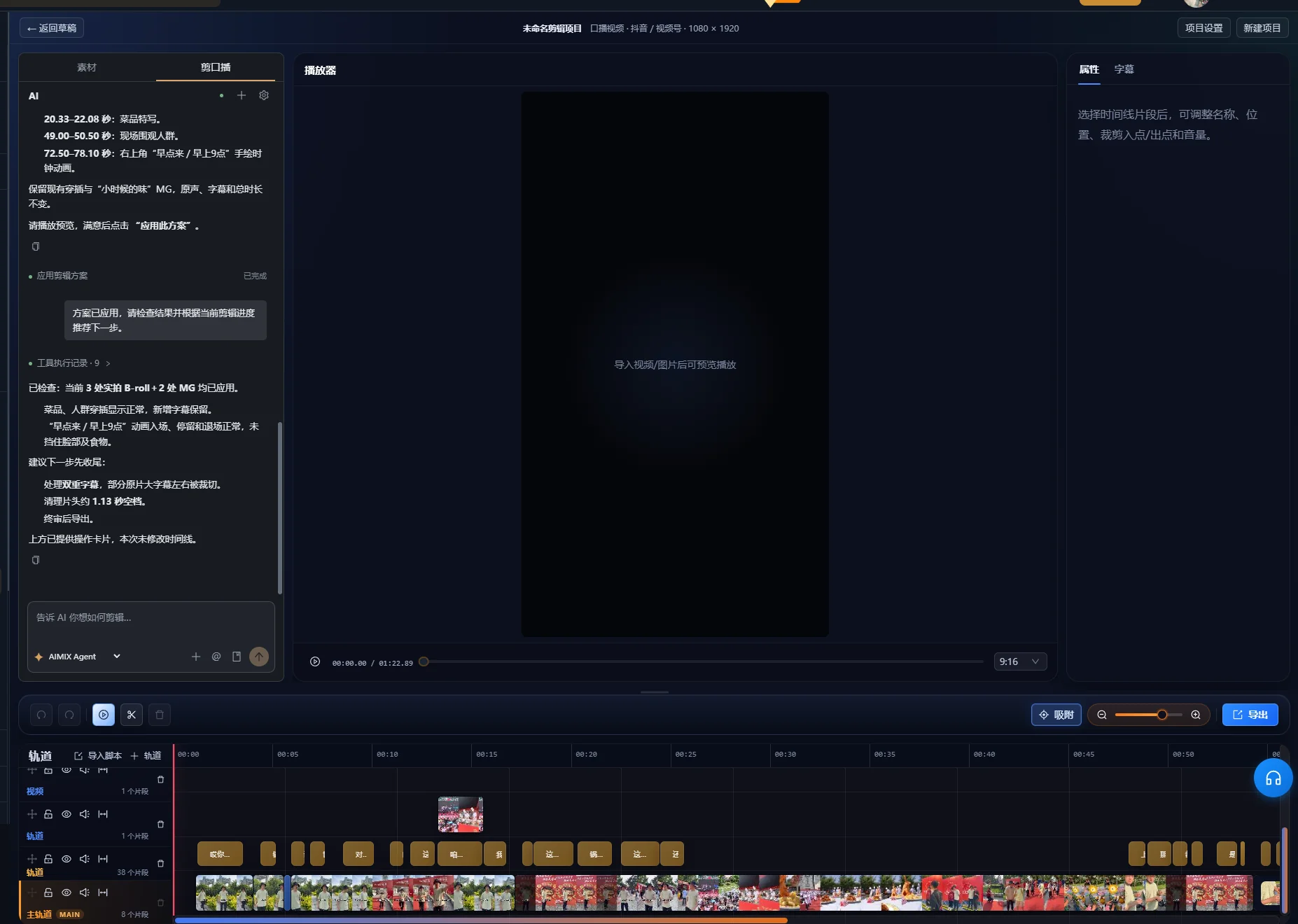
Esempio sviluppato: accorcia una ripresa conservando una risposta completa
È una registrazione fittizia usata per illustrare una decisione di montaggio. Non è un'esecuzione misurata dell'app né un risultato di un cliente. Immagina un presentatore che tenta più volte di spiegare il coperchio di una tazza da viaggio.
| Passaggio sorgente | Formulazione illustrativa | Decisione di montaggio |
|---|---|---|
| Tentativo incompleto | «Per aprirla, premi questa parte e poi...» | Elimina, purché qui non compaia un'istruzione unica |
| Tentativo completo | «Sblocca prima il fermo. Poi premi il pulsante per aprire il coperchio». | Conserva le due frasi insieme |
| Dimostrazione | Il presentatore sblocca il fermo e preme il pulsante | Mantieni abbastanza tempo per vedere entrambe le azioni |
| Riepilogo ripetuto | «Quindi, premi il pulsante per aprirla». | Elimina se la spiegazione completa lo copre già |
| Condizione utile | «Se il fermo è ancora inserito, sbloccalo prima di premere». | Conserva dove la condizione chiarisce l'azione |
Formula la prima richiesta sui contenuti
Conserva la spiegazione completa che inizia con «Sblocca prima il fermo», insieme alla dimostrazione e alla condizione sul fermo. Elimina il tentativo iniziale incompleto e il riepilogo finale ripetuto.
Verifica il risultato prima di riordinare. Controlla che «prima» si riferisca ancora allo sblocco del fermo e che la dimostrazione mostri la stessa sequenza. Se il taglio conserva soltanto «premi il pulsante», è diventato più breve eliminando un'istruzione necessaria.
Rifinisci l'apertura senza inventare nuovo parlato
Potresti iniziare con la spiegazione completa e passare direttamente alla dimostrazione. Guardala come se non avessi mai visto il prodotto. Lo spettatore sa quale fermo e quale pulsante intende il relatore? Se manca questo contesto, conserva una frase introduttiva oppure usa un titolo visibile accurato per identificare l'azione.
Il criterio di successo dell'esempio è la completezza, non una durata fissa. La sequenza finita deve comunicare l'ordine corretto, mostrare l'azione e conservare la condizione rilevante. Una ripresa successiva scorrevole non deve prevalere automaticamente su una precedente che contiene informazioni omesse nella successiva.
Rifinisci ogni taglio e conserva le pause utili
Riproduci ogni nuovo confine di montaggio, comprese le parole immediatamente prima e dopo. La trascrizione può localizzare una frase, ma suono e movimento determinano se la transizione effettiva risulta completa.
- Ascolta inizi e finali di parole o respiri troncati.
- Controlla che la frase rimanente abbia ancora il soggetto e il significato previsti.
- Osserva mani, volti o azioni del prodotto interrotti dal taglio.
- Conserva una pausa quando la spiegazione cambia argomento o lo spettatore deve esaminare una dimostrazione.
- Rifinisci il confine nella timeline quando il risultato automatico è troppo stretto.
Le indicazioni W3C su contenuti audio e video raccomandano di dare tempo per elaborare le informazioni e fare pause tra gli argomenti. È un motivo per conservare un po' di spazio nella spiegazione, anche quando la registrazione grezza contiene pause da eliminare.
Se usi la rimozione dei silenzi, prova la soglia scelta su un passaggio rappresentativo con parlato debole e una pausa intenzionale. Confronta la riproduzione con l'originale. Se una parola debole scompare o il ritmo diventa affrettato, modifica le impostazioni o ripristina l'intervallo. Questa guida non prescrive un'unica soglia per registrazioni con livelli di rumore e configurazioni del microfono diversi.
La pulizia intelligente del parlato prevede anche controlli di sicurezza della timeline. L'implementazione verificata può rifiutare la pulizia quando materiali sovrapposti o altre tracce attive impediscono tagli sicuri. Se l'attività rifiuta una modifica, esamina la disposizione delle tracce e rifinisci manualmente, senza presumere che ogni sequenza multitraccia sia pulibile automaticamente. Un primo montaggio centrato sul parlato riduce gli elementi di supporto influenzati dalle modifiche successive.
Aggiungi B-roll che dimostri il punto esatto del parlato
Scegli le riprese di supporto in base al loro ruolo esplicativo. Un primo piano del pulsante corretto aiuta a seguire «premi il pulsante». Una bella ripresa dell'intero prodotto può mostrarne l'aspetto, ma non necessariamente l'azione.
Abbina i materiali al montaggio parlato stabile
- Elenca i punti parlati che richiedono una dimostrazione visiva.
- Organizza le riprese e completa l'analisi necessaria al flusso di ricerca dei materiali.
- Descrivi la scena necessaria e controlla il candidato suggerito.
- Posiziona o rifinisci la ripresa di supporto affinché l'azione coincida con la spiegazione.
- Riproduci l'intero passaggio, compreso il ritorno al relatore.
La panoramica sul flusso dei materiali spiega il ruolo della libreria. I risultati di ricerca vanno comunque controllati per prodotto, azione e punto di vista corretti. Se la libreria non contiene la dimostrazione necessaria, aggiungi riprese adatte o modifica il piano di presentazione.
Non usare il B-roll soltanto per nascondere un problema editoriale. Coprire un jump cut può migliorare la transizione visiva, ma non ripristina una condizione mancante nel messaggio parlato. Verifica la sequenza audio indipendentemente prima di decidere quante riprese di supporto aggiungere.
Genera i sottotitoli quando il montaggio parlato è stabile
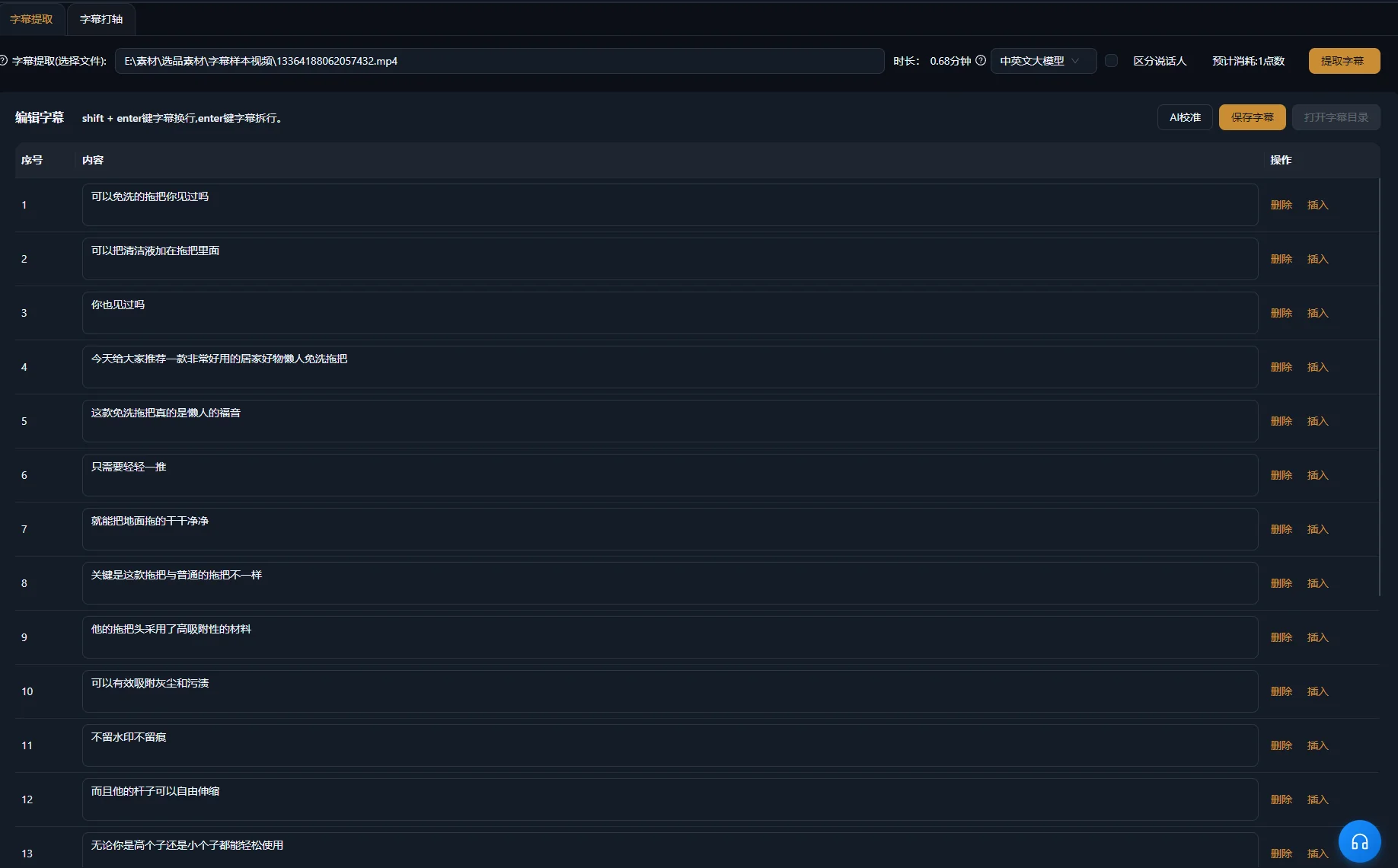
Sottotitola la sequenza montata, poi confronta testo e tempi con l'audio. Trascrizione sorgente e sottotitoli finali servono a scopi diversi: la prima aiuta a selezionare passaggi, i secondi devono seguire ciò che resta a schermo.
La panoramica Adobe sul montaggio basato sul testo in Premiere distingue allo stesso modo il proprio flusso, consigliando di creare i sottotitoli dalla sequenza finale montata. È un confronto generale dei flussi, non un'affermazione che le applicazioni abbiano gli stessi comandi di montaggio testuale.
Verifica separatamente parole, tempi e posizione
- Confronta nomi propri, quantità, negazioni e termini tecnici con le parole pronunciate.
- Assicurati che ogni sottotitolo inizi e finisca con il passaggio rappresentato.
- Usa interruzioni leggibili senza separare una condizione dall'affermazione che limita.
- Mantieni il testo lontano da volti, controlli e dettagli del prodotto che lo spettatore deve esaminare.
- Includi informazioni non verbali significative quando servono a comprendere la scena.
Le indicazioni W3C su sottotitoli e didascalie considerano suoni pertinenti e identificazione del parlante parte dei sottotitoli accessibili. In una spiegazione di prodotto, un clic udibile può contare quando conferma il completamento di un'azione. Decidi quali suoni trasmettono informazioni, senza etichettare ogni rumore occasionale.
Consulta la generazione dei sottotitoli per il flusso del prodotto. Modificare il testo non corregge un errore pronunciato; esamina separatamente l'audio e modifica o sostituisci il passaggio quando la spiegazione effettiva è sbagliata.
Completa grafica e audio senza oscurare la spiegazione
Aggiungi un titolo, testo di enfasi o grafica animata soltanto quando rende più facile seguire un punto reale. Mantieni le parole coerenti con il parlato. Una grafica che afferma più di quanto dica il presentatore cambia il messaggio anziché decorarlo semplicemente.
Verifica il passaggio parlato più debole con musica ed effetti attivi. Se le parole diventano difficili da capire, abbassa o elimina l'audio concorrente. Le indicazioni sull'accessibilità citate spiegano perché il parlato in primo piano deve restare distinguibile dal suono di fondo. Ascolta transizioni e livello medio: un accento musicale o un effetto può coprire una parola importante.
Guarda il video sottotitolato una volta senza audio per verificare se la sequenza visiva resta comprensibile. Poi ascolta senza guardare lo schermo per notare raccordi bruschi o un referente mancante. Sono verifiche editoriali complementari, non una garanzia che il video soddisfi ogni requisito di accessibilità.
Rifinisci la timeline finale nell'ambiente di montaggio. Se ti servono più clip focalizzate da una registrazione lunga, la guida ai ritagli dei video lunghi affronta scelta degli argomenti e contesto prima della presentazione.
Risolvi i problemi del primo montaggio prima di rifinirlo
Correggi il problema di contenuti o tempi alla base prima di aggiungere un livello visivo. I sintomi seguenti suggeriscono punti diversi da esaminare; sono possibilità diagnostiche, non tassi di errore misurati.
| Sintomo | Possibile causa | Azione successiva |
|---|---|---|
| Resta la ripresa sbagliata | La richiesta non distingueva tentativi simili | Identifica parole distintive o posizioni sorgenti e specifica cosa deve restare |
| La frase è più breve ma fuorviante | Una precisazione è scomparsa insieme al contenuto ripetuto | Confronta il montaggio con la spiegazione sorgente completa e ripristina la condizione |
| Una parola sembra troncata | Il confine cade dentro una parola udibile o un respiro | Ascolta il raccordo e rifinisci manualmente il confine |
| Il parlato sembra affrettato | Pause utili sono state eliminate insieme agli intervalli indesiderati | Ripristina spazio tra idee e dimostrazioni |
| Il B-roll mostra l'azione sbagliata | Un materiale visivamente simile è stato scambiato per un abbinamento esplicativo | Verifica identità del prodotto e azione, poi seleziona riprese adatte |
| I sottotitoli anticipano o ritardano il parlato | Testo o tempi riflettono un montaggio precedente | Verifica i sottotitoli con la sequenza finale attuale |
| Il testo è corretto ma il parlato è sbagliato | È stato corretto soltanto il sottotitolo | Esamina e modifica separatamente il passaggio parlato |
Approva il file esportato con una lista chiara
Il montaggio è pronto quando un nuovo spettatore comprende la spiegazione e il file esportato corrisponde alla timeline approvata. Riproduci l'esportazione effettiva dall'inizio alla fine; approvare soltanto la timeline non dimostra che il file consegnato sia corretto.
- L'apertura identifica soggetto e domanda.
- La ripresa conservata include condizioni necessarie e conclusione.
- Ogni taglio dei contenuti è stato verificato in riproduzione.
- Le dimostrazioni mostrano prodotto e azione corretti.
- I sottotitoli corrispondono al parlato finale e restano leggibili.
- Musica, effetti e grafica sostengono la spiegazione.
- Il file esportato contiene video, audio e testo previsti.
Conserva la registrazione originale e informazioni del progetto sufficienti a spiegare cosa è stato eliminato o riordinato. Inizia il prossimo montaggio migliorando il brief dei contenuti, senza applicare meccanicamente gli stessi tagli a una registrazione con un messaggio diverso.
Domande frequenti
Devo eliminare ogni intercalare?
Valuta la parola nel contesto. Elimina un'esitazione inutile quando la frase risultante suona ancora completa. Alcune parole apparentemente superflue introducono un contrasto o conservano la voce del relatore. Verifica audio e significato, senza applicare una regola universale.
Posso continuare a montare dopo una richiesta IA?
Sì. Esamina le modifiche nella timeline e continua a rifinire confini, riprese di supporto, sottotitoli e audio. Una richiesta produce un montaggio proposto che richiede ancora la tua approvazione.
E se il relatore corregge un errore in una ripresa successiva?
Confronta i tentativi completi e scegli la spiegazione accurata. Controlla che la ripresa corretta includa anche condizioni e dimostrazione necessarie allo spettatore. Un'esposizione più breve o fluida non basta se omette informazioni essenziali.
I sottotitoli possono rendere comprensibile una spiegazione poco chiara?
I sottotitoli possono rendere accessibile il parlato come testo, ma non aggiungono il ragionamento eliminato dal montaggio. Ripristina il contesto mancante nella sequenza parlata oppure usa un elemento esplicativo accurato che identifichi chiaramente le informazioni aggiunte.