
Edição em linha do tempo multifaixa
Vídeo, áudio, legendas e figurinhas ficam em faixas separadas em camadas, com refinamento quadro a quadro, mudanças de velocidade, transições e quadros-chave.
Edição Profissional Multifaixa + Aceleração por IA + Remix em Lote
Uma linha do tempo multifaixa, edição por IA e remix em lote em um só lugar: refine em múltiplas faixas, entregue o trabalho repetitivo à IA e escale a produção com o remix em lote — uma única ferramenta para o fluxo inteiro.
Baixar AIMIXO maior problema da edição são as ferramentas espalhadas: um aplicativo para cortes finos, outro para legendas, um terceiro para remix. O Super Editor reúne edição multifaixa, edição por IA e remix em lote em uma linha do tempo só — acabamento e produção em volume sem trocar de ferramenta.
Vídeo, áudio, legendas e figurinhas ficam em faixas separadas em camadas, com refinamento quadro a quadro, mudanças de velocidade, transições e quadros-chave.
Apare automaticamente as pausas do rosto falado, gere legendas e dube em um clique; os roteiros orientam o alinhamento do material e dobram a sua eficiência.
Material em grupos de plano mais regras de remix produzem vários vídeos finalizados em uma passada, com eliminação automática de duplicatas na exportação — é aqui que a produção em escala de matriz começa.
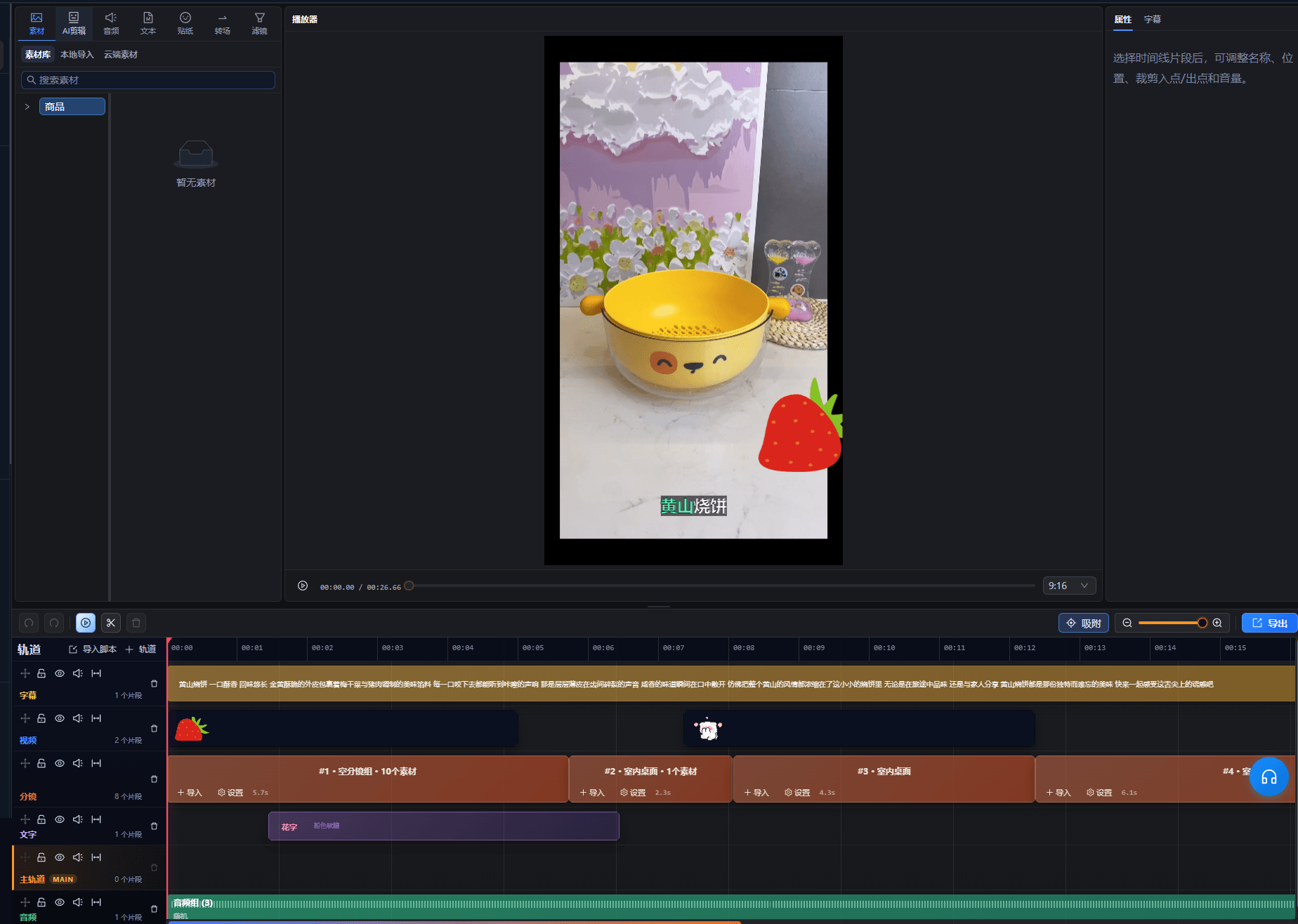
Os casos abaixo são registros reais deste recurso no app AIMIX, sem edições.
Ideal para: equipes de vídeos curtos e operadores de matriz de contas · equilibrar qualidade e volume
结构Fluxo: montagem multifaixa mestra → material em grupos de plano → remix em lote → distribuição multiplataforma
A qualidade vem da edição de precisão, a escala vem do remix — os dois acontecem no mesmo espaço de trabalho, sem troca de ferramenta nem vaivém de material.
Do refinamento à produção em massa, use o que precisar:
Gerencie vídeo, áudio, legendas e figurinhas em camadas separadas; refine quadro a quadro, ajuste a velocidade, adicione transições — o trabalho detalhado mora aqui.
Automatize aparar pausas, adicionar legendas, dublar e alinhar roteiro a material, deixando o seu tempo livre para a criatividade.
Grupos de plano se combinam e se multiplicam em muitos vídeos finalizados com eliminação automática de duplicatas — a linha de suprimento diário de conteúdo para matrizes de contas.
Lapide primeiro um modelo com multifaixa + IA e depois acumule material em grupos de plano para o remix em lote.
Cortes finos, legendas, dublagem e remix no mesmo espaço de trabalho — chega de exportar material de um lado para o outro.
A multifaixa cuida do trabalho fino enquanto a IA absorve a repetição — resultado profissional não exige horas intermináveis.
O remix em lote é uma capacidade nativa e não um acessório, então o reuso de modelos gera várias versões diretamente.
A interface multifaixa segue as convenções da edição convencional; iniciantes podem se apoiar na automação da IA primeiro e assumir o controle fino depois.
Ferramentas comuns cuidam só do corte. Aqui, legendas por IA, dublagem e remix em lote são nativos, cobrindo do material bruto à produção em massa.
Para formatos comuns como vídeos de rosto falado, remixes e vídeos de foto e texto, com certeza; para plug-ins específicos ou color grading cinematográfico, funciona como complemento.
Depende da quantidade de material nos grupos de plano e das regras de combinação — material mais rico gera mais versões, e as duplicatas são filtradas automaticamente na exportação.
Formatos principais de vídeo, áudio e imagem são suportados; siga os avisos de importação para detalhes.
Os projetos ficam salvos no espaço de trabalho da sua conta e podem ser retomados a qualquer momento; as capacidades de colaboração seguem a versão atual.