
Videodan istem çıkarma: referansı analiz edin ve her çekimi uyarlayın
Yazar
Yayımlanma

Videoyu yararlı isteme dönüştürmek için referansın gerçekten ne gösterdiğini açıklayın, çekimleri ayırın ve açıklamayı kendi öznenize ve üretim aracınıza uyarlayın. İstem çıkarımı (tersine mühendislik), görsel briefin taslağını sağlar. Özgün içerik üreticisinin gizli istemini, kamera ayarlarını veya üretim sürecini geri getirmez. Bu rehber yerel referans seçmekten analizi kontrol etmeye, çekimi yeniden yazmaya ve üretilmiş sonucu değerlendirmeye kadar ilerler. Hangi iş akışına ihtiyaç duyduğunuzu hâlâ seçiyorsanız aşağıda bağlantısı bulunan Videodan İstem Çıkarma özelliğinin genel bakışıyla başlayın.
Öne çıkanlar
- Tek görsel soru ve analizle karşılaştırabileceğiniz odaklı referansla başlayın.
- Videonun genel istemini, tam çekim sırasını ve tek tek çekim istemlerini farklı görünümler olarak kontrol edin.
- Özneyi bilinçli değiştirin; ardından kontrol edilmiş briefi hedef aracın girdi moduna uyarlayın.
- Değişiklikleri tutun ve üretilmiş sonuçları inceleyin; açıklama birebir yeniden oluşturmayı garanti etmez.
Referanstan ne öğrenmek istediğinize karar verin
Videoyu analiz etmeden önce tek görsel sorun seçin. Ürünü ortaya çıkaran kamera hareketi, beyaz nesneyi arka plandan ayıran aydınlatma veya ayrıntı çekimleriyle genel görünümü dönüşümlü kullanan sıra isteyebilirsiniz. Bunlar farklı brieflerdir. Tek “stili kopyalayın” isteği, açıklamayı veya yeni sonucu değerlendirmek için açık yol bırakmaz.
Kaynağı izleyin ve incelenmeye değer öğe hakkında tek cümle yazın. Örneğin: “Sabit ürüne yavaş yaklaşarak sıcak arka planda dış hatlarını okunabilir tutun.” Ardından hangi ayrıntıların özgün özneye, hangilerinin çekimin görsel yaklaşımına ait olduğunu not edin.
| Sorunuz | İncelenecek yararlı çıktı | Kaydedilecek bilgi |
|---|---|---|
| Bu tek çekim nasıl çalışıyor? | Tek çekim istemi | Kadraj, eylem, ışık ve kamera hareketi |
| Çekimler nasıl bağlanıyor? | Tam çekim sırası | Sıra, bakış açısı değişimleri ve tekrar eden ayrıntılar |
| Klibin genel görsel yönü nedir? | Videonun genel istemi | Ortam, özne ve genel görsel yaklaşım |
Analiz özelliğini Videodan İstem Çıkarma genel bakışı açıklar. Sorunuz ikna, sözlü mesaj veya anlatı yapısıyla ilgiliyse senaryo çözümlemeyi ayrı görev olarak kullanın. Kamera açıklaması senaryonun argümanının neden işe yaradığını açıklamaz.
Odaklı yerel referans ve karşılaştırma notu hazırlayın
Analiz etmek istediğiniz öğeyi açık gösteren video kullanın. Masaüstü uygulamaya, istem çıkarımına erişime ve kaynak açıklamasıyla sonraki değişiklikleri tutacak yere ihtiyacınız vardır. Daha büyük görev göndermeden kullanılabilirlik ve kullanım maliyetleri uygulamada kontrol edilmelidir.
Bu rehber için 10 Ekim 2026 tarihinde incelenen istemcide yerel seçim, 100 MB üzerindeki veya beş dakikadan uzun dosyaları reddeder. Dosya seçicisi MP4, MOV, AVI, MKV, WMV, FLV ve WebM uzantılarını içerir. Bunlar seçim seçenekleridir; kapsayıcıların içindeki her kodeğin başarıyla işleneceği garantisi değildir. Daha kısa veya küçük referans hazırlarken incelediğiniz özelliği görebilecek kadar görüntü ayrıntısını koruyun.
İlgisiz sahneler içeren uzun kaynak için odaklı parça hazırlayın. Kamera eylemini anlamaya yetecek başlangıcı ve sonu tutun. Hareketin ortasında başlayan klip yönünü belirsiz kılabilir. Video bölme rehberi mevcut kayıttan yeniden kullanılabilir görüntü hazırlamayı açıklar.
Analizden önce görünür olanları yazın
- Ana özneyi ve önemli ikincil özneleri belirleyin.
- Yüzeyi, arka planı ve öznenin konumunu kaydedin.
- Görünür hareketi not edin: ne hareket ediyor, hangi yönde ve ne sabit kalıyor?
- Çekimler arasındaki değişimleri işaretleyin ve kaynak konumlarına referans tutun.
- Yansıtıcı malzeme veya güvenle tanımlayamadığınız kamera hareketi gibi belirsiz ayrıntıları listeleyin.
Bu notlar, çıktıyla karşılaştıracak bağımsız dayanak sağlar. Videonun desteklemediği kesinliği eklemeyin. “Kadrajın solundan gelen yumuşak ışık” yararlı gözlemdir; belirli lamba modeli, üretim bilgisi gerektiren farklı iddiadır.
İstem çıkarımını çalıştırın ve üç görünümünü ayırın
Doğrulanmış istemci yolu, Senaryo Yönetimi’nde video çözümleme penceresinde başlar. Modlar aynı pencereyi paylaşsa bile senaryo çözümlemeden ayrı olan istem çıkarımı görevini seçin. Bu rehber her kontrolün amacını açıklar; etiketlerin kesin dili istemci arayüzünüze bağlıdır.
- Senaryo Yönetimi’ni ve video çözümleme penceresini açın.
- Yerel referans dosyasını seçin ve hazırladığınız kaynak olduğunu doğrulayın.
- İstem çıkarımını seçin ve görevi gönderin.
- Sonucu açın; videonun genel istemini, tam çekim sırasını ve tek tek çekim istemlerini inceleyin.
- İlgili çıktıyı kopyalayın ve karşılaştırma notunun yanında değişmemiş kopya tutun.
Aynı pencere bağlantıdan video alma da sağlar. Bu modda istemci analizden önce bağlantıdaki videoyu indirmeye çalışır. Video alma başarısızsa bu iş akışının desteklediği video bağlantısı sağladığınızı kontrol edin veya yerel dosya hazırlayın. Her platform sayfasını, özel videoyu veya süresi geçmiş bağlantıyı kullanılabilir girdi saymayın. Yukarıdaki yerel dosya kontrolleri, bu yolla alınan her bağlantıya ilişkin vaat olarak okunmamalıdır.
Seçilen göreve erişimi ve arayüzde gösterilen kullanım bilgisini kontrol edin. Senaryo çözümlemeye erişim, tek başına istem çıkarımına erişimi kanıtlamaz. Kaynak iznini de uygulama erişiminden ayrı tutun: malzemeyi indirebilmek veya analiz edebilmek, görüntüsünü yeni üretimde yeniden kullanabileceğinize kanıt değildir.
Genel bakış metnini çekim talimatlarından ayrı tutun. Videonun genel açıklaması yön bulmaya yardımcı olur. Çekim sırası yapıyı geri çıkarmaya yardımcı olur. Tek istem, değiştirilecek daha yönetilebilir birim sağlar. Her çekimin eylemini tek üretim isteğine koymak, öznenin ve kameranın nereye hareket etmesi gerektiği konusunda çelişkili talimatlar yaratabilir.
Sonucun seçilen dosyayı açıkladığını ve tek tek çekimlerin görünür sırayı izlediğini doğrulayın. Eylem yanlış çekimde görünüyorsa metni uyarlamadan ilişkiyi düzeltin. Akıcı paragraf yine de yanlış anı tarif edebilir.
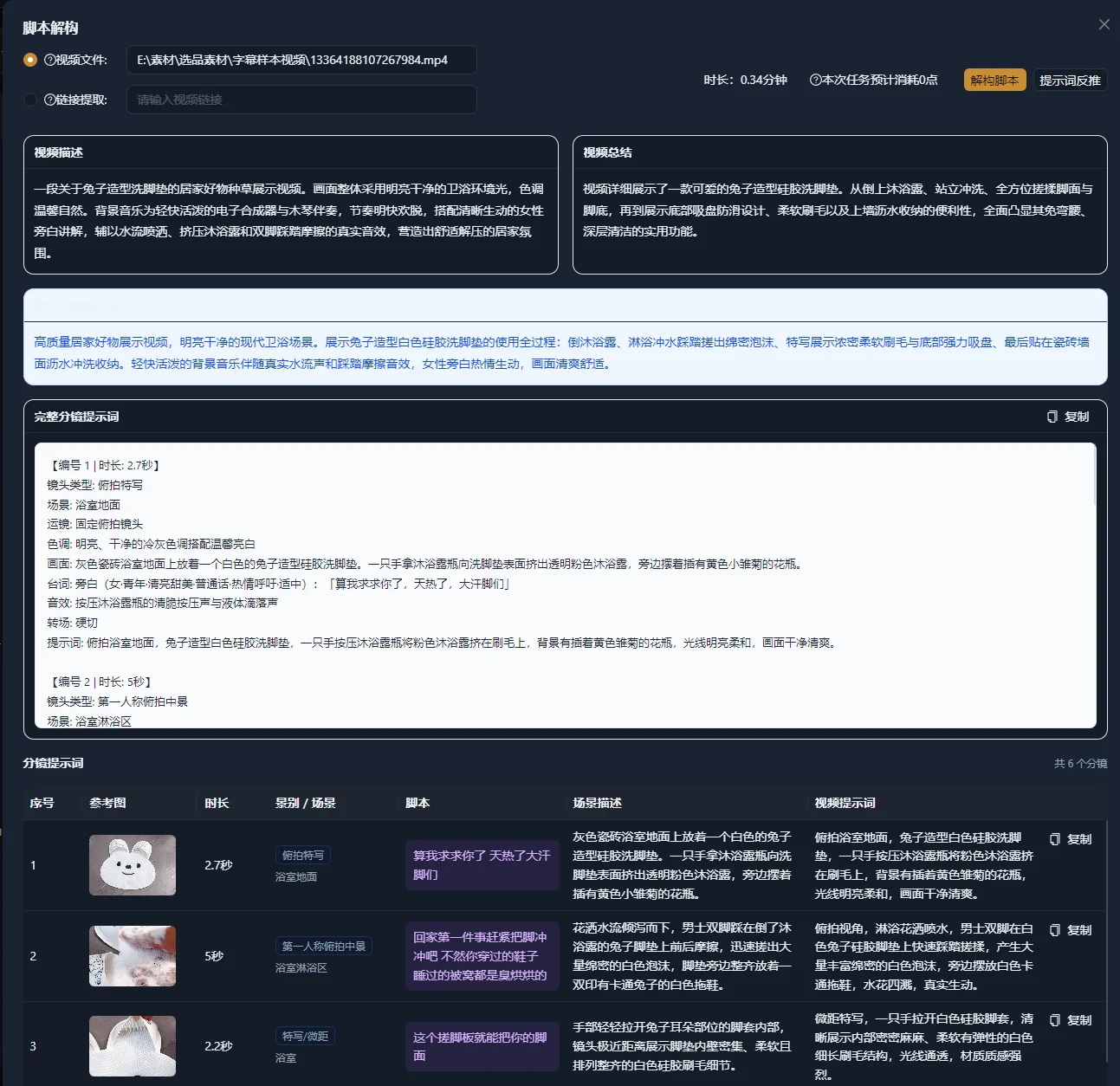
İstemi kendinden emin ifadelere göre değil görüntüye göre denetleyin
Analizi, görüntünün önerilen açıklaması olarak kontrol edin. Hangilerini yeniden kullanacağınıza karar vermeden eksik veya yanlış ayrıntıları düzeltin. Çekici ifadenin istenmeyen gerekliliğe dönüşmemesi için görünür gerçekleri yorumdan ayırın.
| Öğe | Referansla kontrol edilecek durum | Belirsizlikte değişiklik |
|---|---|---|
| Özne | Nesne, kişi, renk ve görünür parçalar | Varsayılan kimlik yerine gözlenebilir ayrıntılar kullanın |
| Eylem | Neyin hangi sırayla hareket ettiği | Fiziksel eylemi doğrudan açıklayın |
| Ortam | Yüzey, arka plan ve mekânsal ilişki | Doğrulayamadığınız rastlantısal ayrıntıları kaldırın |
| Işık | Yön, yumuşaklık ve görünür renk | Kesin ışık ekipmanı veya pozlama ayarı tahmin etmeyin |
| Kamera | Kadraj, yön ve bakış açısı değişimi | Teknik adı belirsizse gözlenen hareketi açıklayın |
| Sıra | Çekim sırası ve süreklilik | İlgisiz eylemleri ayrı çekim brieflerine bölün |
Google’ın video üretim istemi rehberi özne, eylem, bağlam, kamera açıları ve kamera hareketini ayırır. Kamerayı fiziksel olarak yaklaştırma ile yakınlaştırma arasındaki ayrım burada yararlıdır: biri kamerayı mekânda hareket ettirir, diğeri lensin büyütmesini değiştirir. Bu sözcükleri yalnızca referansla eşleştiğinde kullanın.
Çıkarımla eklenen her sıfatı zorunlu saymayın. “Lüks” bütün işi yapıyorsa basit arka plan, kontrollü yansımalar ve yavaş ortaya çıkarma gibi görünür açıklamayla değiştirin. Sonra bu seçimlerin çıktıda olup olmadığını kontrol edebilirsiniz.
Uygulamalı örnek: şişenin ortaya çıkışını seramik fincana uyarlayın
Bu örnek kurgu alıştırmasıdır; gözlenmiş uygulama çıktısı değildir. Ahşap masada duran şişe, sıcak yan ışık ve kameranın yavaş yaklaşması içeren referans düşünün. Brief, ölçülü ortaya çıkarma korunarak beyaz seramik fincanın yeni çekimini oluşturmaktır.
Tarafsız referans açıklaması tutun
Şişe ahşap masada durur. Soldan gelen sıcak ışık şişede parlak kenar oluşturur. Arka plan yumuşak ve odak dışıdır. Şişe sabit kalırken kamera yavaşça yaklaşır.
Bu açıklama özneyi, aydınlatma ilişkisini ve hareketi ayrı belirtir. Lens, lamba veya kesin süre varsaymaz. Uyarlamadan önce görünür değişimin şişenin kameraya hareketi değil kameranın yaklaşması olduğunu doğrulayın.
Özneyi değiştirin ve çelişkili ayrıntıları kaldırın
| Referans ayrıntısı | Yeni brief için karar | Neden |
|---|---|---|
| Şişe şekli ve kapağı | Sağa bakan kulplu seramik fincanla değiştirin | Ürün geometrisi değişir |
| Sıcak yan ışık | Okunabilir beyaz dış hatlarla koruyun | İncelenen görsel yaklaşım budur |
| Ahşap yüzey | Açık renk ahşap yüzey kullanın | Yeni brief daha basit kontrast gerektirir |
| Kameranın yavaş yaklaşması | Tek kontrollü hareketi koruyun | Ortaya çıkarma ana olay olarak kalmalıdır |
Yeni çekim briefi yazın
Beyaz seramik fincan, kulpu sağa bakacak şekilde açık renk ahşap masada durur. Soldan gelen yumuşak sıcak ışık, fincanın dış hatlarını sade arka plandan ayırır. Kamera yavaşça yaklaşırken fincan sabit kalır; hareket ağız kenarı ve kulpun daha yakın görünümüyle biter.
Bu istemi özgün şişeye göre değil yeni briefe göre değerlendirin. Fincan şeklini ve kulpunu korumalı, ışık dış hatlarını görünür tutmalı, kamera amaçlanan yaklaşmayı yapmalıdır. Sonraki sonuç kulp konumunu değiştirirse bu özne tutarlılığı sorunudur. Daha fazla aydınlatma sözü eklemek aynı sorunu çözmez.
Kontrol edilmiş açıklamayı hedef video modeline uyarlayın
İstem çıkarımıyla elde edilen açıklama taşınabilir brieftir; ancak son istem hedef aracın girdi moduna uymalıdır. Metinden video isteği sahnenin daha tam açıklamasını gerektirebilir. Görüntüden video isteği başlangıç görüntüsünde zaten görsel bilgi içerir; bu nedenle hareket etmesi gerekenlere odaklanmanız gerekebilir.
Google’ın video üretimi en iyi uygulamaları görüntünün sahne görünümünü sağladığını açıklar ve görüntüden video istemini harekete odaklamayı önerir. Fincan örneğinde önce sağlanan görüntünün doğru fincanı, kulp yönünü ve ışığı içerdiğini kontrol edin; ardından istediğiniz hareketi açıklayın.
Örnek görüntüden video hareket istemi: fincan sabit kalırken kamera yavaşça yaklaşır; hareket ağız kenarı ve kulpun daha yakın görünümüyle biter.
OpenAI’ın Sora 2 istem rehberi her çekim için tek açık kamera hareketi ve özne eylemi önerir; eylemler zamanlanmış adımlarla açıklanır. Bu Sora rehberidir; her video üreticisi için evrensel sözdizimi kuralı değildir. Kontrol edilmiş briefi girdiye dönüştürmeden hedef modelin belgelerine başvurun.
Son araç istemi daha kısa olsa bile tam kontrol edilmiş briefi tutun. Brief, neyi başarmaya çalıştığınızı tanımlar. Araç istemi, denediğiniz belirli girdidir.
Sonucu kontrollü değişiklik döngüsüyle inceleyin
Başarısız gerekliliği değiştirin; ardından sonraki çıktıyı aynı briefle karşılaştırın. Bu, her denemeden sonra tüm istemi yeniden yazmaktan daha anlaşılır değişiklik sağlar.
- Kamera stilinden önce özne kimliğini ve geometrisini kontrol edin.
- Eylemi ve kamera hareketini baştan sona kontrol edin.
- “Yaklaşma sırasında fincan dönüyor” gibi tek uyumsuzluğu somut belirtin.
- İlgili talimatı veya başlangıç görüntüsünü değiştirin.
- Önceki istemi tutun ve değişikliğin kısa nedenini yazın.
Basit değişiklik kaydı kaynak dosya adını, seçilen çekimi, kontrol edilmiş açıklamayı, hedef modeli ve girdi modunu, istem sürümünü ve çıktısındaki sorunu içerebilir. Karşılaştırmayı etkiliyorsa hedef aracın gösterdiği ayarları kaydedin. Kayıt belge olabilir; bu rehber uygulamada özel istem deney izleyicisi varsaymaz.
Sorun başlangıç görüntüsündeyse hareket isteminden her görsel ayrıntıyı onarmasını istemek yerine o görüntüyü değiştirin. Amaçlanan sonuç birkaç ayrı çekim gerektiriyorsa ayrı briefler hazırlayın ve çıktıları kurgu çalışma alanında birleştirin.
Açıklama ve üretim uyumsuzluklarını çözün
Sorunun analizde, yeniden yazmada veya sonraki üretimde başlayıp başlamadığını belirleyin. Analizi tekrarlamak, bilinçli olarak uyumsuz eylemler isteyen briefi düzeltmez.
| Belirti | Olası neden | Sonraki kontrol veya düzeltme |
|---|---|---|
| Yerel dosya seçimi reddedilir | Referans mevcut dosya boyutu veya süre kontrolünü aşar | Gösterilen sınırlar içinde odaklı parça hazırlayın |
| Bağlantıdan video alma başarısızdır | Video alma aracı bağlantıdan kullanılabilir video elde edemez | Bağlantıyı kontrol edin ve uygun olduğunda desteklenen yerel dosya hazırlayın |
| Açıklama yanlış nesneyi adlandırır | Görsel analiz kimliği yanlış çıkarmıştır | Kaynağı kontrol edin ve gözlenebilir özne ayrıntılarını yeniden yazın |
| İstem birkaç kamera hareketini birleştirir | Sıra metni tek çekim olarak değerlendirilmiştir | Çekimleri ayırın ve her biri için gereken hareketi seçin |
| Yeni ürün eski özne ayrıntılarını tutar | Uyarlamada çelişkili adlar veya geometri kalmıştır | Yan cümleler dahil her özne referansını kontrol edin |
| Görüntüden video çıktısı yanlış kompozisyonla başlar | Başlangıç görüntüsü briefe aykırıdır | Hareket dilini değiştirmeden başlangıç görüntüsünü inceleyin ve değiştirin |
| Kamera ve özne beklenmedik şekilde birlikte hareket eder | İstem ilişkilerini belirsiz bırakır | Hangi öğenin hareket ettiğini, hangisinin sabit kaldığını belirtin |
| Sonuç referansla birebir eşleşmez | Açıklama yeniden oluşturma garantisi sayılmıştır | Tanımlı görsel gereklilikleri değerlendirin ve başarısız öğeyi değiştirin |
Nedeni belirleyemiyorsanız isteği tek özne ve tek harekete indirin. Ek eylemleri veya sahne ayrıntılarını geri getirmeden bu sonucu inceleyin. İstemin teknik görünmesi için referanstan kesin ayar uydurmayın.
Yeniden kullanılabilir görsel briefle bitirin
Bir kişi referansı açmadan amaçlanan çekimi anlayabiliyorsa tesliminiz sonraki üretime hazırdır. Hem açıklamayı hem yeni malzemeyi bu kabul ölçütleriyle kontrol edin.
- Kaynak ve ilgili çekim konumları kaydedilmiştir.
- Açıklama görünür özne, eylem, kadraj ve hareketle eşleşir.
- Belirsiz gözlemler düzeltilmiş veya ayrıntının belirtilmediği açıkça ifade edilmiştir.
- Yeni özne referanstaki tüm çelişkili ayrıntıların yerine geçmiştir.
- Hedef istem aracın gerçek girdi moduna uyar.
- Çıktı özne tutarlılığı, hareket ve çekim sürekliliği açısından kontrol edilmiştir.
Onaylı briefi ve değişiklikleri ilgili işle birlikte Senaryo Yönetimi’nde veya üretim kayıtlarında tutun. Sonraki görev elinizdeki görüntülerden video oluşturmaksa mevcut malzemeye dayalı video oluşturma rehberiyle devam edin. Görsel brief, her çekim için üretilmiş alternatif gerektirmeden çekim seçimine yön verebilir.
Sık sorulan sorular
Videodan İstem Çıkarma, kaynağı oluşturmakta kullanılan istemi geri getirir mi?
İnceleyip uyarlayabileceğiniz açıklamalar üretir. Kaynak video özgün gizli istemi, model ayarlarını veya üretim geçmişini açıklamaz. Çıktıyı önerilen görsel brief olarak kullanın ve görüntüyle karşılaştırın.
Her üretimde videonun genel istemini kullanmalı mıyım?
Genel yönü anlamak için kullanın. Belirli çekim için o çekimin açıklamasını seçip değiştirin. Farklı konular, hareketler veya yerler içeren sıra ayrı üretim girdileri ve sonraki kurgu gerektirebilir.
Referans yapay zekâ üretimi yerine gerçek çekimse ne olur?
Görünür kompozisyonu, aydınlatmayı, eylemi ve hareketi yine inceleyebilirsiniz. Gözleyebildiklerinizi açıklayın. Üretim bu bilgiyi sağlamıyorsa gerçek lensi, aydınlatma ekipmanını veya kamera ayarlarını geri getirdiğinizi iddia etmeyin.
İstem tam olarak belirli bir ürünün görüntüsünün yerini alabilir mi?
İstem üretim aracına yön verir; ancak ortaya çıkan malzeme yine şekil, etiketler ve önemli diğer ayrıntılar bakımından inceleme gerektirir. Ürünün tam görünümü önemliyse uygun girdi seçip çıktıyı dikkatle kontrol edin veya kurguda doğrulanmış görüntü kullanın.