
Кадрирование видео: убирайте черные полосы, меняйте соотношения сторон и подгоняйте один мастер под каждую платформу
Author
Date Published

Зальете горизонтальную съемку в Douyin — экран заполняется черными полосами; загрузите вертикальное видео на YouTube — выживает узкая полоска: соотношение сторон — первое препятствие мультиплатформенной дистрибуции. Кадрирование видео закрывает удаление черных полос, свободное переключение форматов и ИИ-трекинг объекта для умного рефрейминга, так что одно видео работает везде.
Главное
- ИИ-трекинг сохраняет объекты
- Один мастер — много версий
- Пакетная конвертация форматов
Как это работает
Загрузите видео
Импортируйте видео, которому нужно поправить соотношение сторон, или поставьте несколько клипов вместе в пакетную задачу.
Выберите способ кадрирования
Удаление черных полос автоматически находит и срезает полосы сверху и снизу; переключение форматов предлагает 9:16, 1:1, 16:9 и другие; ИИ-трекинг держит объект по центру, так что перевод из горизонтали в вертикаль никогда не срезает лица.
Предпросмотр и экспорт
Проверьте кадрирование и экспортируйте — за раз выводите несколько версий под разными форматами, и один контент закрывает все платформы.
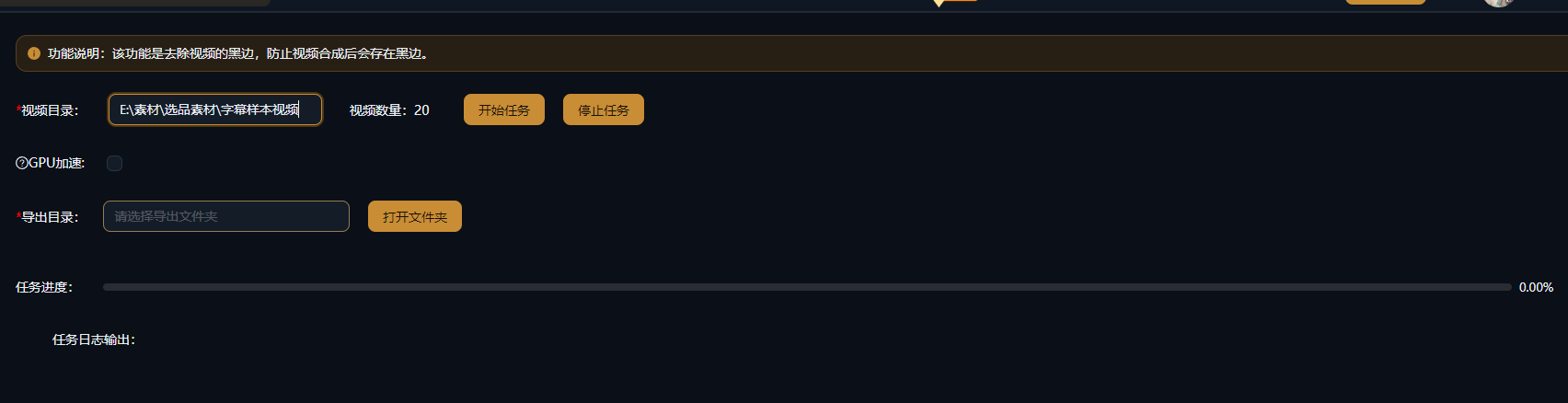
Реальные примеры
Ниже приведены реальные примеры использования этой функции в приложении AIMIX без изменений.
Мультиплатформенная дистрибуция горизонтального контента: три формата за один проход
Кому подходит: экспертные видео, курсы, интервью · исходный материал в 16:9
Процесс: горизонтальный мастер → кадрирование версий 9:16 / 1:1 / 16:9 → публикация по платформам
Из горизонтали в вертикаль без срезания лиц · Один мастер, три версии, полное покрытие · Пакетная обработка целых колонок материала
Мультиплатформенное ведение — это не перемонтаж трижды, а кадрирование трижды. ИИ-трекинг держит лицо по центру при каждой конвертации из горизонтали в вертикаль, поэтому один и тот же контент идеально ложится на каждую платформу.
Три высокочастотных сценария кадрирования
Каждый соответствует своей задаче дистрибуции:
Удаление черных полос
Автоматически определяет рабочую область кадра и срезает полосы сверху и снизу — спасение для старых материалов и записей экрана.
Переключение соотношения сторон
Переключайтесь между 9:16, 1:1, 16:9, 4:3 и другими с точным выводом под спецификации каждой платформы.
ИИ-умный трекинг
Распознавание объекта плюс динамическое кадрирование удерживает людей в безопасной зоне кадра при смене ориентации.
Для мультиплатформенной дистрибуции экспортируйте сразу несколько версий под разными форматами и избавьтесь от повторных экспортов.
Контроль над монтажом
ИИ-трекинг сохраняет объекты
Рефрейминг из горизонтали в вертикаль оценивается ИИ отрезок за отрезком, и кадр следует за объектом, когда люди двигаются.
Один мастер — много версий
Выводите одно и то же видео сразу в нескольких форматах и закрывайте все требования платформ за один проход.
Пакетная конвертация форматов
Переводите целую партию материала под одно целевое соотношение — идеально для серийного, матричного темпа производства.
Частые вопросы
Искажает ли кадрирование картинку?
Нет. Кадрирование срезает область кадра с сохранением пропорций, не растягивая материал; при необходимости дополните его размытием фона или похожими эффектами.
Как работает ИИ-умный трекинг?
ИИ определяет главный объект в кадре (например, лицо) отрезок за отрезком и динамически двигает рамку кадрирования, так что объект остается в центре композиции после смены формата.
Какие соотношения сторон поддерживаются?
Распространенные форматы, включая 9:16, 1:1, 16:9 и 4:3, плюс произвольные области кадрирования.
Можно обрабатывать видео массово?
Да. Задайте одно целевое соотношение для нескольких видео и экспортируйте их все одним прогоном.
Снижает ли кадрирование качество картинки?
Кадрирование меняет только видимую область кадра; разрешение следует настройкам экспорта. Меньше эффективных пикселей при вырезании вертикального клипа из горизонтального материала — нормальная ситуация.
Расходует ли кадрирование видео кредиты?
Тарификация за задачу, как показано в подсказке в приложении; пакетные задачи показывают оценку стоимости перед запуском.