
Serieredigering av video: Praktisk guide til produktvideovarianter
Forfatter
Publisert

Originalt reklameforsidebilde er beholdt. Fremdriftsprosentene og videokøen er illustrasjonsverdier, ikke et registrert resultat fra denne veiledningen. Etikettene er på kinesisk.
Serieredigering av video fungerer når en repeterbar struktur møter opptak som kan byttes uten å endre meningen. Den vanskelige delen er å definere disse byttene: En annen åpning kan endre løftet, en lengre fortellerstemme kan vare lenger enn demonstrasjonen, og et produkt som ligner, kan være feil modell. Denne veiledningen tar én produktvideobeskrivelse fra planlegging gjennom en pilotredigering, seriekontroll og filoverlevering. Den forklarer hva du må forberede, hvilke kombinasjoner du bør avvise, og hvordan du sporer et problem til det felles elementet som forårsaket det.
Viktige punkter
- Bruk Grunnleggende komposisjon til en ordnet sekvens av opptaksgrupper; Automatisk miksing starter fra en opptakssamling og har andre varighetskontroller.
- En kandidat er bare utbyttbar når produktidentitet, handling og tidsplassering fortsatt er riktige under samme fortellerstemme.
- Knytt hvert manus til faktisk lyd og undertekster, og undersøk de risikable byttene før du utvider serien.
- Kontroller hver eksporterte fil og behold en versjonslogg; produksjonsvarianter alene fastslår ikke kampanjeresultater.
Hva serieredigering av video endrer, og hva den trenger fra deg
Serieredigering kombinerer forberedte opptak, en definert rekkefølge og innholdsvarianter. Den er nyttig når flere videoer deler samme kommunikasjonsmål, men trenger ulike åpninger, demonstrasjoner eller avslutninger. Begynn med oversikten over serieredigering for funksjonens plass i arbeidsflyten.
En serie er mer nyttig når hver versjon har en identifiserbar redaksjonell forskjell. Å endre et bakgrunnsopptak kan gi deg en ny fil, men gir ikke automatisk et annet budskap. Avgjør om du lager alternativer for én målgruppe, tilpasser samme forklaring til ulike bruksområder eller sammenligner et bestemt kreativt valg.
Inndataene bør inneholde brukbare klipp, et manus for hvert budskap og tilhørende lyd når fortellerstemme kreves. Resultatet er et sett videoer som skal kontrolleres og leveres. Filantall er et produksjonsmål; det fastslår ikke at en versjon tiltrekker flere seere eller gir bedre resultater.
Arbeidsregel: Et opptak er bare utbyttbart hvis det fortsatt er korrekt med ordene, tidsplasseringen og naboopptakene på den plassen.
Forbered en oppdragsbeskrivelse og en oversikt før du åpner oppgaven
Definer én setning hver versjon må formidle, og skill deretter faste krav fra valgene du vil variere. Dette gir deg grunnlag for å avvise en kombinasjon før du bruker tid på undertekster eller grafikk.
- Fast: produktidentitet, nødvendig demonstrasjon, godkjent faktaordlyd og målformat.
- Variabelt: åpningsspørsmål, rekkefølge på støtteopptak, fortellerstil eller avslutningsscene.
- Utelukket: utgåtte modeller, opptak med feil emballasje, irrelevante arkivopptak og utdaterte tilbud.
Kartlegg opptak etter jobben de kan utføre: introdusere produktet, vise en handling, forklare en detalj eller etablere en brukssituasjon. Registrer kildefilnavnet, et nyttig kildeområde og eventuelle begrensninger. Hvis du bare har lange opptak, forbereder du kandidater med arbeidsflyten for videodeling.
Å organisere materiale før redigering er etablert praksis. Adobes oversikt over mediebeholdere forklarer gruppering av kildefiler og sekvenser. Du kan bruke samme organiseringsprinsipp her uten å kopiere et annet redigeringsprograms grensesnitt: Hold kildeopptak, fortellerstemme og kontrollerte versjoner mulig å skille fra hverandre.
Forberedelseskontrollen er enkel: Kan du finne opptak for hvert nødvendig poeng, og kan en annen redigerer se hvilket manus og hvilken lyd som hører sammen? Avklar begge usikkerhetene før du lager varianter.
Velg komposisjonsmodus og de faktiske inndataene
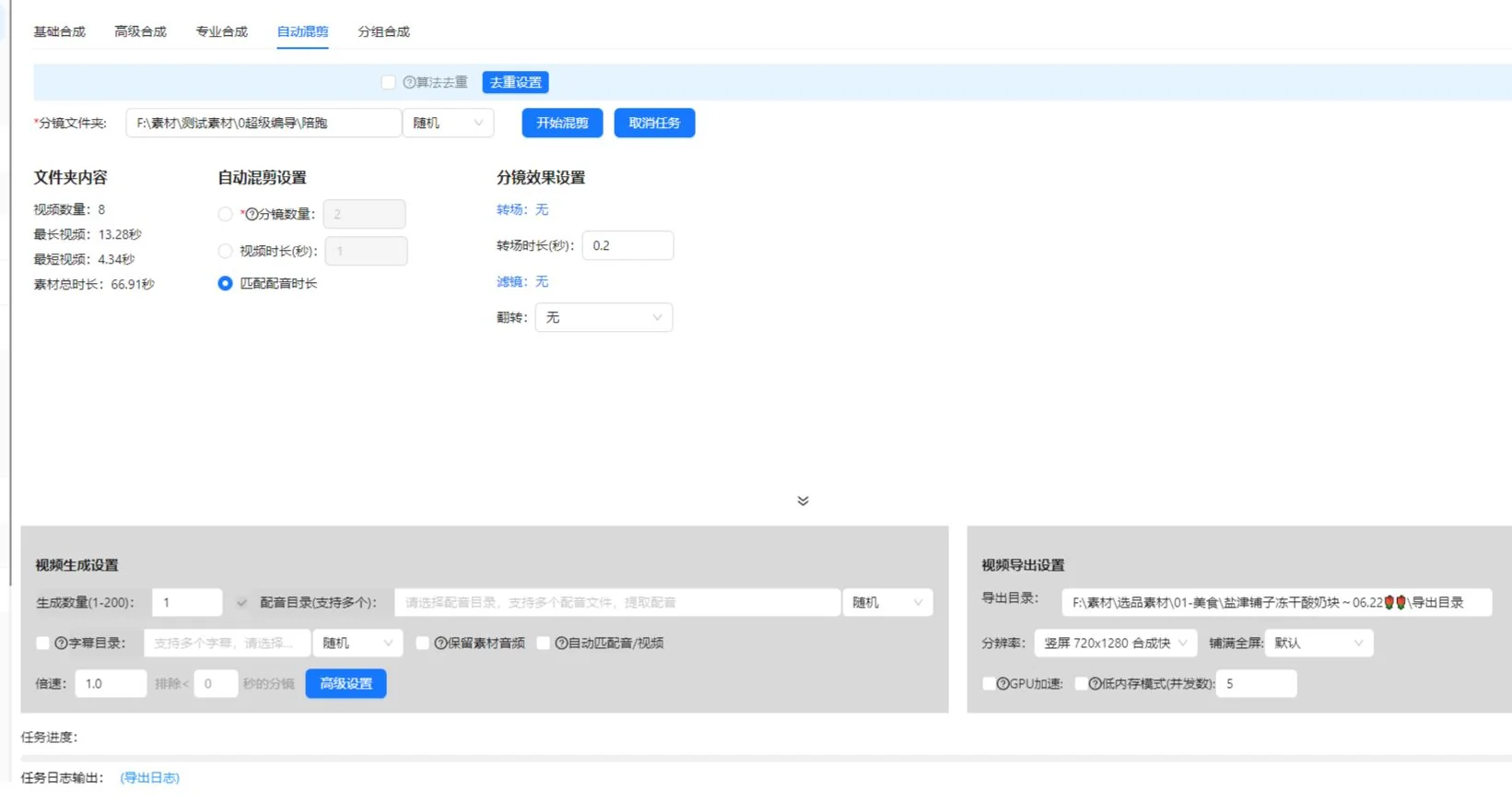
Det nåværende komposisjonsområdet har fanene Grunnleggende, Avansert, Profesjonell og Automatisk miksing. Ikke anta at de importerer samme mappestruktur eller godtar lyd på samme måte. Oppskriften med ordnede opptak i denne veiledningen starter med Grunnleggende komposisjon.
| Utgangspunkt | Gjeldende kontroller som er relevante her | Inndatakontroll |
|---|---|---|
| Grunnleggende komposisjon | Ordnede opptaksrader, en kildemappe eller bibliotekimport for hver rad, genereringsantall, valgfri fortellerfil og SRT-fil | Hver opptaksrad trenger brukbart materiale. Angi utdatamappen. |
| Automatisk miksing | En opptaksmappe, opptaksantall, ønsket videovarighet eller tilpasning til fortellerstemmens varighet, flere fortellerfiler og en valgfri SRT-mappe | Opptak må ligge direkte i den valgte mappen på første nivå. Velg minst én mikseregel. |
For Grunnleggende komposisjon forbereder du én godkjent fortellerstemme og tilhørende undertekstfil til piloten. Hvis du trenger et annet manus, etablerer du uttrykkelig forbindelsen til tilhørende lyd og undertekster i valgt modus eller et separat oppsett. Dette hindrer at en redaksjonell varianttabell forveksles med et løfte om at hver fane automatisk lager enhver kombinasjon.
Automatisk miksing behandler ønsket videovarighet og tilpasning til fortellerstemmens varighet som alternativer. Når opptaksantall og fortellertilpasning er aktivert sammen, sier det nåværende grensesnittet at det prioriterer fortellerstemmens varighet og kan legge til opptak for å dekke den. Å beholde kildelyd og gjenta opptak i løkke er uforenlige innstillinger. Alternativet for korteste lyd-/videotilpasning krever fortellerstemme og kan korte ned resultatet, så undersøk om det fjerner avslutningen du trenger.
Disse kontrollene ble kontrollert mot klientimplementasjonen 10. oktober 2026. Bekreft navn og tilgjengelighet i din installerte versjon. Gjeldende medlemsinnstillinger avgjør genereringsgrenser; denne veiledningen tildeler ikke én grense til alle kontoer.
Bygg opptaksgrupper rundt et felles visuelt formål
Grupper alternativer etter hva de demonstrerer, fremfor hvor like miniatyrbildene er. For en setning om å åpne et lokk må hver kandidat vise åpningen tydelig. Et rent presentasjonsopptak av produktet hører hjemme i en annen gruppe.
Trinn 1: Definer rollen for hver plassering
- Les manussetningen for den plasseringen.
- Skriv ned den visuelle dokumentasjonen seeren trenger.
- I Grunnleggende komposisjon legger du til eller navngir opptaksraden i nødvendig rekkefølge.
- Tildel opptaksmappen eller importer relevant bibliotekmateriale. Mappeinndata leser støttet materiale direkte i den mappen.
- Kontroller om hver kandidats nyttige handling passer den muntlige setningen.
Ta produktidentiteten med i gruppereglene. To opptak kan vise samme handling, men bruke ulike farger, tilbehør eller produktgenerasjoner. Det kan være akseptabelt i en sammenligningsvideo, men er et feiltreff i en redigering som presenterer én bestemt vare.
Trinn 2: Fjern svake erstatninger
Spill hver kandidat gjennom hele handlingen. Avvis et klipp som starter etter at handlingen har begynt, slutter før den er ferdig, skjuler mekanismen eller trenger sammenheng manuset ikke gir. Behold den opprinnelige kildehenvisningen slik at en senere redigerer kan hente et videre område.
Kontroller gruppen ved å pare hver kandidat med samme fortellerstemme. Hvis én kandidat trenger annen ordlyd for å gi mening, flytter du den til en annen gruppe eller behandler den som en separat manusvariant. Ikke skjul denne forskjellen i et sett som tilsynelatende er utbyttbart.
Planlegg en liten serie med tydelig variantlogg
Reisekoppeksemplet nedenfor er en planleggingsøvelse, ikke et registrert oppgaveresultat eller en kampanjestudie. Anta at tilgjengelige opptak viser samme kopp på et skrivebord, lokket som åpnes, håndtaket og en person som drikker av koppen.
| Versjon | Åpningsvalg | Felles demonstrasjon | Avslutningsvalg | Kontrollspørsmål |
|---|---|---|---|---|
| A | Introduser koppen på et skrivebord | Vis hele lokkåpningen | Gå tilbake til skrivebordsoppsettet | Etablerer åpningen produktet? |
| B | Begynn med lokkhandlingen | Behold samme handlingsforklaring | Bruk samme skrivebordsoppsett | Gir åpningen fortsatt nok sammenheng? |
| C | Bruk samme introduksjon som A | Behold samme handlingsforklaring | Vis koppen i vanlig bruk | Støtter avslutningen budskapet? |
A og B endrer åpningen. A og C endrer avslutningen. Dette er forståelige forskjeller du kan registrere og undersøke. Hvis du endrer åpning, stemme, musikk og avslutning samtidig, kan resultatvideoen være nyttig, men det blir vanskeligere å forklare hva én endring bidro med.
Skriv den tiltenkte forskjellen ved siden av hver versjon før du genererer filer. En minimumslogg omfatter versjons-ID, manus-ID, fortellerfilnavn, valgte opptakskandidater og begrunnelsen for endringen. Dette er en redaksjonell logg du vedlikeholder; den forutsetter ikke en automatisk rapport fra appen.
Undersøk kombinasjoner for avhengigheter. En avslutning som sier «bruk den som vist», avhenger av den tidligere demonstrasjonen. En undertekst som nevner én farge, må stemme med opptakene. Der valgene avhenger av hverandre, forbereder du separate kompatible sett fremfor å tillate enhver kombinasjon.
Knytt manus, fortellerstemme og undertekster før du legger til dekor
Hver manusvariant trenger en verifisert forbindelse til lyd og undertekster. Lignende filnavn er ikke nok: Lytt til den muntlige replikken og sammenlign med godkjent tekst.
Trinn 3: Kontroller den lengste og mest krevende fortellerstemmen
Finn passasjer med flere ord, lengre produktnavn eller en detaljert demonstrasjon. Spill passasjene mot opptakene. Hvis fortellerstemmen fortsetter etter at den nyttige visuelle fremstillingen er slutt, utvider du dekningen med et relevant opptak, justerer redigeringen eller endrer ordlyden. Ikke løs problemet ved å øke hastigheten på en handling så mye at seerne ikke kan forstå den.
Bruk arbeidsflyten for fortellerstemme og undertekster i serier til den tilknyttede oppgaven. Behold en kopi av godkjent manus utenfor videoen slik at tekstendringer kan kontrolleres mot den.
Trinn 4: Korrekturles undertekster som en separat oppgave
Undertekstkontroll omfatter talens nøyaktighet, tidsplassering og informasjon som formidles gjennom lyd. W3Cs veiledning om undertekster for forhåndsinnspilt innhold omfatter meningsbærende informasjon uten tale og taleridentifikasjon der det trengs. For dette produkteksemplet kontrollerer du produktnavnet og om lyden av lokket er viktig for forklaringen.
Godkjenn først grunnsekvensen, og legg deretter til felles musikk, tekst eller klistremerker. Ellers kan en finpusset presentasjon avlede oppmerksomheten fra et feil opptak eller et fortellerspor som ikke passer.
Kjør en pilot som dekker de risikable kombinasjonene
En pilot bør prøve valgene som mest sannsynlig endrer mening, tidsplassering eller presentasjon. Å bare se første kombinasjon lar de andre byttene være uprøvd.
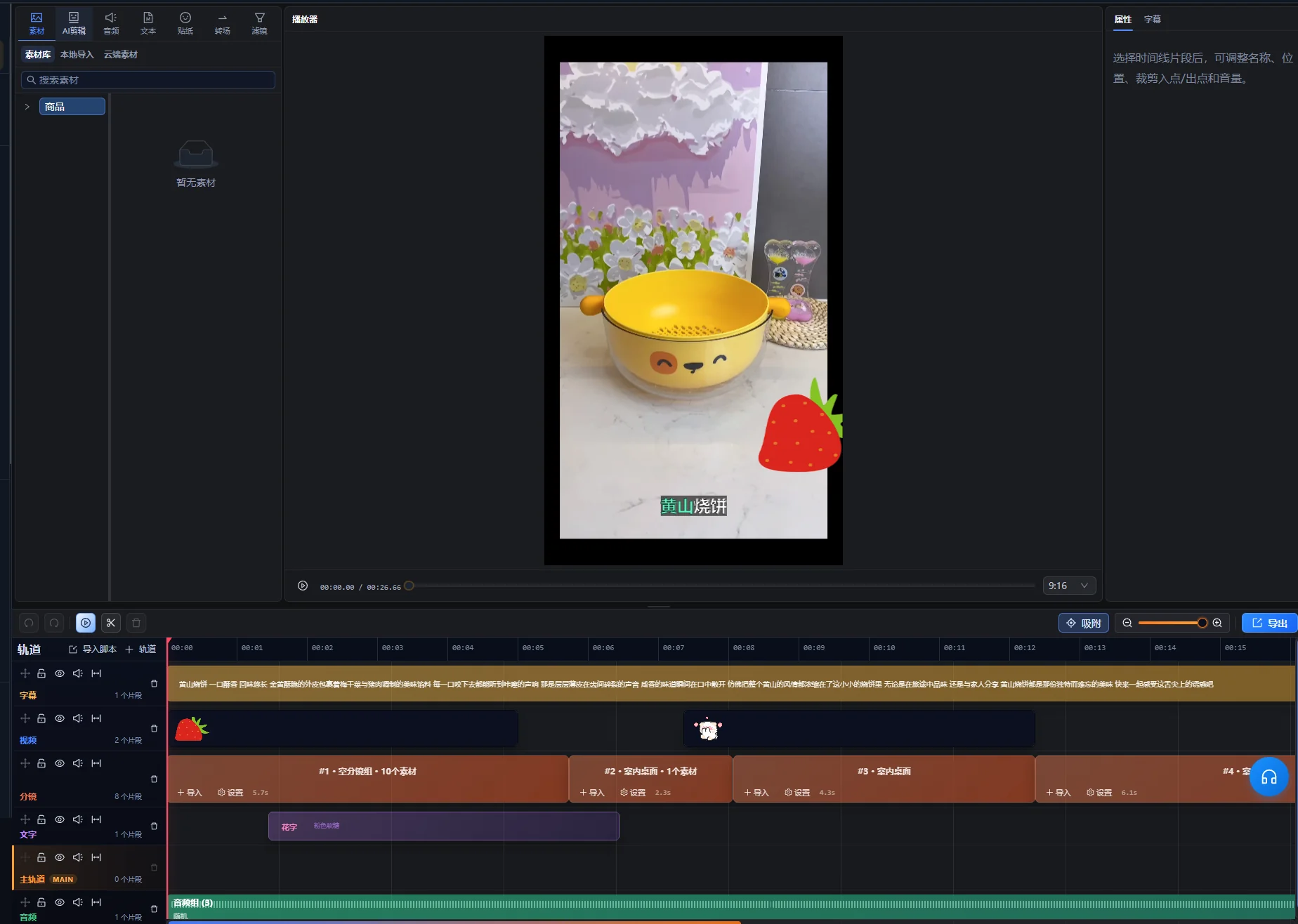
- I Grunnleggende komposisjon kontrollerer du rekkefølge, navn og materialantall i opptaksradene.
- Angi et lite genereringsantall og velg utdatamappen.
- Hvis fortellerstemme eller undertekster er aktivert, velger du den faktiske fortellerfilen og tilhørende SRT-fil.
- Undersøk en versjon med standard fortellerstemme og den tydeligste demonstrasjonen.
- For andre manusoppsett undersøker du den lengste fortellerstemmen med den korteste nyttige demonstrasjonskandidaten.
- Undersøk hver åpning som endrer sammenhengen for neste setning.
- Kontroller kandidater med ulike utsnitt eller tekstplasseringer.
- Rett felles innstillinger og kandidater før du utvider serien.
Dette er en kontrollstrategi, ikke en påstand om at klienten tilbyr en automatisk kompatibilitetstest. Bruk forhåndsvisningene og kontrollene som er tilgjengelige i din installerte versjon. Kontroller oppgavetilgjengelighet, brukskostnader og grenser i appen når du forbereder en større jobb.
Behold en kort feilliste: versjons-ID, berørt plassering, observert problem og tiltenkt rettelse. «B begynner med et uidentifisert nærbilde» gir et konkret utgangspunkt for retting. «B føles feil» er vanskeligere å løse. Etter en rettelse spiller du den endrede passasjen og naboovergangene på nytt.
Piloten er klar når de valgte versjonene oppfyller oppdragsbeskrivelsen, forbindelsene til felles lyd og undertekster fungerer, og hver gjenværende kandidat har et tydelig formål. Den erstatter fortsatt ikke kontroll av hver ferdige video.
Feilsøk gjentatte og isolerte problemer i serien
Begynn med å avgjøre om feilen gjelder flere versjoner eller én bestemt kombinasjon. Gjentatte problemer antyder et felles element; isolerte problemer antyder en kandidat eller avhengighet gruppereglene overså.
| Symptom | Det du bør undersøke | Praktisk rettelse |
|---|---|---|
| Hver versjon viser feil produktdetalj | Den felles opptaksgruppen eller manuspåstanden | Bytt gruppen eller rett godkjent manus, og kontroller deretter berørte versjoner. |
| Én video skifter produktfarge halvveis | Identitetsregler for de valgte klippene | Fjern den uforenlige kandidaten eller lag et separat produktsett. |
| Fortellerstemmen varer lenger enn demonstrasjonen | Den nyttige handlingslengden og den muntlige replikken | Legg til relevant dekning, juster tidsplasseringen eller kort ned ordlyden uten å miste forklaringen. |
| Undertekster inneholder ordlyden fra en annen versjon | Koblingen mellom manus, lyd og undertekster | Rett koblingen og korrekturles den berørte eksporten. |
| En ny åpning gjør neste setning forvirrende | Manglende introduksjon eller henvisning | Legg til sammenheng, endre setningen eller avvis den åpningskombinasjonen. |
| Første resultat er riktig, men senere resultater avvises i kontroll | Bytter som piloten ikke dekket | Undersøk hver kandidat og begrens de kompatible valgene. |
Rett kilden til en felles feil før du reparerer mange separate filer. Hvis samme undertekstfeil finnes overalt, retter du felles tekst eller kobling først. Hvis bare ett opptak er uegnet, skal du ikke skrive om hvert manus for å tilpasse det.
Kontroller hver eksport mot en godkjenningssjekkliste
En serie er klar for overlevering når hver fil oppfyller oppdragsbeskrivelsen uavhengig. Kontroller den faktiske eksporterte filen, siden tidslinjeforhåndsvisning alene ikke bekrefter levert beholderformat, lydspor eller tekstgjengivelse.
- Åpningen identifiserer motivet eller gir nok sammenheng til neste replikk.
- Riktig produkt vises gjennom hele videoen, inkludert detaljer og tilbehør.
- Hver demonstrasjon starter tidlig nok og slutter etter at handlingen er tydelig.
- Fortellerstemmen stemmer med valgt manus og er forståelig under musikken.
- Undertekster er nøyaktige, tidsplassert til riktig lyd og holder viktige detaljer synlige.
- Avslutningen fullfører budskapet uten å legge til en udokumentert påstand.
- Filen spilles fra begynnelse til slutt i tiltenkt visningsformat.
- Filnavnet og versjonsloggen viser til de samme kreative valgene.
Bruk målets tekniske krav når du velger eksportinnstillinger. For levering til YouTube ser du YouTubes anbefalte innstillinger for opplastingskoding, inkludert rådet om å beholde innspilt bildefrekvens. Dette er målveiledning, ikke en uttalelse om hvilke eksportvalg denne klienten tilbyr.
For detaljerte tidslinjereparasjoner fortsetter du i Super Editor. Registrer om en fil er godkjent, trenger retting eller er erstattet. En kontrollstatus gjør overleveringen tydeligere enn en mappe med flere filer kalt «final».
Hold produksjonsregistreringer atskilt fra resultatpåstander
Versjonsloggen bør forklare hva som ble endret i videoen. En senere resultatsammenligning trenger også informasjon om distribusjon, målgruppe, datoer og målet som sammenlignes.
Hvis versjon B for eksempel får flere visninger etter å ha blitt vist til en større målgruppe, viser ikke visningstallet alene at åpningen forårsaket forskjellen. Hvis du vil sammenligne åpninger, planlegger du distribusjon og måling separat fremfor å behandle serien som et ferdig eksperiment.
Registrer plattform, plassering, publiseringsperiode og tilgjengelige resultater sammen med den kreative ID-en. Bevar definisjonene: En visning, en fullført avspilling og et klikk er ulike utfall. Ikke gjør et produksjonseksempel til en påstått suksesshistorie med mindre du har underliggende registreringer og en forsvarlig sammenligning.
Når et nytt manus trenger opptaksvalg før du kan definere utbyttbare grupper, bruker du veiledningen om videoproduksjon fra eksisterende materiale. Serieredigering kommer etter dette strukturarbeidet når du har pålitelige opptak å bytte mellom.
Begynn med én godkjent struktur
Velg ett produkt, ett fullstendig budskap og et lite sett kompatible alternativer. Godkjenn piloten, rett gruppereglene, og utvid deretter bare endringene du kan identifisere og kontrollere. En håndterlig serie med sporbare valg er lettere å levere enn en stor mappe med uforklarte kombinasjoner.
Redaksjonelt grunnlag: AIMIX Editorial Team utarbeidet denne veiledningen fra gjeldende klientarbeidsflyt og lenket primærdokumentasjon. Reisekoppplanen og kontrollprosessen er illustrative anbefalinger. Ingen referansemåling av behandlingshastighet, kampanjetest eller kunderesultat er påstått.
Vanlige spørsmål
Kan jeg bruke flere produkter i samme serie?
Ja, hvis forbindelsene mellom manus og opptak holder produktene entydige. Skill de kompatible settene for hvert produkt med mindre videoen bevisst sammenligner dem. Kontroller modellnavn, farger, tilbehør og undertekster i hver versjon.
Hvor mange versjoner bør jeg forberede?
Forbered versjonene som representerer nyttige endringer som kan kontrolleres. Tilgjengelige opptak, redaksjonelt mål og kontrollkapasitet avgjør det nyttige antallet. Se gjeldende oppgavegrenser i appen fremfor å anta et fast antall fra denne veiledningen.
Kan ett fortellerspor fungere for hver variant?
Det kan det når hvert valgt opptak fortsatt er korrekt med samme ord og tidsplassering. Hvis en kandidat trenger en annen forklaring, bruker du et eget manus med tilhørende lyd eller fjerner den fra den utbyttbare gruppen.
Lager serieredigering automatisk en A/B-test?
Nei. Den forbereder kreative varianter. En meningsfull resultatsammenligning trenger også en definert hypotese, distribusjonsplan og konsekvent måling. Behold kreative registreringer slik at senere resultater kan knyttes til de faktiske endringene.