
Ekstraksi Teks Batch: Unggah Sekali, Dapatkan Naskah dari Seluruh Batch Video
Author
Date Published

Membedah satu akun pembanding berarti mentranskripsi puluhan video — unggah satu, tunggu, ekspor, ulangi — dan aktivitas salin-tempelnya saja sudah cukup membuat Anda menyerah. Ekstraksi Teks Batch menjalankan seluruh alurnya sebagai satu batch: masukkan puluhan video sekaligus, AI mengurai antreannya, dan saat selesai Anda memiliki semua transkrip — cukup unggah, kerjakan hal lain, lalu kembali untuk hasilnya.
Poin utama
- Proses seluruh batch, tanpa perlu diawasi terus
- Hasil dikelola di satu tempat
- Langsung mengalir ke kreasi
Cara kerja
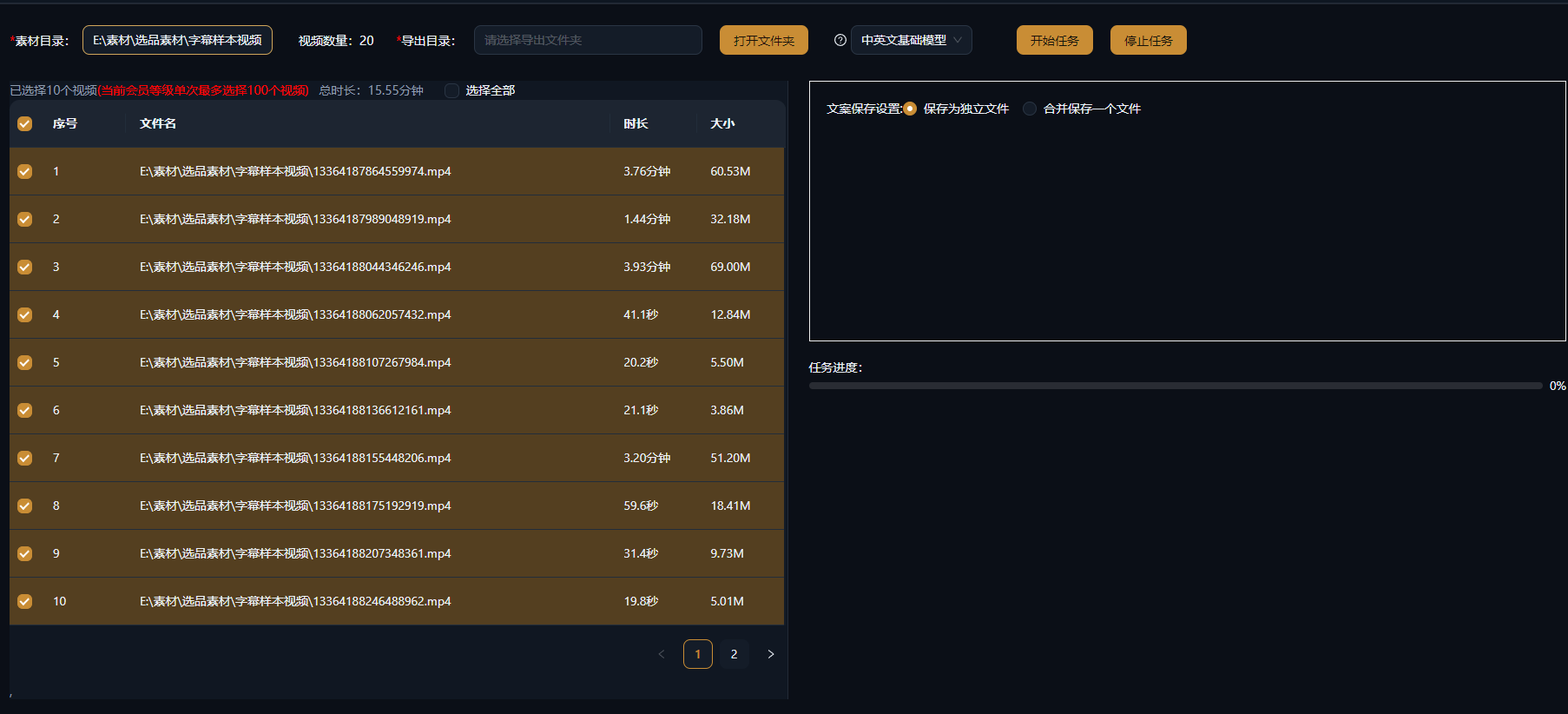
Unggah materi secara batch
Seret semua video atau audio yang ingin Anda transkripsi ke Ekstraksi Teks Batch sekaligus: video akun pembanding, rekaman live-stream, dan audio kursus bisa dicampur — sistem mengantrekan setiap item untuk diproses.
Transkripsi batch
AI menangani pengenalan ucapan, pemenggalan kalimat, dan tanda baca secara otomatis, dengan konten multibahasa didukung; daftar tugas menampilkan kemajuan setiap item secara waktu nyata, dan semua transkrip siap saat proses selesai.
Kelola dan ekspor di satu tempat
Transkrip diarsipkan per item sumber: sunting dan koreksi secara daring, ekspor teksnya secara batch, atau simpan ke Manajemen Skrip sebagai bahan mentah untuk bedah skrip viral atau skrip baru.
Contoh nyata
Kasus di bawah ini adalah catatan penggunaan nyata fitur ini di aplikasi AIMIX, tanpa diedit.
Bedah akun pembanding: tarik semua skrip hits dari satu akun dalam satu putaran
Cocok untuk: strategis konten, tim iklan berbayar · bedah akun pembanding secara sistematis
Alur kerja: kumpulkan video pembanding → ekstraksi naskah secara batch → analisis struktur dan hook satu per satu → kumpulkan templat skrip
Puluhan video pembanding diekstraksi dalam satu batch · Tanpa unggah dan tunggu satu per satu · Hasil langsung tersimpan ke Manajemen Skrip
Hambatan terbesar dalam bedah akun pembanding adalah "mendapatkan naskahnya": puluhan video berpenonton tinggi yang harus ditranskripsi atau diekstraksi satu per satu. Dengan Ekstraksi Teks Batch Anda unggah sekali, seluruh batch diproses, dan beberapa menit kemudian semua skrip sudah di tangan — bandingkan hook pembuka, urutan keunggulan, dan kalimat penutup satu per satu, cepat temukan formula tetap yang diikuti akun ini, lalu tinggal isi dengan produk Anda sendiri mengikuti struktur tersebut.
Skenario tipikal untuk ekstraksi batch
Setiap situasi dengan "naskah banyak, pemrosesan satu per satu tidak sepadan" cocok untuk proses batch:
B
e
A
u
Kami menyarankan mengunggah per akun atau per tema, mengarsipkan hasilnya ke dalam grup di Manajemen Skrip, dan perlahan membangun "pustaka naskah" yang bisa dicari.
Tetap kendalikan hasil edit
Proses seluruh batch, tanpa perlu diawasi terus
Unggah sekali dan biarkan antrean berjalan — naskah dari puluhan item tiba dalam satu sapuan, puluhan kali lebih cepat.
Hasil dikelola di satu tempat
Diarsipkan per item, dikoreksi secara daring, diekspor secara batch — transkrip Anda berhenti tersebar di dokumen acak.
Langsung mengalir ke kreasi
Transkrip bisa disimpan ke Manajemen Skrip dan dilanjutkan ke bedah skrip viral, penulisan ulang AI, atau sulih suara dan penyuntingan.
Pertanyaan umum
Apakah Ekstraksi Teks Batch menghabiskan kredit?
Kredit transkripsi AI dihitung berdasarkan durasi media; estimasi ditampilkan sebelum Anda mengirim tugas, dengan jumlah pasti sesuai klien.
Berapa banyak item yang bisa saya unggah sekaligus?
Tugas batch didukung, dengan jumlah pasti dan batas konkurensi sesuai klien; untuk set besar, kami menyarankan pengiriman per grup dan menjalankan yang mendesak lebih dulu.
Seberapa akurat transkripsinya?
Konten ucapan yang jernih seperti sulih suara dan kursus mendapat akurasi tinggi; untuk audio berderau atau penutur yang tumpang tindih, kami menyarankan peredam derau dulu atau pemeriksaan manual.
Bahasa apa saja yang didukung?
Mandarin, Inggris, Jepang, dan lainnya, plus beberapa dialek; konten campuran Mandarin-Inggris juga bisa ditranskripsi.
Bisakah hasil diekspor secara batch?
Ya. Teks bisa diekspor massal, dan hasil juga bisa disunting secara daring serta disimpan ke Manajemen Skrip untuk pengarsipan terpadu.
Apa bedanya dengan ekstraksi satu item?
Kemampuan dasarnya sama — versi batch hanya mengubah unggahan, transkripsi, dan pengelolaan menjadi satu alur massal. Gunakan saat item Anda banyak; untuk sekali pakai, keduanya sama saja.