
Montage vidéo par lots : créer des variantes de vidéos produit
Auteur
Date de publication

Couverture promotionnelle originale conservée. Ses pourcentages de progression et sa file de vidéos sont des valeurs illustratives, pas un résultat enregistré dans ce tutoriel. Les libellés sont en chinois.
Le montage vidéo par lots fonctionne lorsqu’une structure réutilisable rencontre des rushes interchangeables sans modifier le sens. La difficulté consiste à définir ces échanges : une autre ouverture peut changer la promesse, une narration plus longue peut dépasser la démonstration et un produit ressemblant peut être le mauvais modèle. Ce guide accompagne un brief de vidéo produit de la préparation au montage pilote, à la vérification du lot et à la remise des fichiers. Il explique quoi préparer, quelles combinaisons rejeter et comment remonter d’un problème à l’élément partagé qui l’a causé.
À retenir
- Utilisez la composition de base pour une séquence ordonnée de groupes de plans ; le mixage automatique part d’un ensemble de rushes et possède d’autres commandes de durée.
- Un plan n’est interchangeable que si l’identité du produit, l’action et le timing restent exacts avec la même narration.
- Associez chaque script à son audio et à ses sous-titres réels, puis examinez les substitutions risquées avant d’agrandir le lot.
- Vérifiez chaque fichier exporté et conservez un relevé des versions ; produire des variantes ne prouve pas les performances d’une campagne.
Ce que change le montage vidéo par lots et ce qu’il attend de vous
Le montage par lots combine des rushes préparés, une séquence définie et des variantes de contenu. Il est utile lorsque plusieurs vidéos partagent le même objectif de communication mais nécessitent différentes ouvertures, démonstrations ou conclusions. Consultez d’abord la présentation du montage par lots pour situer cette fonction dans le processus.
Un lot est plus utile si chaque version présente une différence éditoriale identifiable. Changer un plan de fond peut produire un autre fichier, sans automatiquement donner un autre message. Déterminez si vous préparez des alternatives pour un public, adaptez une explication à plusieurs usages ou comparez un choix créatif précis.
Les entrées doivent comprendre des extraits exploitables, un script pour chaque message et l’audio correspondant lorsqu’une narration est nécessaire. Le résultat est un ensemble de vidéos à vérifier et à livrer. Le nombre de fichiers mesure la production ; il ne prouve pas qu’une version attire plus de spectateurs ou fonctionne mieux.
Règle de travail : Un plan n’est interchangeable que s’il reste exact avec les mots, le timing et les plans voisins à cette position.
Préparer un brief et un inventaire avant d’ouvrir la tâche
Définissez en une phrase ce que chaque version doit communiquer, puis distinguez les exigences fixes des choix à faire varier. Vous disposerez ainsi d’un critère pour rejeter une combinaison avant de consacrer du temps aux sous-titres ou aux éléments graphiques.
- Fixes : identité du produit, démonstration nécessaire, formulation factuelle validée et format de destination.
- Variables : question d’ouverture, ordre des plans complémentaires, approche de narration ou scène finale.
- Exclus : modèles abandonnés, rushes avec le mauvais emballage, images de stock sans rapport et offres obsolètes.
Classez les rushes selon leur fonction : présenter le produit, montrer une action, expliquer un détail ou établir une situation d’usage. Notez le nom du fichier source, une plage utile et les restrictions. Si vous ne disposez que d’enregistrements longs, préparez les plans candidats avec le processus de découpage vidéo.
Organiser les médias avant le montage est une pratique établie. La présentation des chutiers d’Adobe explique le regroupement des fichiers sources et des séquences. Vous pouvez appliquer ce principe sans reproduire l’interface d’un autre éditeur : gardez les rushes sources, la narration et les versions vérifiées identifiables.
Le contrôle de préparation est simple : trouvez-vous des rushes pour chaque point nécessaire, et un autre monteur peut-il reconnaître le script et l’audio associés ? Résolvez ces incertitudes avant de créer des variantes.
Choisir le mode de composition et ses entrées réelles
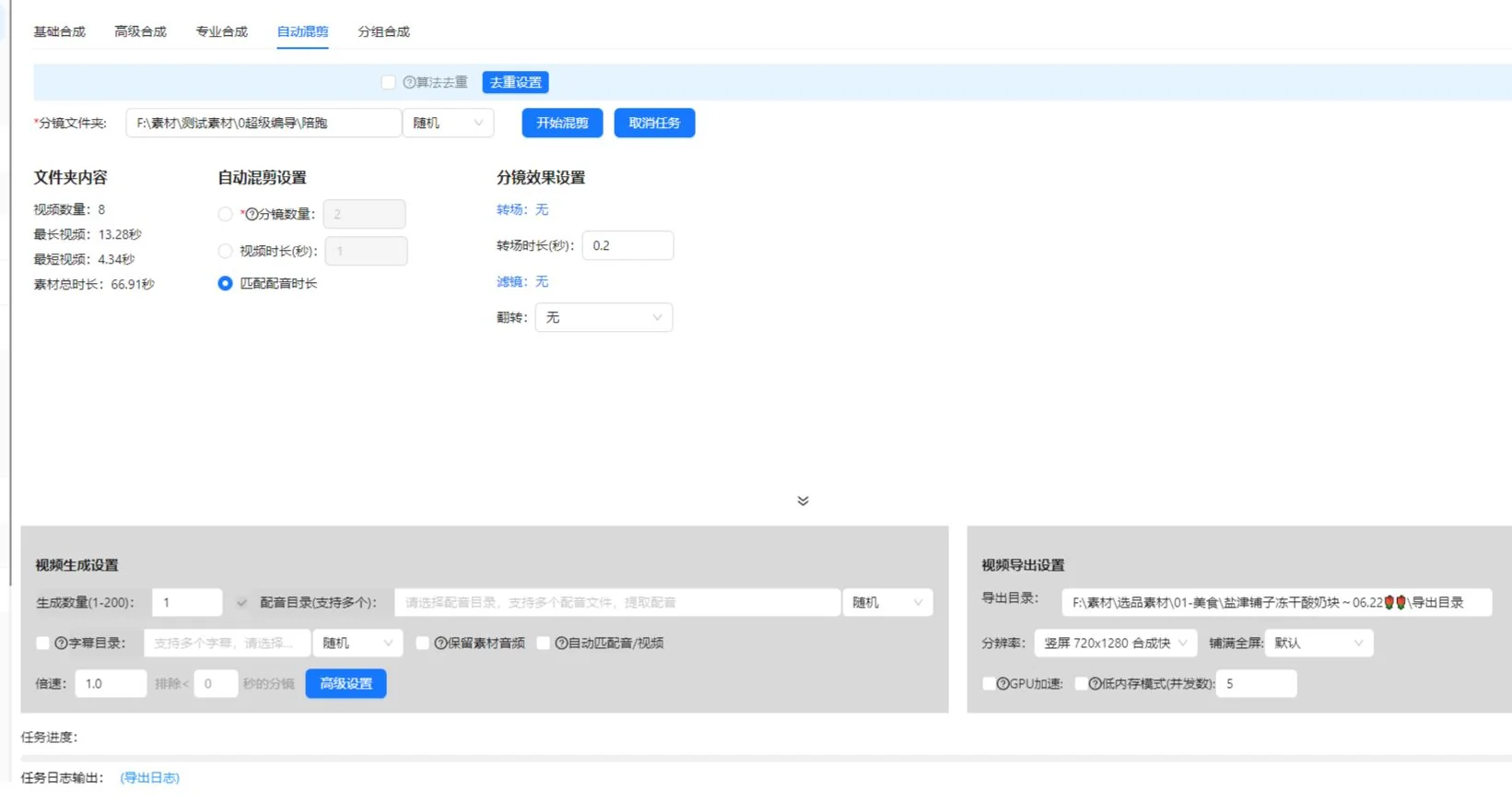
L’espace de composition actuel possède les onglets de base, avancé, professionnel et mixage automatique. Ne supposez pas qu’ils importent la même structure de dossiers ou acceptent l’audio de la même façon. La méthode à plans ordonnés de ce guide commence avec la composition de base.
| Point de départ | Commandes actuelles utiles pour ce guide | Contrôle des entrées |
|---|---|---|
| Composition de base | Lignes de plans ordonnées, dossier source ou import de bibliothèque par ligne, nombre de générations, fichier de narration et fichier SRT facultatifs | Chaque ligne de plan doit contenir des médias exploitables. Définissez le dossier de sortie. |
| Mixage automatique | Dossier de rushes, nombre de plans, durée vidéo cible ou adaptation à la durée de narration, plusieurs fichiers de narration et dossier SRT facultatif | Les rushes doivent se trouver directement dans le dossier de premier niveau sélectionné. Choisissez au moins une règle de mixage. |
Pour la composition de base, préparez une narration validée et son fichier de sous-titres pour le pilote. Si vous souhaitez un autre script, établissez explicitement l’association entre son audio et ses sous-titres dans le mode choisi ou dans une configuration distincte. Cela évite de prendre un tableau éditorial de variantes pour la promesse que chaque onglet crée automatiquement toutes les combinaisons.
Le mixage automatique considère la durée vidéo cible et l’adaptation à la durée de narration comme des alternatives. Lorsque le nombre de plans et l’adaptation à la narration sont activés ensemble, l’interface actuelle indique qu’elle privilégie la durée de narration et peut ajouter des plans pour la couvrir. Conserver l’audio source et mettre les rushes en boucle sont des réglages incompatibles. L’option d’adaptation à la durée la plus courte entre audio et vidéo exige une narration et peut raccourcir le résultat ; vérifiez donc si elle supprime la conclusion nécessaire.
Ces commandes ont été vérifiées dans l’implémentation client le 10 octobre 2026. Confirmez leurs noms et leur disponibilité dans votre version installée. Les paramètres d’abonnement actuels déterminent les limites de génération ; ce guide n’attribue pas une limite unique à tous les comptes.
Constituer des groupes de plans selon un objectif visuel commun
Regroupez les alternatives selon ce qu’elles démontrent plutôt que selon la ressemblance de leurs vignettes. Pour une phrase sur l’ouverture d’un couvercle, chaque plan doit montrer clairement cette action. Un plan esthétique du produit appartient à un autre groupe.
Étape 1 : définir le rôle de chaque position
- Lisez la phrase du script correspondant à cette position.
- Décrivez la preuve visuelle nécessaire au spectateur.
- En composition de base, ajoutez ou nommez la ligne de plan dans l’ordre voulu.
- Associez son dossier de rushes ou importez les médias de bibliothèque pertinents. L’entrée de dossier lit les médias compatibles situés directement dans ce répertoire.
- Vérifiez que l’action utile de chaque plan correspond à la durée de la phrase.
Incluez l’identité du produit dans les règles des groupes. Deux plans peuvent montrer la même action avec des couleurs, accessoires ou générations du produit différents. Cela peut convenir à une comparaison, mais constitue une discordance dans une vidéo présentant un article précis.
Étape 2 : retirer les remplacements peu adaptés
Visionnez chaque plan jusqu’à la fin de l’action. Rejetez un extrait commençant après le début de l’action, se terminant avant sa fin, masquant le mécanisme ou nécessitant un contexte absent du script. Conservez la référence source originale pour qu’un autre monteur puisse retrouver une plage plus large.
Vérifiez le groupe en associant chaque plan à la même narration. Si un plan nécessite d’autres mots pour être compréhensible, déplacez-le vers un autre groupe ou traitez-le comme une variante de script distincte. Ne dissimulez pas cette différence dans un ensemble apparemment interchangeable.
Préparer un petit lot avec un relevé clair des variantes
L’exemple suivant sur une tasse de voyage est un exercice de préparation, pas le résultat enregistré d’une tâche ni une étude de campagne. Supposons que les rushes montrent la même tasse sur un bureau, l’ouverture de son couvercle, son anse et une personne buvant avec.
| Version | Choix d’ouverture | Démonstration commune | Choix de conclusion | Question de vérification |
|---|---|---|---|---|
| A | Présenter la tasse sur un bureau | Montrer l’ouverture complète du couvercle | Revenir au décor du bureau | L’ouverture présente-t-elle le produit ? |
| B | Commencer par l’action sur le couvercle | Conserver la même explication de l’action | Utiliser le même décor de bureau | L’ouverture fournit-elle toujours assez de contexte ? |
| C | Reprendre l’introduction de A | Conserver la même explication de l’action | Montrer l’utilisation habituelle de la tasse | La fin soutient-elle le message ? |
A et B changent l’ouverture. A et C changent la conclusion. Ces différences sont compréhensibles, traçables et vérifiables. Si vous changez simultanément l’ouverture, la voix, la musique et la fin, la vidéo obtenue peut être utile, mais il devient plus difficile d’expliquer l’apport de chaque modification.
Notez la différence voulue à côté de chaque version avant de générer les fichiers. Un relevé minimal contient un identifiant de version, un identifiant de script, le nom du fichier de narration, les plans choisis et la raison du changement. Vous tenez ce relevé éditorial vous-même ; il ne suppose aucun rapport automatique de l’application.
Examinez les dépendances entre choix. Une conclusion disant « utilisez-la comme indiqué » dépend de la démonstration précédente. Un sous-titre mentionnant une couleur doit correspondre aux rushes. Lorsque les choix sont interdépendants, préparez des ensembles compatibles distincts plutôt que d’autoriser toutes les combinaisons.
Associer scripts, narration et sous-titres avant l’habillage
Chaque variante de script exige une association vérifiée avec son audio et ses sous-titres. Des noms de fichiers similaires ne suffisent pas : écoutez la phrase prononcée et comparez-la au texte validé.
Étape 3 : vérifier la narration la plus longue et la plus exigeante
Repérez les passages contenant plus de mots, des noms de produits longs ou une démonstration détaillée. Visionnez-les avec les rushes. Si la narration continue après la fin de l’image utile, prolongez-la avec un plan pertinent, ajustez le montage ou révisez le texte. Ne résolvez pas le problème en accélérant l’action au point de la rendre incompréhensible.
Utilisez le processus de voix off et sous-titres par lots pour cette tâche associée. Conservez une copie du script validé hors de la vidéo pour pouvoir lui comparer les révisions textuelles.
Étape 4 : relire les sous-titres séparément
La vérification des sous-titres couvre l’exactitude de la parole, le timing et l’information sonore. Les recommandations du W3C sur les sous-titres préenregistrés incluent les informations non verbales pertinentes et l’identification des locuteurs si nécessaire. Dans cet exemple produit, vérifiez le nom du produit et si le bruit du couvercle contribue à l’explication.
Validez d’abord la séquence de base, puis ajoutez la musique, le texte ou les autocollants communs. Une présentation soignée risquerait sinon de détourner l’attention d’un mauvais plan ou d’une piste vocale inadaptée.
Tester un pilote couvrant les combinaisons risquées
Un pilote doit tester les choix les plus susceptibles de modifier le sens, le timing ou la présentation. Visionner uniquement la première combinaison laisse les autres substitutions sans contrôle.
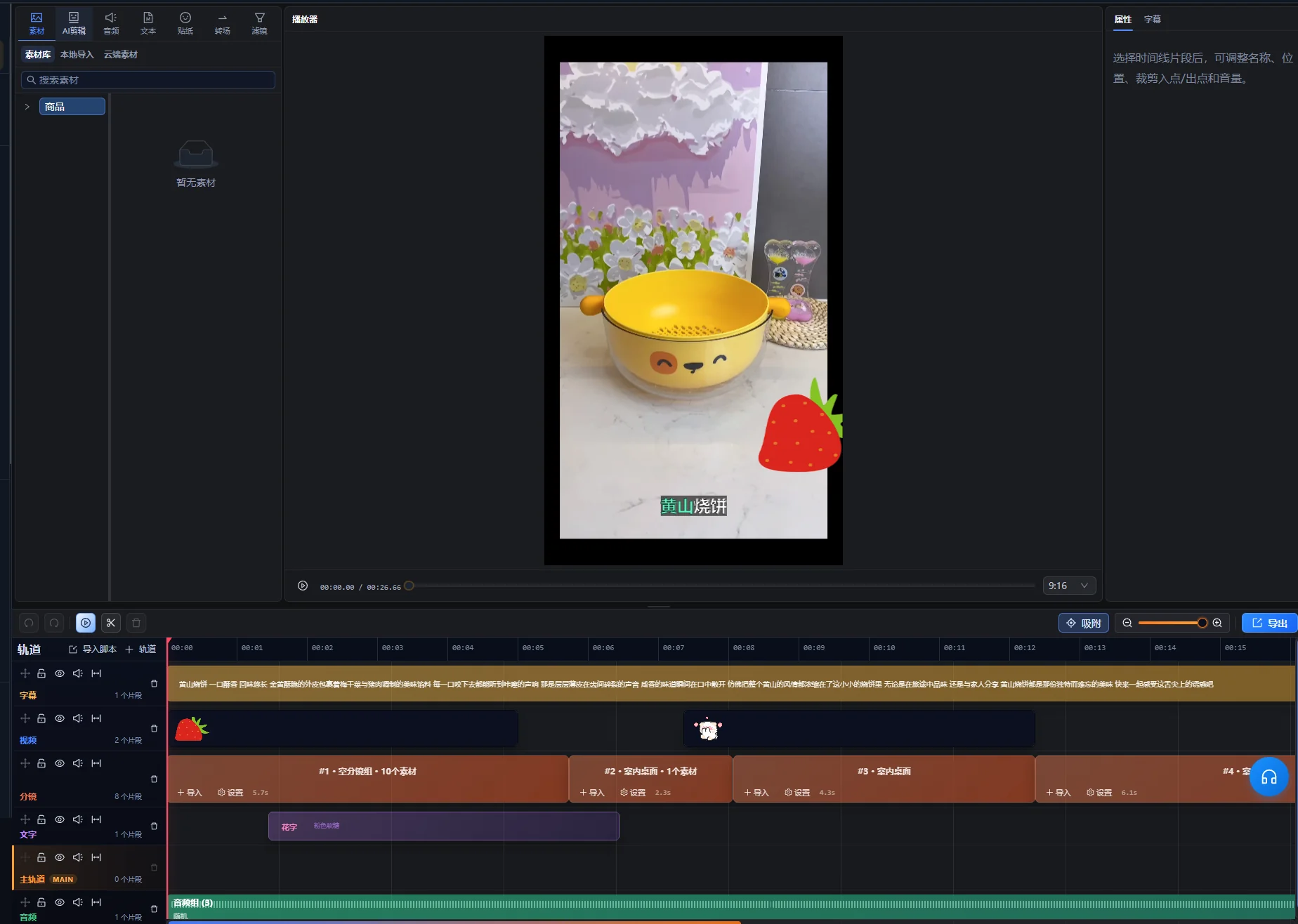
- En composition de base, vérifiez l’ordre, les noms et le nombre de médias des lignes de plans.
- Définissez un petit nombre de générations et choisissez le dossier de sortie.
- Si narration ou sous-titres sont activés, sélectionnez le fichier de narration réel et son fichier SRT.
- Examinez une version avec la narration standard et la démonstration la plus claire.
- Pour les autres scripts, examinez la narration la plus longue avec le plan de démonstration dont la plage utile est la plus courte.
- Examinez chaque ouverture qui modifie le contexte de la phrase suivante.
- Vérifiez les plans présentant un cadrage ou un placement de texte différent.
- Corrigez les réglages et plans communs avant d’agrandir le lot.
Il s’agit d’une stratégie de vérification, sans affirmer que le client dispose d’un test automatique de compatibilité. Utilisez les aperçus et commandes disponibles dans votre version installée. Vérifiez la disponibilité des tâches, les coûts et les limites d’utilisation dans l’application avant un travail plus important.
Tenez une courte liste de défauts : identifiant de version, position concernée, problème observé et correction souhaitée. « B commence par un gros plan non identifié » permet d’agir. « B ne fonctionne pas » est plus difficile à résoudre. Après une correction, revisionnez le passage modifié et les transitions voisines.
Le pilote est prêt lorsque les versions sélectionnées respectent le brief, que les associations audio et sous-titres communes fonctionnent et que chaque plan restant a un rôle clair. Il ne remplace toujours pas la vérification de chaque vidéo finale.
Diagnostiquer les problèmes récurrents ou isolés du lot
Déterminez d’abord si le défaut affecte plusieurs versions ou une combinaison précise. Les problèmes répétés suggèrent un élément commun ; les problèmes isolés suggèrent un plan ou une dépendance omise par les règles des groupes.
| Symptôme | Élément à examiner | Correction pratique |
|---|---|---|
| Toutes les versions montrent le mauvais détail du produit | Le groupe de plans partagé ou l’affirmation du script | Remplacez le groupe ou corrigez le script validé, puis vérifiez les versions affectées. |
| Une vidéo change de couleur de produit à mi-parcours | Les règles d’identité des extraits sélectionnés | Retirez le plan incompatible ou créez un ensemble produit distinct. |
| La narration dépasse la démonstration | La durée utile de l’action et la phrase parlée | Ajoutez des images pertinentes, révisez le timing ou raccourcissez le texte sans perdre l’explication. |
| Les sous-titres reprennent les mots d’une autre version | L’association script-audio-sous-titres | Corrigez l’association et relisez l’export affecté. |
| Une nouvelle ouverture rend la phrase suivante confuse | Une introduction ou une référence manquante | Ajoutez du contexte, modifiez la phrase ou rejetez cette combinaison d’ouverture. |
| Le premier résultat est correct mais les suivants échouent à la vérification | Les substitutions non couvertes par le pilote | Examinez chaque plan et réduisez les choix compatibles. |
Corrigez la source d’une erreur commune avant de réparer de nombreux fichiers séparés. Si la même erreur de sous-titre apparaît partout, corrigez d’abord le texte ou l’association commune. Si un seul plan est inadapté, ne réécrivez pas tous les scripts pour l’accommoder.
Vérifier chaque export avec une liste de validation
Un lot est prêt à être remis lorsque chaque fichier respecte le brief indépendamment. Vérifiez le fichier réellement exporté : l’aperçu de la timeline ne confirme pas à lui seul le conteneur livré, la piste audio ou le rendu du texte.
- L’ouverture identifie le sujet ou fournit assez de contexte pour la phrase suivante.
- Le bon produit apparaît partout, y compris ses détails et accessoires.
- Chaque démonstration commence assez tôt et se termine une fois l’action claire.
- La narration correspond au script choisi et reste compréhensible avec la musique.
- Les sous-titres sont exacts, synchronisés avec le bon audio et ne masquent pas les détails importants.
- La fin complète le message sans ajouter d’affirmation non étayée.
- Le fichier se lit du début à la fin dans son format de visionnage prévu.
- Le nom du fichier et le relevé de version désignent les mêmes choix créatifs.
Utilisez les exigences techniques de la destination pour choisir les paramètres d’export. Pour une livraison sur YouTube, consultez les paramètres d’encodage recommandés par YouTubeet notamment le conseil de conserver la fréquence d’images de l’enregistrement. Ces recommandations concernent la destination, sans indiquer quelles options d’export ce client propose.
Pour des réparations précises sur la timeline, poursuivez dans Super Editor. Notez si un fichier est validé, doit être corrigé ou a été remplacé. Un statut de vérification rend la remise plus claire qu’un dossier avec plusieurs fichiers nommés « final ».
Distinguer les relevés de production des affirmations de performance
Votre relevé de versions doit expliquer ce qui a changé dans la vidéo. Une comparaison ultérieure des performances exige aussi des informations sur la diffusion, le public, les dates et la mesure comparée.
Par exemple, si la version B obtient plus de vues après avoir été présentée à un public plus large, le nombre de vues ne prouve pas à lui seul que son ouverture a causé la différence. Si vous souhaitez comparer des ouvertures, préparez la diffusion et les mesures séparément au lieu de considérer le lot comme une expérience achevée.
Notez la plateforme, l’emplacement, la période de publication et les résultats disponibles avec l’identifiant créatif. Conservez les définitions : une vue, une lecture complète et un clic sont des résultats différents. Ne transformez pas un exemple de production en réussite revendiquée sans les relevés sous-jacents et une comparaison défendable.
Lorsqu’un nouveau script exige de sélectionner les rushes avant de définir les groupes interchangeables, utilisez le guide de création de films à partir de médias. Le montage par lots intervient après ce travail de structure, lorsque vos substitutions sont fiables.
Commencer par une structure validée
Choisissez un produit, un message complet et un petit ensemble d’alternatives compatibles. Validez le pilote, corrigez les règles des groupes, puis développez uniquement les modifications identifiables et vérifiables. Un lot maîtrisable avec des choix traçables est plus facile à livrer qu’un grand dossier de combinaisons inexpliquées.
Base éditoriale : AIMIX Editorial Team a préparé ce guide à partir du processus client actuel et de la documentation primaire citée. Le plan sur la tasse de voyage et le processus de vérification sont des recommandations illustratives. Aucun benchmark de vitesse de traitement, test de campagne ou résultat client n’est revendiqué.
Questions fréquentes
Puis-je utiliser plusieurs produits dans le même lot ?
Oui, si les liens entre scripts et rushes permettent d’identifier les produits sans ambiguïté. Séparez les ensembles compatibles de chaque produit, sauf si la vidéo les compare volontairement. Vérifiez les noms de modèles, couleurs, accessoires et sous-titres dans chaque version.
Combien de versions dois-je préparer ?
Préparez les versions correspondant à des changements utiles et vérifiables. Les rushes disponibles, l’objectif éditorial et la capacité de vérification déterminent le nombre utile. Vérifiez les limites actuelles de l’application plutôt que de supposer un nombre fixe indiqué par ce guide.
Une seule piste de narration peut-elle servir à toutes les variantes ?
Oui, lorsque chaque plan sélectionné reste exact avec les mêmes mots et le même timing. Si un plan exige une autre explication, utilisez une association script-audio distincte ou retirez-le du groupe interchangeable.
Le montage par lots crée-t-il automatiquement un test A/B ?
Non. Il prépare des variantes créatives. Une comparaison de performances pertinente exige aussi une hypothèse définie, un plan de diffusion et des mesures cohérentes. Conservez les relevés créatifs pour relier les résultats ultérieurs aux modifications réelles.