
Montage de vidéos face caméra par IA : du dérushage au montage final
Auteur
Date de publication

Un montage face caméra clair commence par le propos : conserver la prise complète, retirer les répétitions inutiles et organiser l’explication pour qu’un nouveau spectateur puisse la suivre. Un assistant de montage par IA peut vous aider à effectuer ces modifications, mais vous devez toujours vérifier la timeline obtenue. Ce guide explique comment préparer la source, rédiger des demandes vérifiables, affiner les coupes dans la parole, puis ajouter des images complémentaires, des sous-titres et du son. Il comprend un premier montage illustratif et une liste de contrôle pratique pour valider le fichier final.
À retenir
- Choisissez la prise complète et exacte avant d’affiner le rythme.
- Rendez chaque demande IA suffisamment précise pour être vérifiée, en indiquant le contenu à conserver.
- Après chaque modification de contenu, vérifiez le sens, les limites audibles et les pauses utiles.
- Ajoutez les images complémentaires et les sous-titres une fois le montage parlé stabilisé, puis vérifiez l’export réel.
Distinguer montage du contenu, suppression des silences et habillage
Appuyez-vous sur le message parlé pour décider ce qui doit rester. Une explication répétée, un intervalle silencieux et une démonstration de produit manquante sont des problèmes différents. Supprimer toutes les pauses ne permet pas de choisir la prise complète, et ajouter des éléments graphiques ne corrige pas une explication contradictoire.
| Tâche | Décision prise | Vérification toujours nécessaire |
|---|---|---|
| Montage du contenu | Quels passages parlés conserver et dans quel ordre | Sens, contexte et raisonnement complet |
| Suppression des silences | Quels intervalles calmes correspondent au seuil audio choisi | Parole faible, respiration et pauses utiles |
| Habillage visuel | Comment les images complémentaires, le texte et le son présentent l’explication | Exactitude, lisibilité et distractions |
La présentation du montage face caméra décrit le processus de traitement du contenu. Distinguez les outils de traitement du guide produit dans votre préparation : une opération fondée sur un seuil ne remplace pas une décision éditoriale.
Cet ordre présente aussi un avantage pratique. Lorsque la séquence parlée change encore, des sous-titres et plans complémentaires peuvent être associés à des passages qui seront ensuite déplacés ou supprimés. Stabilisez le premier montage avant d’affiner ces associations.
Préparer la source, la transcription et l’objectif du montage
Commencez avec l’enregistrement original et un objectif exprimé en une phrase. Un objectif utile précise le public et la réponse : « Montrer à un nouvel utilisateur comment ouvrir la tasse de voyage et expliquer quand déverrouiller le mécanisme. » Gardez la source accessible pendant le montage.
Importer et vérifier les passages parlés
- Importez les rushes dans l’espace de montage et ouvrez l’assistant IA.
- Effectuez la transcription lorsque la tâche repose sur le contenu parlé.
- Écoutez les mots qui déterminent le sens : noms, nombres, négations, conditions et termes techniques.
- Repérez les prises répétées et déterminez laquelle contient l’explication complète.
- Notez les actions visibles à conserver à côté de leurs instructions parlées.
Utilisez la transcription pour naviguer et préparer le montage, mais comparez les passages importants à l’audio. Les recommandations du W3C sur les sous-titres indiquent que les sous-titres générés automatiquement nécessitent une vérification de leur exactitude. Vérifiez les mots déterminants pour ce montage au lieu de considérer un texte fluide comme une preuve d’exactitude.
Avant la première demande, votre plan doit préciser l’ouverture souhaitée, l’explication essentielle et sa conclusion. Si vous ne pouvez pas énoncer ce qui doit rester, une instruction générale comme « rendez cela plus concis » sera difficile à évaluer.
Rédiger des demandes de montage IA vérifiables sur la timeline
Une demande utile désigne un passage, une action et une règle de conservation. Indiquez à l’assistant ce qu’il doit conserver ou supprimer, puis la condition à préserver après la modification. Vérifiez un type de modification avant d’en ajouter un autre.
| Intention de montage | Exemple de demande | Vérification |
|---|---|---|
| Choisir entre plusieurs tentatives | Conservez la deuxième explication complète de l’ouverture du couvercle. Supprimez la première tentative interrompue au milieu d’une phrase. | La tentative retenue contient l’action et la conclusion complètes |
| Modifier l’ouverture | Commencez par la réponse, puis conservez la démonstration et la condition concernant le déverrouillage. | L’ouverture est compréhensible avant la démonstration |
| Supprimer une répétition | Supprimez le résumé répété après la démonstration. Conservez le premier résumé et la condition d’utilisation. | Aucune précision nécessaire n’a disparu avec les mots répétés |
Évitez de combiner « réorganisez tout, supprimez chaque pause, ajoutez du B-roll et finalisez les sous-titres » dans la première demande. Des modifications séparées permettent d’identifier l’action à l’origine d’une coupe indésirable. Si le passage visé est ambigu, indiquez ses mots distinctifs ou sa position dans la source plutôt que « la partie ennuyeuse ».
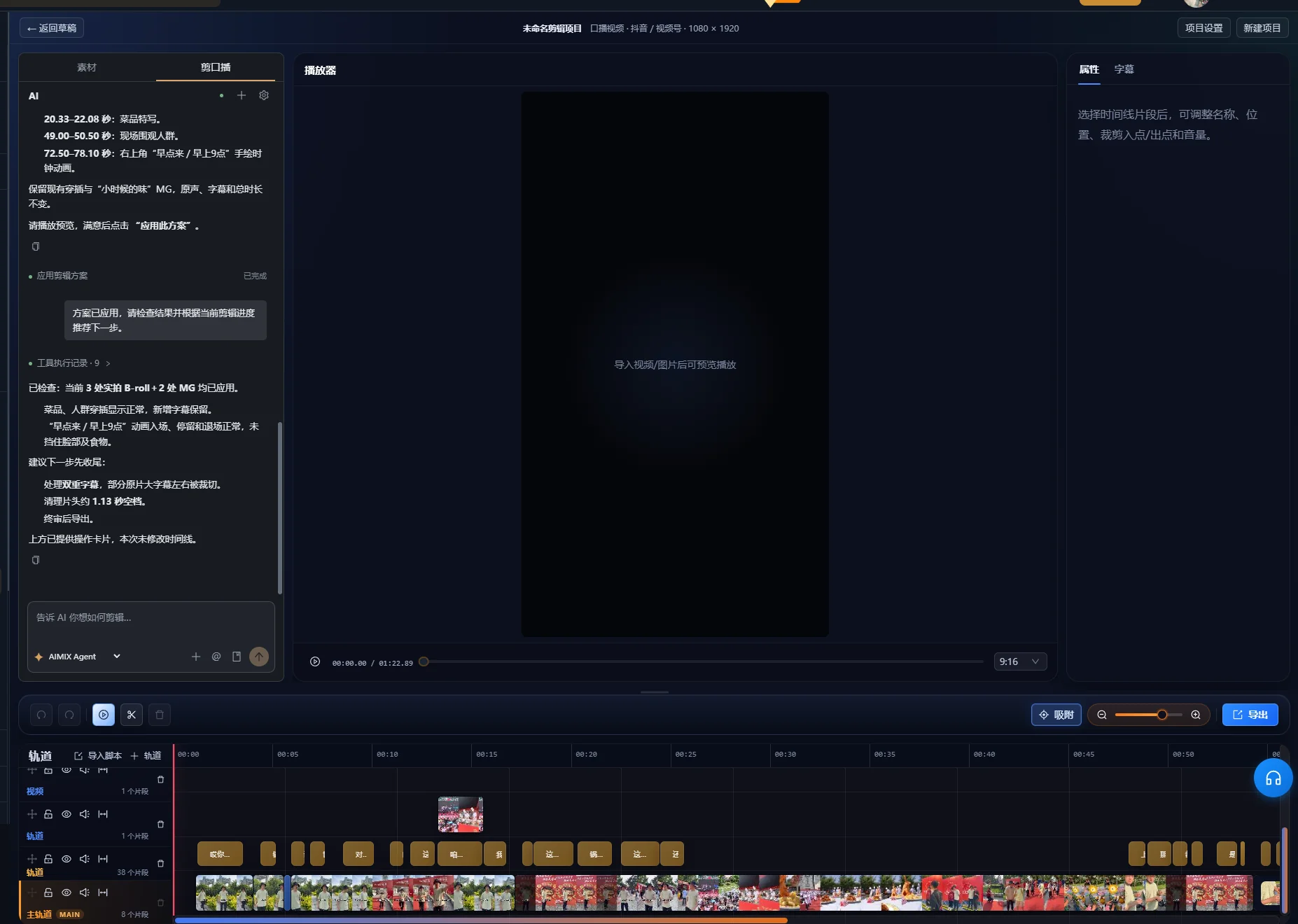
Pour une proposition de nettoyage de la parole, examinez l’aperçu avant d’appliquer le montage. Une proposition en attente n’a pas encore modifié la timeline. L’interface vérifiée regroupe les modifications proposées, comme les pauses, hésitations, répétitions, faux départs et autocorrections, avec leurs plages temporelles sources et les éléments exigeant une vérification manuelle. Vérifiez ces plages dans l’enregistrement, puis utilisez la commande d’application après avoir validé les modifications. Si l’interface signale une proposition obsolète, utilisez sa commande de régénération de l’aperçu pour préparer une nouvelle proposition à partir de la timeline actuelle avant de l’appliquer.
Après une demande, examinez la timeline réelle. Confirmez que le segment voulu a été déplacé ou supprimé, puis visionnez la transition dans son contexte. Une réponse indiquant que la tâche a réussi ne vaut pas validation du montage.
Exemple détaillé : raccourcir une prise en conservant une réponse complète
Cet enregistrement fictif illustre une décision de montage. Il ne s’agit ni d’une exécution mesurée de l’application ni d’un résultat client. Imaginez un présentateur qui tente plusieurs fois d’expliquer le couvercle d’une tasse de voyage.
| Passage source | Exemple de formulation | Décision de montage |
|---|---|---|
| Tentative inachevée | « Pour l’ouvrir, appuyez sur cette partie et ensuite… » | Supprimer, à condition qu’aucune instruction unique ne figure ici |
| Tentative complète | « Déverrouillez d’abord le mécanisme. Appuyez ensuite sur le bouton pour ouvrir le couvercle. » | Conserver les deux phrases ensemble |
| Démonstration | Le présentateur déverrouille le mécanisme et appuie sur le bouton | Conserver assez de temps pour voir les deux actions |
| Résumé répété | « Donc, appuyez sur le bouton pour l’ouvrir. » | Supprimer si l’explication complète le couvre déjà |
| Condition utile | « Si le mécanisme est encore verrouillé, déverrouillez-le avant d’appuyer. » | Conserver là où la condition précise l’action |
Formuler la première demande sur le contenu
Conservez l’explication complète commençant par « Déverrouillez d’abord le mécanisme », avec la démonstration et la condition sur le verrouillage. Supprimez la tentative d’ouverture inachevée et le résumé final répété.
Examinez le résultat avant de réorganiser les passages. Vérifiez que « d’abord » renvoie toujours au déverrouillage et que la démonstration montre le même ordre. Si la coupe ne conserve que « appuyez sur le bouton », elle a raccourci la vidéo en supprimant une instruction nécessaire.
Affiner l’ouverture sans inventer de nouvelles paroles
Vous pouvez commencer par l’explication complète et passer directement à la démonstration. Visionnez-la comme si vous n’aviez jamais vu le produit. Le spectateur sait-il de quel verrou et de quel bouton il s’agit ? Si ce contexte manque, conservez une phrase de présentation ou utilisez un titre visible exact pour identifier l’action.
Le critère de réussite de cet exemple est l’exhaustivité, pas une durée fixe. La séquence finale doit communiquer le bon ordre, montrer l’action et préserver la condition pertinente. Une prise ultérieure fluide ne doit pas automatiquement l’emporter sur une prise antérieure contenant des informations qu’elle omet.
Affiner chaque coupe et préserver les pauses utiles
Visionnez chaque nouvelle jonction, avec les mots qui la précèdent et la suivent immédiatement. La transcription peut situer une phrase, mais le son et le mouvement déterminent si la transition réelle paraît complète.
- Écoutez les débuts et fins de mots et les respirations tronqués.
- Vérifiez que la phrase restante conserve son sujet et le sens voulu.
- Repérez les gestes de main, de visage ou les actions sur le produit interrompus par la coupe.
- Conservez une pause lors d’un changement de sujet ou lorsque le spectateur doit observer une démonstration.
- Affinez la limite dans la timeline si le résultat automatique est trop serré.
Les recommandations du W3C sur le contenu audio et vidéo préconisent de laisser le temps de traiter les informations et de ménager des pauses entre les sujets. Cela justifie de conserver de l’espace dans une explication, même lorsque l’enregistrement brut contient aussi des pauses à retirer.
Si vous utilisez la suppression des silences, testez le seuil choisi sur un passage représentatif contenant à la fois une parole faible et une pause volontaire. Comparez la lecture à l’original. Si un mot faible disparaît ou si le rythme devient précipité, modifiez les réglages ou restaurez l’intervalle concerné. Ce guide ne prescrit pas de seuil unique pour des enregistrements aux bruits ambiants et dispositifs de microphone différents.
Le nettoyage intelligent de la parole comporte aussi des contrôles de sécurité sur la timeline. L’implémentation vérifiée peut refuser un nettoyage lorsque des médias superposés ou d’autres pistes actives empêchent des coupes sûres. Si la tâche refuse une modification, examinez l’agencement des pistes et affinez manuellement le montage sans supposer que toute séquence multipiste peut être nettoyée automatiquement. Un premier montage centré sur la parole réduit le nombre de couches complémentaires affectées par des modifications ultérieures.
Ajouter du B-roll qui démontre précisément le propos
Choisissez les images complémentaires selon leur rôle explicatif. Un gros plan du bon bouton aide à suivre « appuyez sur le bouton ». Un beau plan du produit entier peut en présenter l’apparence, mais ne montre pas nécessairement l’action.
Associer les médias au montage parlé stabilisé
- Listez les points de la narration nécessitant une démonstration visuelle.
- Organisez vos rushes et terminez l’analyse nécessaire au processus de recherche de médias.
- Décrivez la scène souhaitée et examinez le plan proposé.
- Placez ou ajustez le plan complémentaire pour faire coïncider son action avec l’explication.
- Visionnez tout le passage, y compris le retour au présentateur.
La présentation de la gestion des médias explique le rôle de la bibliothèque. Les résultats de recherche nécessitent toujours une vérification du produit, de l’action et du point de vue. Si la démonstration nécessaire manque dans la bibliothèque, ajoutez des rushes adaptés ou révisez le plan de présentation.
N’utilisez pas le B-roll simplement pour masquer un problème éditorial. Couvrir un faux raccord peut améliorer la transition visuelle ; cela ne rétablit pas une condition manquante dans le message parlé. Vérifiez séparément la séquence audio avant de décider de la quantité d’images complémentaires.
Générer les sous-titres après stabilisation du montage parlé
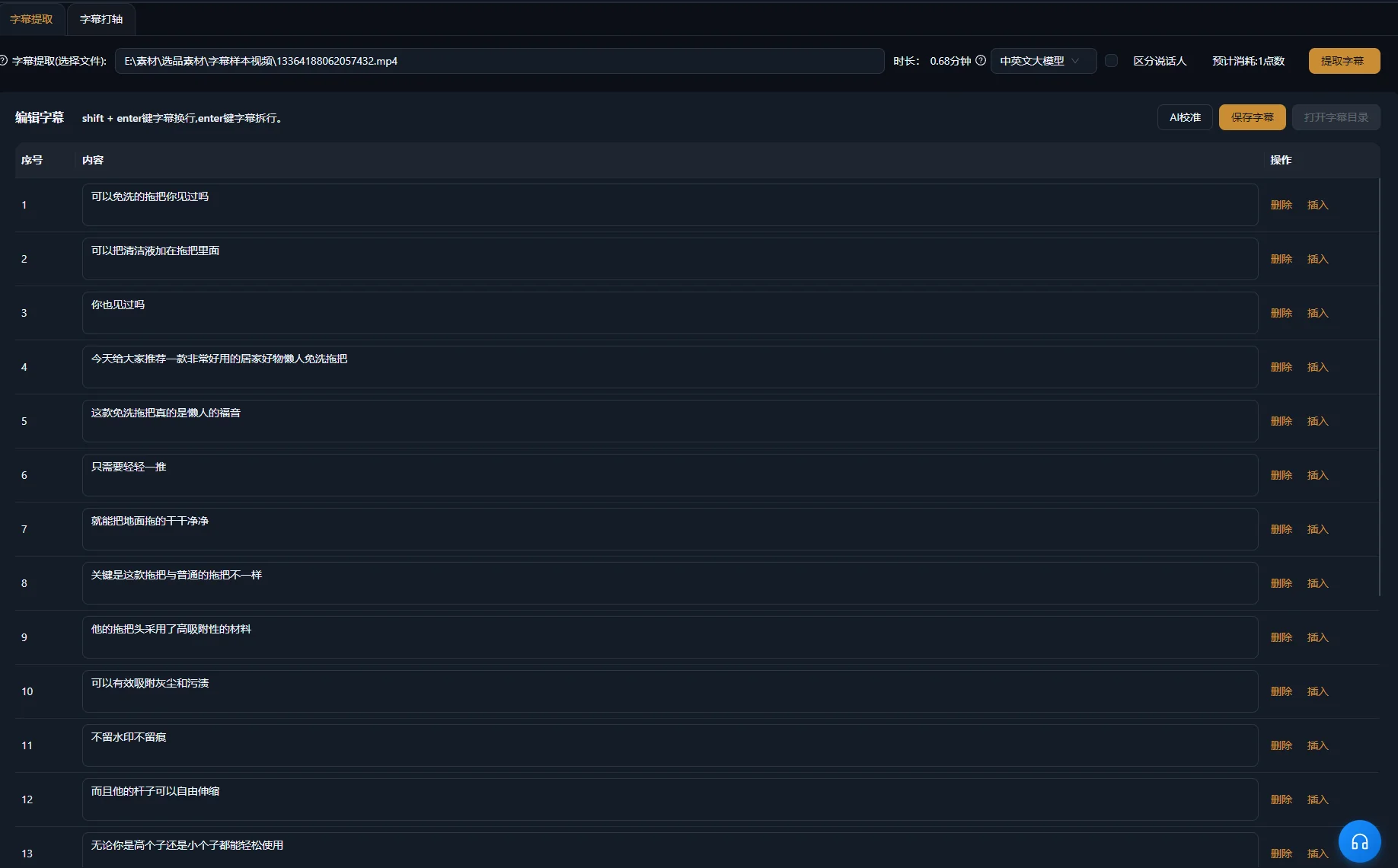
Sous-titrez la séquence montée, puis vérifiez le texte et le timing par rapport à l’audio. La transcription source et les sous-titres finaux servent des objectifs différents : la première aide à sélectionner les passages, les seconds doivent suivre ce qui reste à l’écran.
La présentation du montage basé sur le texte dans Premiere d’Adobe fait la même distinction dans son propre processus et recommande de créer les sous-titres à partir de la séquence montée finale. Il s’agit d’une comparaison générale des processus, sans affirmer que les deux applications disposent de commandes de montage textuel identiques.
Vérifier séparément les mots, le timing et le placement
- Comparez les noms propres, quantités, négations et termes techniques aux paroles.
- Faites commencer et finir chaque sous-titre avec le passage qu’il représente.
- Utilisez des coupures lisibles sans séparer une condition de l’énoncé qu’elle précise.
- Placez le texte sans masquer les visages, commandes et détails du produit à observer.
- Incluez les informations non verbales importantes lorsqu’elles sont nécessaires pour comprendre la scène.
Les recommandations du W3C sur les sous-titres incluent les sons pertinents et l’identification des locuteurs dans les sous-titres accessibles. Pour une explication de produit, un clic audible peut compter s’il confirme la fin d’une action. Identifiez les sons informatifs plutôt que de signaler chaque bruit accessoire.
Consultez la génération de sous-titres pour le processus du produit. Modifier un sous-titre ne corrige pas une erreur prononcée ; examinez l’audio séparément et modifiez ou remplacez le passage si l’explication réelle est erronée.
Finaliser les éléments graphiques et le son sans masquer l’explication
Ajoutez un titre, un texte d’accentuation ou une animation graphique uniquement si cela facilite la compréhension d’un point réel. Gardez une formulation cohérente avec les paroles. Un élément graphique affirmant davantage que le présentateur modifie le message au lieu de simplement l’habiller.
Écoutez le passage parlé le plus faible avec la musique et les effets activés. Si les mots deviennent difficiles à comprendre, baissez ou retirez les sons concurrents. Les recommandations d’accessibilité citées expliquent pourquoi la parole au premier plan doit rester distincte du fond sonore. Écoutez les transitions autant que le niveau moyen : un accent musical ou un effet peut masquer un mot important.
Visionnez une fois la vidéo sous-titrée sans son pour vérifier la compréhension de la séquence visuelle. Écoutez ensuite sans regarder l’écran pour repérer les jonctions abruptes ou une référence manquante. Ce sont des contrôles éditoriaux complémentaires, sans garantir que la vidéo respecte toutes les exigences d’accessibilité.
Affinez la timeline finale dans l’ espace de montage. Si vous avez besoin de plusieurs extraits ciblés d’un enregistrement long, le guide de découpage de vidéos longues traite de la sélection des sujets et du contexte avant l’habillage.
Diagnostiquer le premier montage avant d’ajouter des finitions
Corrigez le problème de contenu ou de timing sous-jacent avant d’ajouter une couche visuelle. Les symptômes suivants orientent vers différents éléments à examiner ; ce sont des hypothèses de diagnostic, pas des taux d’échec mesurés.
| Symptôme | Cause possible | Action suivante |
|---|---|---|
| La mauvaise prise est conservée | La demande ne distinguait pas les tentatives similaires | Indiquez des mots distinctifs ou les positions sources et précisez ce qui doit rester |
| La phrase est plus courte mais trompeuse | Une précision a disparu avec le contenu répété | Comparez le montage à l’explication source complète et restaurez la condition |
| Un mot paraît tronqué | La limite se situe dans un mot audible ou une respiration | Écoutez la jonction et affinez la limite manuellement |
| Le débit paraît précipité | Des pauses utiles ont été retirées avec les temps morts | Rétablissez de l’espace entre les idées et les démonstrations |
| Le B-roll montre la mauvaise action | Un média visuellement similaire a été pris pour une correspondance explicative | Vérifiez le produit et l’action, puis choisissez des rushes adaptés |
| Les sous-titres précèdent ou suivent trop tard la parole | Le texte ou le timing correspond à un ancien montage | Comparez les sous-titres à la séquence finale actuelle |
| Le texte est juste mais la parole est erronée | Seul le sous-titre a été corrigé | Examinez et révisez le passage parlé séparément |
Valider le fichier exporté avec une liste de contrôle claire
Le montage est prêt lorsqu’un nouveau spectateur peut comprendre l’explication et que le fichier exporté correspond à la timeline validée. Visionnez l’export réel du début à la fin ; valider la timeline ne prouve pas à lui seul que le fichier livré est correct.
- L’ouverture identifie le sujet et la question.
- La prise conservée comprend les conditions nécessaires et la conclusion.
- Chaque coupe de contenu a été vérifiée en lecture.
- Les démonstrations montrent le bon produit et la bonne action.
- Les sous-titres correspondent aux paroles finales et restent lisibles.
- La musique, les effets et les éléments graphiques servent l’explication.
- Le fichier exporté contient la vidéo, le son et le texte voulus.
Conservez l’enregistrement original et assez d’informations sur le projet pour expliquer les suppressions et réorganisations. Commencez le montage suivant en améliorant le brief de contenu plutôt qu’en appliquant mécaniquement les mêmes coupes à un enregistrement portant un autre message.
Questions fréquentes
Dois-je supprimer tous les mots d’hésitation ?
Évaluez chaque mot dans son contexte. Supprimez une hésitation inutile si la phrase obtenue reste complète à l’écoute. Certains mots apparemment superflus introduisent une opposition ou préservent la personnalité du locuteur. Vérifiez l’audio et le sens plutôt que d’appliquer une règle générale.
Puis-je continuer le montage après une demande IA ?
Oui. Examinez les modifications dans la timeline et poursuivez l’ajustement des limites, des images complémentaires, des sous-titres et du son. Une demande produit une proposition de montage qui reste à valider.
Que faire si le présentateur corrige une erreur dans une prise ultérieure ?
Comparez les tentatives complètes et choisissez l’explication exacte. Vérifiez que la prise corrigée contient aussi les conditions et la démonstration nécessaires au spectateur. Une présentation plus courte ou fluide ne suffit pas si elle omet des informations essentielles.
Les sous-titres peuvent-ils rendre une explication confuse compréhensible ?
Les sous-titres rendent la parole accessible sous forme de texte, mais ne peuvent fournir un raisonnement retiré au montage. Restaurez le contexte manquant dans la séquence parlée ou utilisez un élément explicatif exact qui identifie clairement toute information ajoutée.