
De videos largos a clips cortos: selecciona y termina piezas autónomas
Autor
Publicado

Para convertir un video largo en clips cortos útiles, selecciona fragmentos que respondan una pregunta o muestren una acción completa y edita cada uno para alguien que no haya visto el original. La IA puede organizar propuestas, pero la selección final requiere comprobar el contexto y que el contenido esté completo. Esta guía abarca transmisiones en directo, entrevistas y cursos, desde las instrucciones de selección hasta los archivos exportados. También explica cuándo combinar fragmentos separados ayuda a responder y cuándo un corte más breve cambia lo que realmente quiso decir la persona.
Puntos clave
- Elige una pregunta autónoma y conserva su respuesta, las condiciones necesarias y la conclusión.
- Revisa los clips propuestos en su contexto original antes de aprobar los límites o combinar fragmentos.
- Define el formato de entrega según la información visible y los requisitos actuales del destino.
- Corrige los subtítulos y reproduce cada clip exportado; más archivos no equivalen a más temas completos.
Elige un tema completo antes de fijar la duración
Un clip corto útil plantea una pregunta clara y ofrece una respuesta completa. Empieza por escribir qué debería entender el espectador al terminar. «Explica por qué cambia el ajuste para una grabación con ruido» ofrece un criterio editorial. «Busca los mejores momentos» no define qué se considera útil.
Cada formato de origen sugiere unidades diferentes. Un fragmento de un curso puede contener una demostración con un requisito previo. Una entrevista puede incluir una afirmación y el razonamiento que la respalda. Una transmisión en directo puede responder una pregunta sobre un producto mientras muestra la acción. Conserva lo que permita entender esa respuesta concreta.
| Origen | Posible tema autónomo | Contexto que se debe conservar |
|---|---|---|
| Curso | Cómo configurar un ajuste | Condiciones de entrada, pasos y resultado esperado |
| Entrevista | Una afirmación con su explicación | La pregunta, las pruebas y cualquier matiz |
| Transmisión en directo | Una acción o respuesta sobre un producto | El modelo mostrado y lo que demuestra la acción |
Consulta la introducción a la extracción de clips de videos largos para entender el flujo de trabajo. Para las tomas repetidas dentro de una misma explicación oral, la guía de edición de videos de personas hablando a cámara aborda decisiones más específicas del montaje preliminar.
Prepara la grabación y las instrucciones editoriales de selección
Conserva el original y define el público, el tema y el formato de entrega antes de solicitar propuestas. Si el reconocimiento de voz ayuda en la tarea, revisa la transcripción alrededor de los fragmentos cuyo significado dependa de un nombre, una cifra, una negación o una condición.
Redacta requisitos que puedas comprobar
- Público: ¿qué sabe ya el espectador?
- Tema: ¿qué pregunta debe responder cada clip?
- Contenido esencial: ¿qué pregunta, acción, condición o conclusión debe permanecer?
- Presentación: ¿qué rostro, detalle del producto o control debe seguir visible?
- Entrega: ¿qué relación de aspecto y requisito de duración corresponden al destino?
Ejemplo de instrucciones: Organiza clips candidatos de este curso, con una pregunta por clip. Conserva los antecedentes necesarios, la demostración y la conclusión. Mantén las condiciones que explican cuándo es válida una respuesta. Identifica los clips que necesitan contexto previo para entenderse por sí solos.
Esta solicitud es un ejemplo de planificación, no una promesa de que la aplicación devuelva una cantidad o un formato concreto de clips. Comprueba en la aplicación el flujo compatible, la disponibilidad de la tarea y la información de uso. Empieza con material representativo para revisar el método de selección antes de ampliar la tarea.
Organiza los clips propuestos en el espacio de edición
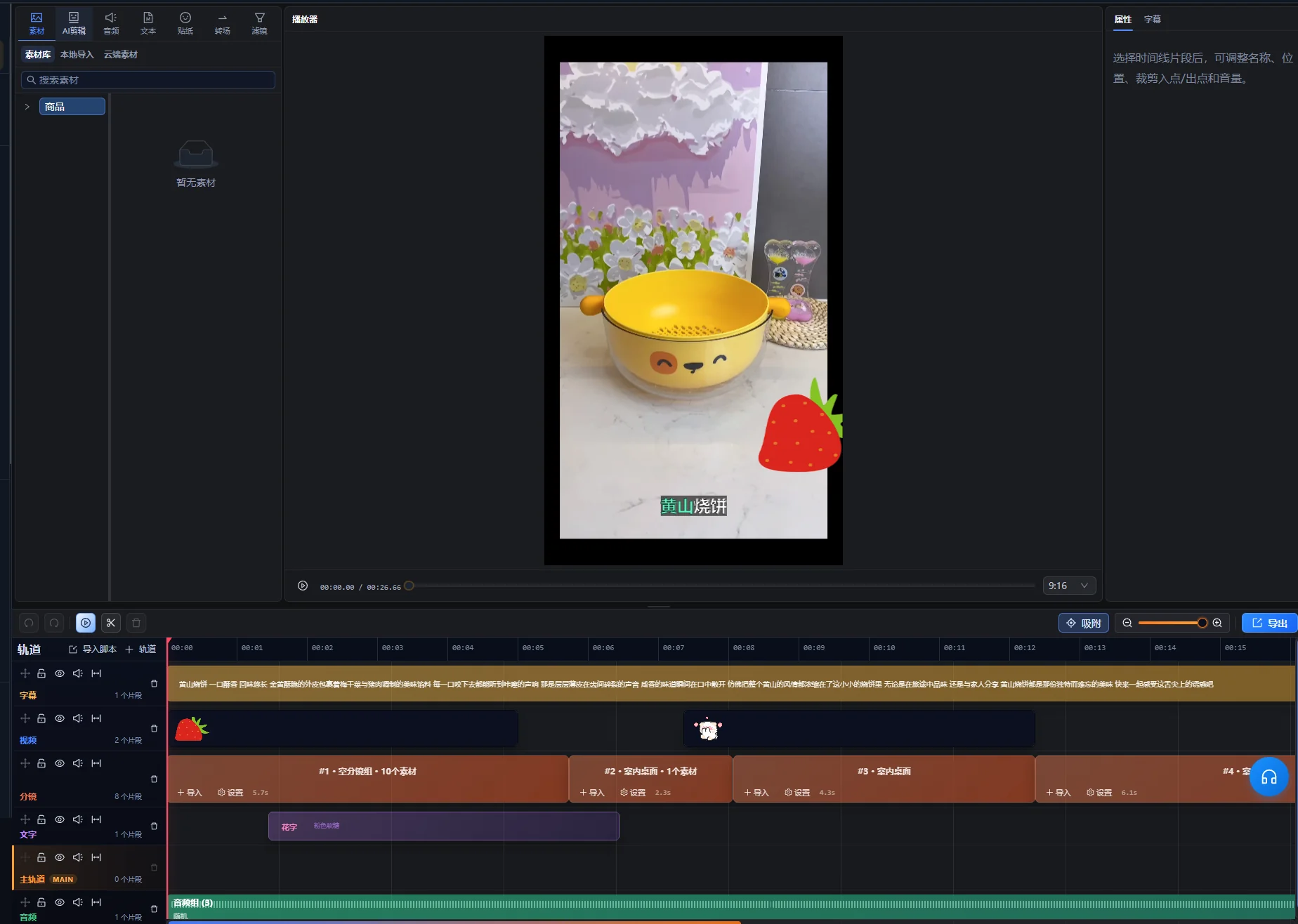
Utiliza el asistente de IA del espacio de edición para solicitar clips candidatos y trata su selección como un conjunto inicial que debes revisar. El flujo compatible para videos largos permite organizar fragmentos y líneas de tiempo editables, incluidos fragmentos no consecutivos cuando corresponda. Esa flexibilidad obliga a comprobar el significado: dos fragmentos con la misma palabra clave pueden responder preguntas distintas.
- Importa la grabación larga al espacio de edición y abre el asistente de IA.
- Indica el objetivo de selección y el contenido que debe conservarse.
- Examina la vista previa de los clips candidatos e identifica cada tema propuesto.
- Reproduce los fragmentos seleccionados y el contexto original que los rodea.
- Solicita una propuesta revisada si la respuesta o la secuencia están incompletas.
- Después de revisarla, utiliza el control de aplicación de la propuesta para crear la edición aprobada y sigue ajustando cada clip en el espacio de edición.
La vista previa de los candidatos es una propuesta pendiente, no una modificación ya aplicada a la línea de tiempo. Si los cambios del original o de la línea de tiempo dejan desactualizada la propuesta, utiliza el control para regenerar la vista previa y revisa los nuevos candidatos antes de aplicarlos. El nombre real de los controles depende del idioma de la interfaz; estas instrucciones identifican las acciones sin dar por hecho una etiqueta en inglés.
Conserva para cada candidato una referencia al original y una razón breve para seleccionarlo. Un documento sencillo puede registrar el tema, las posiciones de origen, el contexto necesario y los problemas pendientes. Esta guía no presupone un panel automatizado independiente para revisar clips.
El panel de selección de clips cortos muestra el título, la duración y las posiciones de origen del candidato, junto con una acción para reproducir la selección. Usa esos datos para localizar el original y previsualizar el fragmento real. Trata el título propuesto como una etiqueta que debes verificar, no como un titular aprobado para publicación.
La primera comprobación es semántica: ¿puedes identificar la pregunta y la respuesta sin adivinar? Si un candidato contiene una cita interesante pero no un tema comprensible, examina el contexto anterior antes de decidir si lo conservas.
Revisa los comienzos, los matices y los finales en contexto
Comprueba lo que hay más allá de los puntos de entrada y salida propuestos. Una frase omitida justo antes del clip puede cambiar el significado de todo lo que permanece; una conclusión inmediatamente posterior puede ser necesaria para completar la respuesta.
| Comprobación | Qué escuchar o buscar | Decisión |
|---|---|---|
| Comienzo | «Esto», «esa opción» o una respuesta sin pregunta | Conservar suficiente material anterior o identificar claramente el tema |
| Condición | «Solo cuando», «a menos que» o un matiz ligado a la afirmación | Mantener la condición junto a la respuesta que limita |
| Demostración | Una acción sin su preparación o su resultado | Conservar lo necesario para entender el paso |
| Final | Una idea sin terminar o una conclusión omitida | Ampliar o revisar el final para completar la respuesta |
| Fragmentos combinados | Un cambio de pregunta, producto, período o postura del hablante | Comprobar que la secuencia montada conserva el significado original |
Revisa el clip una vez sin apoyarte en tu recuerdo de la grabación larga. Si necesitas explicar qué significa «este» mientras lo ves, probablemente haga falta más contexto. Un título preciso puede identificar el tema, pero no debe añadir una afirmación más contundente de lo que respalda el original.
Al combinar fragmentos separados, míralos tanto en sus contextos originales como en la nueva secuencia. Mantén cada matiz unido a la afirmación correspondiente aunque un montaje más simple resulte más breve.
Ejemplo práctico: convierte una respuesta de un curso en un clip corto
Este fragmento ficticio de un curso ilustra la selección y la revisión. No es un resultado real de extracción de clips ni un estudio de rendimiento. Un estudiante pregunta cómo quitar los intervalos de silencio no deseados de una grabación sin perder las palabras pronunciadas en voz baja.
Identifica las partes del original antes de cortar
| Componente de origen | Información que aporta | Decisión editorial |
|---|---|---|
| Pregunta | La grabación contiene pausas y palabras en voz baja | Conservar el problema o identificarlo con precisión al comienzo |
| Introducción larga | El instructor comenta ejercicios anteriores ajenos al tema | Excluir el material innecesario para esta respuesta |
| Demostración | El instructor prueba el ajuste en un fragmento representativo | Conservar el paso y suficiente reproducción para evaluarlo |
| Condición | Un ajuste agresivo puede eliminar palabras en voz baja | Mantenerla junto a la demostración |
| Conclusión | Escuchar la muestra y ajustar antes de procesar más material | Conservarla como recomendación completa |
Construye una respuesta con principio y final
Empieza con el problema o una descripción concisa de la tarea y muestra después la prueba representativa. Conserva la condición del instructor sobre las palabras en voz baja y termina con la recomendación de escuchar antes de aplicar los ajustes a más material.
Si la demostración y la conclusión aparecen en posiciones distintas del original, solo formarán una secuencia útil si se refieren al mismo ajuste y al mismo tipo de entrada. Comprueba si el material intermedio cambia de escenario. No combines una prueba en una grabación silenciosa con una conclusión referida expresamente a una grabación con ruido.
Comprueba el clip como si lo vieras por primera vez
El espectador debe saber qué problema se resuelve, qué control o acción importa, qué debe escuchar y cómo reaccionar si el ajuste elimina palabras útiles. Si el clip solo dice «aumenta este valor», conserva la identificación que falta o elige un fragmento más completo.
El criterio de aceptación es que la respuesta siga siendo válida fuera del curso. Su duración depende de la información necesaria para explicar la acción y la condición. Si no encaja en el destino, acorta la preparación irrelevante o divídelo en preguntas realmente distintas, en lugar de eliminar la limitación.
Define el formato de entrega y revisa cada recorte importante
Elige el encuadre final según lo que el espectador necesita ver. Un recorte vertical que conserva el rostro del presentador pero elimina el control que se demuestra no ofrece la misma explicación que el original.
Según la comprobación del 10 de octubre de 2026, la guía de YouTube Información sobre los Shorts de YouTube de tres minutos indica que, en los canales estándar de YouTube, los videos cuadrados o verticales de hasta tres minutos subidos desde el 15 de octubre de 2024 se clasifican como Shorts. Los canales oficiales de artistas tienen una fecha histórica de corte distinta. Revisa la guía enlazada para tu canal y fecha de subida al preparar la entrega. Esta regla de clasificación no es un límite de procesamiento de la aplicación.
Revisa el encuadre durante toda la acción
- Comprueba la composición inicial e identifica el tema.
- Sigue los rostros, las manos, los productos y los controles mostrados mientras se mueven.
- Examina las grabaciones de pantalla para detectar texto demasiado pequeño tras el cambio de encuadre.
- Reserva espacio para los subtítulos sin tapar información necesaria.
- Revisa cada transición entre fragmentos con encuadres diferentes.
Utiliza el flujo de recorte y ajusta manualmente la línea de tiempo cuando haga falta. Si un recorte no permite mostrar a la persona y una demostración amplia a la vez, considera otra disposición o un fragmento de origen que conserve la explicación. No des por hecho que un recorte automático decide qué control diminuto importa en la lección.
Subtitula el clip final y conserva la información visual útil
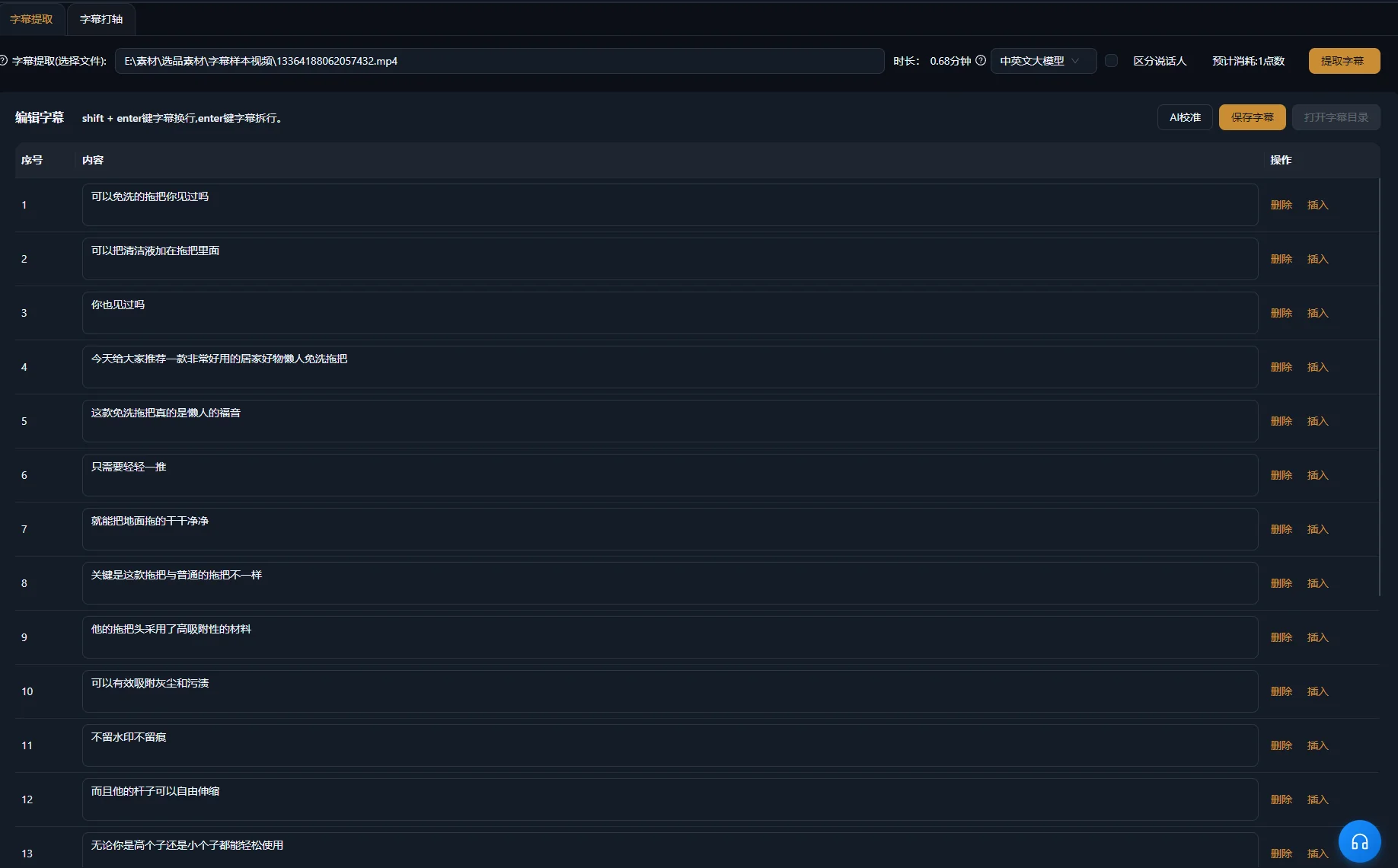
Genera o revisa los subtítulos del clip editado final y compáralos con las palabras pronunciadas. Los subtítulos del original pueden dejar de coincidir tras eliminar o reordenar fragmentos. Presta especial atención a nombres de productos, cantidades, condiciones y negaciones.
La guía de W3C Subtítulos explica que los subtítulos accesibles también transmiten los sonidos no verbales relevantes y la información del hablante. En una entrevista puede importar identificar a quien habla. En una demostración, un clic audible puede confirmar que una acción se completó. Incluye la información necesaria para entender el contenido.
La guía de W3C Contenido de audio y contenido de video también recomienda audio claro, texto superpuesto legible y tiempo para procesar la información. Aplica esas comprobaciones al propio clip: un recorte o una secuencia rápida pueden dificultar una demostración antes clara.
Comprueba el texto y el sonido como capas independientes
- Corrige los subtítulos comparándolos con el audio final.
- Comprueba la sincronización y los saltos de línea legibles.
- Revisa su posición sobre rostros, controles y detalles del producto.
- Escucha las uniones para detectar palabras cortadas o cambios bruscos de sonido.
- Reduce la música que compita con la respuesta y dificulte oírla.
La introducción a la generación de subtítulos explica el flujo relacionado del producto. Un subtítulo debe representar fielmente lo hablado; cambiarlo no corrige una respuesta oral errónea o incompleta.
Resuelve los problemas de los clips que dependen del contexto
Reconsidera la selección cuando el clip no contiene una respuesta completa. La presentación puede mejorarlo, pero no hace que un fragmento ajeno aporte el razonamiento que falta.
| Síntoma | Posible causa | Siguiente comprobación o solución |
|---|---|---|
| El comienzo responde una pregunta desconocida | Se excluyó la pregunta o el tema | Examinar el contexto anterior y conservar o identificar el tema necesario |
| La afirmación parece más general que en el original | Se eliminó una limitación | Restaurar el matiz junto a la afirmación |
| La demostración termina antes del resultado | El límite del candidato sigue el habla en lugar de la acción | Ampliar o revisar el final para mostrar el resultado útil |
| Los fragmentos combinados se contradicen | Se refieren a escenarios o preguntas diferentes | Comparar los contextos originales y separar los temas si hace falta |
| El clip vertical oculta un control | El recorte prioriza la zona equivocada | Ajustar el encuadre durante la demostración o usar una disposición adecuada |
| Los subtítulos ya no coinciden con el orden | Corresponden al original largo o a un montaje anterior | Comprobarlos con el clip terminado |
| Varios clips repiten la misma respuesta | La selección favoreció fragmentos similares frente a temas distintos | Comparar la pregunta y la conclusión de cada candidato |
Si un tema sigue necesitando demasiada explicación previa, quizá funcione mejor en un fragmento largo que en un clip corto. Rechazar un candidato es un resultado editorial útil. El número de archivos extraídos no demuestra que el original produjera esa cantidad de respuestas distintas y completas.
Revisa los clips exportados y registra su contexto original
Aprueba cada archivo exportado por separado. Los ajustes compartidos pueden reducir la preparación repetitiva, pero cada clip tiene sus propios límites, significado y acción visible. Una primera exportación correcta no demuestra que las demás estén completas.
El flujo compatible de extracción puede preparar clips independientes para exportarlos por separado. Confirma qué resultados se entregan y reproduce cada archivo generado. Mantén separados los clips de temas independientes salvo que las instrucciones de entrega pidan expresamente una recopilación.
- El clip responde una pregunta identificable.
- El comienzo funciona para alguien que no conoce el original.
- Se conservan el matiz, la demostración y la conclusión necesarios.
- Los fragmentos combinados mantienen el significado del original.
- El sujeto y la acción importantes siguen visibles.
- Los subtítulos, el habla y los sonidos de apoyo son correctos en el archivo exportado.
- El archivo cumple los requisitos del destino elegido.
Registra junto al proyecto el tema, las posiciones de origen, el nombre final del archivo y los cambios editoriales. Pon al clip un título preciso basado en su respuesta real. Si posteriormente revisas datos de distribución, utiliza esos registros para saber qué contenido se publicó; el volumen de producción por sí solo no demuestra la eficacia de la selección.
Para el siguiente original, elige una pregunta representativa y llévala primero por todo el proceso. Cuando puedas examinar la selección, el encuadre, los subtítulos y la exportación, amplía el trabajo a otros temas distintos.
Preguntas frecuentes
¿Cuántos clips cortos debería crear a partir de una grabación?
Elige los temas distintos que puedan convertirse en clips autónomos completos. Algunas grabaciones contienen muchas respuestas útiles; otras dependen mucho del contexto anterior. Evalúa la repetición de temas y la integridad de las respuestas en lugar de fijar una cuota según la duración de la grabación.
¿Puede un clip corto combinar fragmentos de distintas posiciones del original?
Los flujos compatibles permiten organizar fragmentos no consecutivos. Comprueba cada uno en su contexto original y revisa el significado del montaje. Conserva las condiciones necesarias y evita combinar respuestas sobre escenarios diferentes como si fueran una sola afirmación.
¿Deberían empezar todos los clips cortos por la conclusión?
Empieza por la conclusión cuando se entienda y sea precisa sin la preparación previa. Algunas demostraciones necesitan presentar el problema o la condición antes de la respuesta. Elige un comienzo que aclare el tema real en lugar de aplicar la misma estructura a todos los originales.
¿Puedo utilizar la misma exportación en todas las plataformas?
Comprueba los requisitos actuales de formato del destino y cómo su interfaz de visualización presenta el clip. Un mismo archivo puede servir en varios lugares, pero una duración o un recorte adecuados en un destino no demuestran que funcione igual de bien en los demás.