
Edición de videos por lotes: guía práctica para variantes de producto
Autor
Publicado

Se conserva la portada promocional original. Sus porcentajes de progreso y su cola de videos son valores ilustrativos, no un resultado registrado de este tutorial. Las etiquetas están en chino.
La edición de videos por lotes funciona cuando una estructura repetible se combina con material intercambiable que no cambia el significado. Lo difícil es definir esos intercambios: un comienzo distinto puede modificar la promesa, una narración más larga puede durar más que la demostración y un producto parecido puede ser otro modelo. Esta guía lleva unas instrucciones de video de producto desde la planificación hasta un montaje piloto, la revisión del lote y la entrega de archivos. Explica qué preparar, qué combinaciones rechazar y cómo rastrear un problema hasta el elemento compartido que lo provocó.
Puntos clave
- Usa Composición básica para una secuencia ordenada de grupos de planos; Mezcla automática parte de un conjunto de material y tiene controles de duración distintos.
- Un candidato solo es intercambiable si la identidad del producto, la acción y los tiempos siguen siendo correctos con la misma narración.
- Asocia cada guion con su audio y sus subtítulos reales y revisa las sustituciones arriesgadas antes de ampliar el lote.
- Revisa cada archivo exportado y conserva un registro de versiones; las variantes de producción por sí solas no demuestran el rendimiento de una campaña.
Qué cambia la edición de videos por lotes y qué necesita de ti
La edición por lotes combina material preparado, una secuencia definida y variantes de contenido. Es útil cuando varios videos comparten el objetivo de comunicación, pero necesitan distintos comienzos, demostraciones o finales. Empieza por la introducción a la edición por lotes para situar la función en el flujo de trabajo.
Un lote es más útil cuando cada versión tiene una diferencia editorial identificable. Cambiar un plano de fondo puede producir otro archivo, pero no genera automáticamente un mensaje distinto. Decide si preparas alternativas para un público, adaptas la misma explicación a usos diferentes o comparas una elección creativa concreta.
La entrada debe incluir clips utilizables, un guion para cada mensaje y el audio correspondiente cuando se necesite narración. El resultado es un conjunto de videos para revisar y entregar. La cantidad de archivos mide la producción; no demuestra que una versión atraiga más espectadores ni rinda mejor.
Regla de trabajo: Un plano solo es intercambiable si sigue siendo correcto con las palabras, los tiempos y los planos que rodean esa posición.
Prepara instrucciones y un inventario antes de abrir la tarea
Define una frase que todas las versiones deban comunicar y separa después los requisitos fijos de las elecciones que piensas variar. Así tendrás una base para rechazar una combinación antes de dedicar tiempo a subtítulos o gráficos.
- Fijo: identidad del producto, demostración necesaria, redacción objetiva aprobada y formato del destino.
- Variable: pregunta inicial, orden de los planos de apoyo, enfoque de narración o escena final.
- Excluido: modelos retirados, material con el embalaje incorrecto, planos de archivo ajenos al tema y ofertas desactualizadas.
Clasifica el material por su función: presentar el producto, mostrar una acción, explicar un detalle o establecer una situación de uso. Registra el nombre del archivo original, un rango útil y cualquier restricción. Si solo tienes grabaciones largas, prepara candidatos mediante el flujo de división de videos.
Organizar los recursos antes de editar es una práctica establecida. La introducción a las bandejas multimedia de Adobe explica la agrupación de archivos originales y secuencias. Puedes aplicar el mismo principio organizativo sin copiar la interfaz de otro editor: distingue el material de origen, la narración y las versiones revisadas.
La comprobación de preparación es sencilla: ¿puedes encontrar material para cada punto necesario y puede otro editor identificar qué guion y audio van juntos? Resuelve cualquier incertidumbre antes de crear variantes.
Elige el modo de composición y sus entradas reales
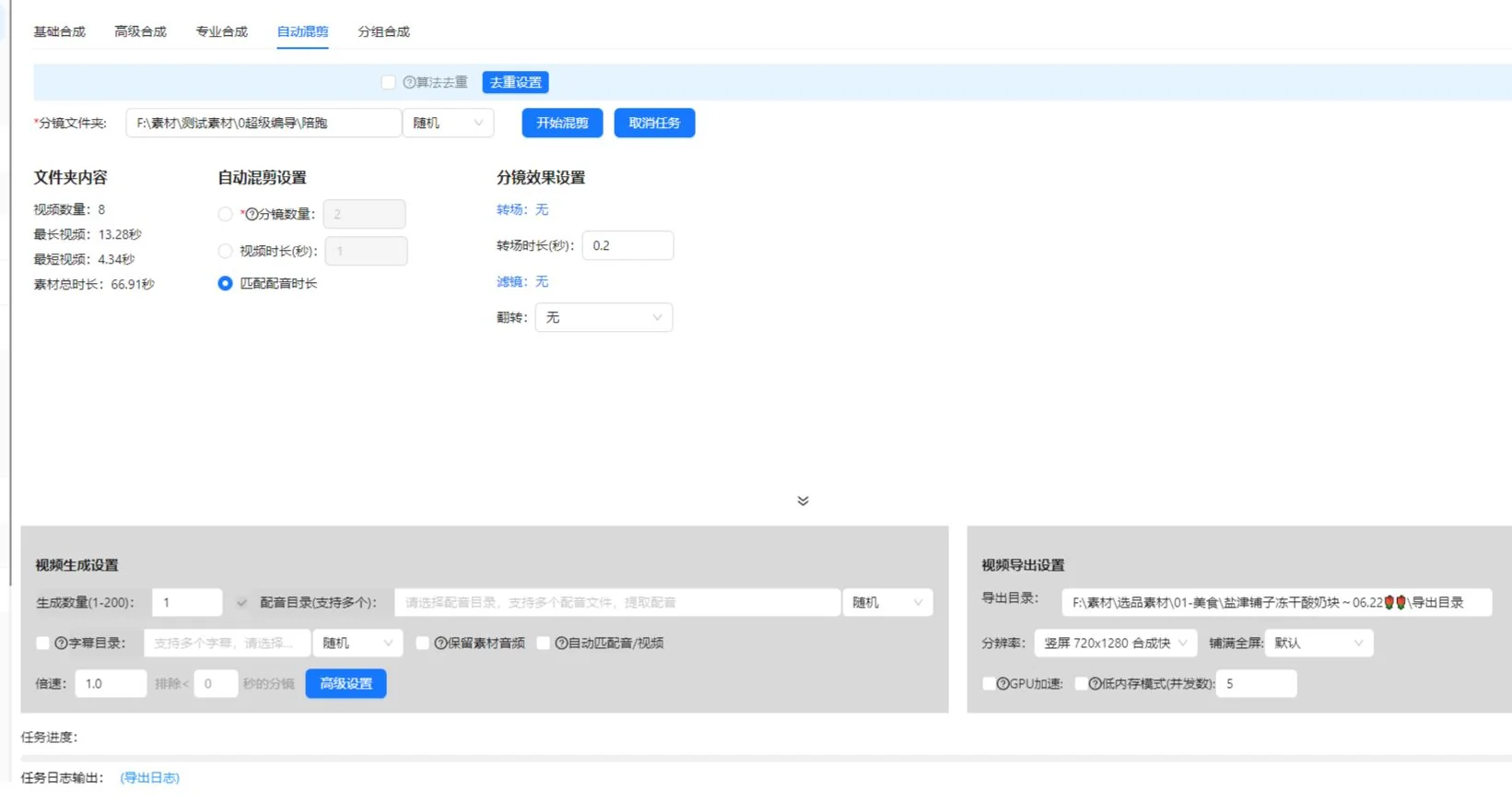
El espacio de composición actual tiene pestañas Básica, Avanzada, Profesional y Mezcla automática. No supongas que importan la misma estructura de carpetas ni que admiten el audio de la misma forma. El procedimiento de planos ordenados de esta guía empieza con Composición básica.
| Punto de partida | Controles actuales pertinentes para esta guía | Comprobación de entrada |
|---|---|---|
| Composición básica | Filas de planos ordenadas, carpeta de origen o importación de biblioteca para cada fila, cantidad de generaciones, archivo de narración opcional y archivo SRT | Cada fila de planos necesita material utilizable. Define la carpeta de salida. |
| Mezcla automática | Carpeta de material, cantidad de planos, duración objetivo o ajuste a la duración de la narración, varios archivos de narración y una carpeta SRT opcional | El material debe estar directamente en la carpeta seleccionada de primer nivel. Selecciona al menos una regla de mezcla. |
Para Composición básica, prepara una narración aprobada y su archivo de subtítulos para la prueba piloto. Si necesitas otro guion, establece expresamente la relación con su audio y sus subtítulos en el modo elegido o en una configuración separada. Así evitas confundir una tabla editorial de variantes con una promesa de que todas las pestañas creen automáticamente todas las combinaciones.
Mezcla automática trata la duración objetivo del video y el ajuste a la duración de la narración como alternativas. Cuando se activan juntos la cantidad de planos y el ajuste a la narración, la interfaz actual indica que prioriza la duración de la narración y puede añadir planos para cubrirla. Conservar el audio original y repetir el material en bucle son ajustes incompatibles. La opción de ajuste a la duración más corta entre audio y video requiere narración y puede acortar el resultado; comprueba si elimina el final necesario.
Estos controles se comprobaron con la implementación del cliente el 10 de octubre de 2026. Confirma sus nombres y disponibilidad en tu versión instalada. La configuración actual de membresía determina los límites de generación; esta guía no asigna un mismo límite a todas las cuentas.
Crea grupos de planos con una función visual compartida
Agrupa las alternativas por lo que demuestran, no por el parecido entre sus miniaturas. Para una frase sobre abrir una tapa, cada candidato debe mostrar claramente la apertura. Un plano estético del producto pertenece a otro grupo.
Paso 1: Define la función de cada posición
- Lee la frase del guion correspondiente a esa posición.
- Escribe la prueba visual que necesita el espectador.
- En Composición básica, añade o nombra la fila de planos en el orden requerido.
- Asigna su carpeta de material o importa los recursos pertinentes de la biblioteca. La entrada de carpeta lee material compatible situado directamente en ese directorio.
- Comprueba si la acción útil de cada candidato encaja con la frase hablada.
Incluye la identidad del producto en las reglas del grupo. Dos planos pueden mostrar la misma acción con colores, accesorios o generaciones distintas del producto. Eso puede servir en un video comparativo, pero es una discrepancia en un montaje que presenta un artículo concreto.
Paso 2: Elimina los sustitutos débiles
Reproduce cada candidato durante toda la acción. Rechaza un clip que empiece después del inicio de la acción, termine antes de completarla, oculte el mecanismo o necesite contexto que el guion no aporta. Conserva la referencia al original para que otro editor pueda recuperar un rango más amplio.
Verifica el grupo asociando cada candidato a la misma narración. Si alguno necesita otras palabras para entenderse, muévelo a otro grupo o trátalo como una variante de guion independiente. No ocultes esa diferencia dentro de un conjunto aparentemente intercambiable.
Planifica un lote pequeño con un registro claro de variantes
Este ejemplo del vaso de viaje es un ejercicio de planificación, no un resultado registrado de una tarea ni un caso de campaña. Supón que el material disponible muestra el mismo vaso sobre un escritorio, la apertura de su tapa, su asa y a una persona bebiendo de él.
| Versión | Elección inicial | Demostración compartida | Elección final | Pregunta de revisión |
|---|---|---|---|---|
| A | Presentar el vaso sobre un escritorio | Mostrar toda la apertura de la tapa | Volver al entorno del escritorio | ¿Presenta el comienzo el producto? |
| B | Empezar con la acción de la tapa | Mantener la misma explicación de la acción | Usar el mismo entorno del escritorio | ¿El comienzo sigue aportando contexto suficiente? |
| C | Usar la misma introducción que A | Mantener la misma explicación de la acción | Mostrar el vaso en uso habitual | ¿El final apoya el mensaje? |
A y B cambian el comienzo. A y C cambian el final. Son diferencias comprensibles que puedes registrar y revisar. Si cambias a la vez el comienzo, la voz, la música y el final, el video resultante puede ser útil, pero será más difícil explicar qué aportó un cambio concreto.
Anota la diferencia prevista junto a cada versión antes de generar archivos. Un registro mínimo incluye el identificador de versión, el identificador de guion, el nombre del archivo de narración, los planos candidatos elegidos y la razón del cambio. Es un registro editorial que mantienes tú; no presupone un informe automático de la aplicación.
Examina las dependencias entre combinaciones. Un final que diga «úsalo como se muestra» depende de la demostración anterior. Un subtítulo que mencione un color debe coincidir con el material. Si las elecciones dependen entre sí, prepara conjuntos compatibles separados en lugar de permitir todas las combinaciones.
Coordina guiones, narración y subtítulos antes de añadir decoración
Cada variante de guion necesita una relación verificada con su audio y sus subtítulos. Los nombres de archivo similares no bastan: escucha la frase y compárala con el texto aprobado.
Paso 3: Comprueba la narración más larga y exigente
Identifica los fragmentos con más palabras, nombres de producto más largos o una demostración detallada. Reprodúcelos con el material. Si la narración continúa después de terminar la imagen útil, amplía la cobertura con un plano pertinente, ajusta el montaje o revisa la redacción. No soluciones el problema acelerando una acción hasta que el espectador no pueda entenderla.
Utiliza el flujo de narración y subtítulos por lotes para la tarea relacionada. Conserva una copia del guion aprobado fuera del video para comparar las revisiones de texto.
Paso 4: Corrige los subtítulos como tarea independiente
La revisión de subtítulos incluye la precisión del habla, los tiempos y la información transmitida por el sonido. La guía de subtítulos pregrabados de W3C incluye información no verbal significativa y la identificación del hablante cuando sea necesaria. En este ejemplo de producto, comprueba el nombre del producto y si el sonido de la tapa importa para la explicación.
Aprueba primero la secuencia básica y añade después música, texto o adhesivos compartidos. De lo contrario, una presentación pulida puede distraer de un plano incorrecto o una pista de voz mal asociada.
Ejecuta una prueba piloto que cubra las combinaciones arriesgadas
La prueba piloto debe poner a prueba las elecciones con más probabilidades de cambiar el significado, los tiempos o la presentación. Mirar solo la primera combinación deja las demás sustituciones sin comprobar.
- En Composición básica, comprueba el orden, los nombres y las cantidades de material de las filas de planos.
- Define una cantidad pequeña de generaciones y elige la carpeta de salida.
- Si activas la narración o los subtítulos, selecciona el archivo real de narración y su archivo SRT.
- Revisa una versión con la narración estándar y la demostración más clara.
- Para otras configuraciones de guion, revisa la narración más larga con el candidato cuya demostración útil sea más corta.
- Examina cada comienzo que cambie el contexto de la siguiente frase.
- Comprueba los candidatos con encuadres o posiciones de texto distintos.
- Corrige los ajustes y candidatos compartidos antes de ampliar el lote.
Es una estrategia de revisión, no una afirmación de que el cliente ofrezca una prueba automática de compatibilidad. Usa las vistas previas y los controles de tu versión instalada. Comprueba en la aplicación la disponibilidad de tareas, los costos de uso y los límites al preparar un trabajo mayor.
Mantén una lista breve de defectos: identificador de versión, posición afectada, problema observado y corrección prevista. «B empieza con un primer plano sin identificar» permite actuar. «B se siente mal» es más difícil de resolver. Después de una corrección, reproduce el fragmento modificado y las transiciones adyacentes.
La prueba piloto está lista cuando las versiones elegidas cumplen las instrucciones, las relaciones compartidas de audio y subtítulos funcionan y cada candidato restante tiene una función clara. Aun así, no sustituye la revisión de cada video terminado.
Resuelve los problemas repetidos y aislados del lote
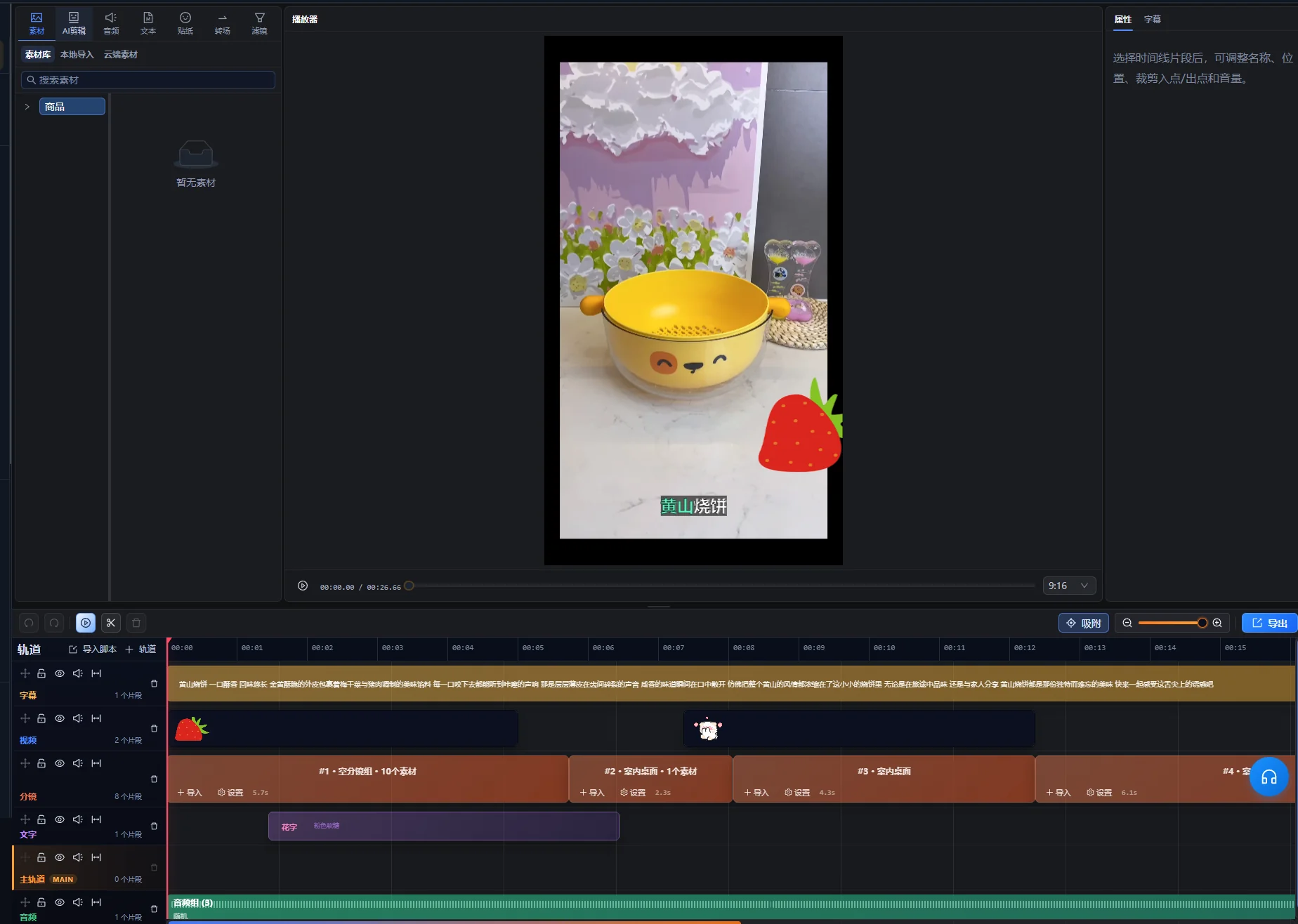
Empieza por decidir si el defecto afecta a varias versiones o a una combinación concreta. Los problemas repetidos sugieren un elemento compartido; los aislados, un candidato o una dependencia que las reglas del grupo no contemplaron.
| Síntoma | Qué investigar | Corrección práctica |
|---|---|---|
| Todas las versiones muestran el detalle equivocado del producto | El grupo de planos compartido o la afirmación del guion | Sustituir el grupo o corregir el guion aprobado y revisar las versiones afectadas. |
| Un video cambia de color de producto a mitad del montaje | Las reglas de identidad de sus clips seleccionados | Eliminar el candidato incompatible o crear un conjunto de producto separado. |
| La narración dura más que la demostración | La duración útil de la acción y la frase hablada | Añadir cobertura pertinente, revisar los tiempos o acortar la redacción sin perder la explicación. |
| Los subtítulos contienen palabras de otra versión | La relación entre guion, audio y subtítulos | Corregir la relación y revisar la exportación afectada. |
| Un comienzo nuevo vuelve confusa la siguiente frase | Una introducción o un referente ausentes | Añadir contexto, cambiar la frase o rechazar esa combinación inicial. |
| El primer resultado es correcto, pero los posteriores no superan la revisión | Sustituciones que la prueba piloto no cubrió | Examinar cada candidato y limitar las opciones compatibles. |
Corrige la causa de un error compartido antes de reparar muchos archivos separados. Si el mismo error de subtítulos está en todas partes, corrige primero el texto o la asociación comunes. Si solo un plano es inadecuado, no reescribas todos los guiones para adaptarlos a él.
Revisa cada exportación con una lista de aceptación
Un lote está listo para entregar cuando cada archivo cumple las instrucciones por separado. Comprueba el archivo exportado real, porque la vista previa de la línea de tiempo no confirma por sí sola el contenedor entregado, la pista de audio ni la representación del texto.
- El comienzo identifica el sujeto o aporta contexto suficiente para la siguiente frase.
- El producto correcto aparece en todo el video, incluidos sus detalles y accesorios.
- Cada demostración empieza con suficiente anticipación y termina después de que la acción se entienda.
- La narración corresponde al guion elegido y se entiende con la música.
- Los subtítulos son precisos, están sincronizados con el audio correcto y no tapan detalles importantes.
- El final completa el mensaje sin añadir una afirmación no respaldada.
- El archivo se reproduce de principio a fin en el formato de visualización previsto.
- El nombre del archivo y el registro de versión corresponden a las mismas decisiones creativas.
Utiliza los requisitos técnicos del destino al elegir los ajustes de exportación. Para entregar en YouTube, consulta los ajustes de codificación recomendados por YouTube para subidas, incluida su recomendación de conservar la frecuencia de fotogramas grabada. Es orientación del destino, no una afirmación sobre qué opciones de exportación expone este cliente.
Para reparaciones detalladas de la línea de tiempo, continúa en Super Editor. Registra si un archivo fue aprobado, necesita corrección o se sustituyó. Un estado de revisión aclara más la entrega que una carpeta con varios archivos llamados «final».
Separa los registros de producción de las afirmaciones de rendimiento
El registro de versiones debe explicar qué cambió en el video. Una comparación posterior de rendimiento también necesita información sobre distribución, público, fechas y la métrica comparada.
Por ejemplo, si la versión B recibe más visualizaciones tras mostrarse a un público mayor, el total de visualizaciones por sí solo no demuestra que el comienzo causara la diferencia. Si quieres comparar comienzos, planifica por separado la distribución y la medición en lugar de tratar el lote como un experimento terminado.
Registra la plataforma, la ubicación, el período de publicación y los resultados disponibles junto al identificador creativo. Mantén las definiciones: una visualización, una reproducción completa y un clic son resultados diferentes. No conviertas un ejemplo de producción en una historia de éxito declarada sin los registros originales y una comparación defendible.
Cuando un guion nuevo necesite selección de material antes de definir grupos intercambiables, utiliza la guía de creación de videos a partir de recursos. La edición por lotes viene después de ese trabajo estructural, cuando ya tienes sustituciones fiables.
Empieza con una estructura aprobada
Elige un producto, un mensaje completo y un conjunto pequeño de alternativas compatibles. Aprueba la prueba piloto, corrige las reglas de los grupos y amplía solo los cambios que puedas identificar y revisar. Un lote manejable con elecciones rastreables es más fácil de entregar que una carpeta grande de combinaciones sin explicación.
Base editorial: AIMIX Editorial Team preparó esta guía a partir del flujo actual del cliente y la documentación primaria enlazada. El plan del vaso de viaje y el proceso de revisión son recomendaciones ilustrativas. No se afirma ninguna referencia de velocidad de procesamiento, prueba de campaña ni resultado de un cliente.
Preguntas frecuentes
¿Puedo utilizar varios productos en el mismo lote?
Sí, siempre que las relaciones entre guiones y material mantengan los productos inequívocos. Separa los conjuntos compatibles de cada producto salvo que el video los compare intencionalmente. Comprueba los nombres de modelo, colores, accesorios y subtítulos en cada versión.
¿Cuántas versiones debería preparar?
Prepara las versiones que representen cambios útiles y verificables. El material disponible, el objetivo editorial y la capacidad de revisión determinan la cantidad útil. Comprueba en la aplicación los límites actuales de tareas en lugar de suponer una cifra fija a partir de esta guía.
¿Puede servir una sola pista de narración para todas las variantes?
Puede servir si cada plano seleccionado sigue siendo preciso con las mismas palabras y tiempos. Si un candidato necesita otra explicación, establece una relación separada de guion y audio o elimínalo del grupo intercambiable.
¿La edición por lotes crea automáticamente una prueba A/B?
No. Prepara variantes creativas. Una comparación significativa de rendimiento también necesita una hipótesis definida, un plan de distribución y mediciones coherentes. Conserva los registros creativos para vincular los resultados posteriores con los cambios reales.