
การสร้างคำบรรยาย: AI จดจำเสียงพากย์และปรับเทียบไทม์ไลน์คำบรรยายอัตโนมัติ
Author
Date Published

วิดีโอสั้นที่ไม่มีคำบรรยายจะถูกปัดทิ้งทันทีที่ผู้ชมเลื่อนผ่านแบบปิดเสียง คำบรรยายจึงเป็นของพื้นฐานไปแล้ว แต่การจัดจังหวะด้วยมือคือขั้นตอนที่น่าเบื่อที่สุดของเวิร์กโฟลว์: ฟังหนึ่งประโยค พิมพ์หนึ่งประโยค ซิงก์หนึ่งไทม์สแตมป์ ฟีเจอร์สร้างคำบรรยายมอบงานนี้ให้ AI: จดจำคำพูดในวิดีโอ สร้างคำบรรยายที่จัดเรียงประโยคต่อประโยค ปรับเทียบไทม์ไลน์ และหลังเลือกเทมเพลตสไตล์เร็ว ๆ คุณก็พร้อมส่งออก คำบรรยายหนึ่งวิดีโอหดจากครึ่งชั่วโมงเหลือหนึ่งนาที
ประเด็นสำคัญ
- ไทม์ไลน์ปรับเทียบอัตโนมัติ
- สร้างแบบแบตช์หลายวิดีโอ
- เทมเพลตสไตล์ในคลิกเดียว
วิธีใช้งาน
นำเข้าวิดีโอ
นำวิดีโอที่ต้องการคำบรรยายเข้าสู่ฟีเจอร์สร้างคำบรรยาย: คลิปพูดหน้ากล้อง งานรีมิกซ์ที่เสร็จแล้ว และไฟล์บันทึกคอร์สใช้ได้หมด และงานแบบแบตช์ประมวลผลได้หลายชิ้นพร้อมกัน
AI สร้างและปรับเทียบ
AI จดจำคำพูด สร้างข้อความคำบรรยาย และกำหนดเวลาอัตโนมัติที่จุดตัดประโยค ทุกบรรทัดคำบรรยายเริ่มและจบตรงกับเสียงพูด ไม่ต้องจัดแนวเอง
ใส่สไตล์แล้วส่งออก
เลือกเทมเพลตสไตล์คำบรรยายและปรับฟอนต์ สี เส้นขอบ และตำแหน่ง (กลางจอ ล่างจอ หรือในกรอบปลอดภัย) เมื่อพอใจแล้วส่งออกได้เลย หรือขึ้นไทม์ไลน์ขัดเกลาต่อก็ได้
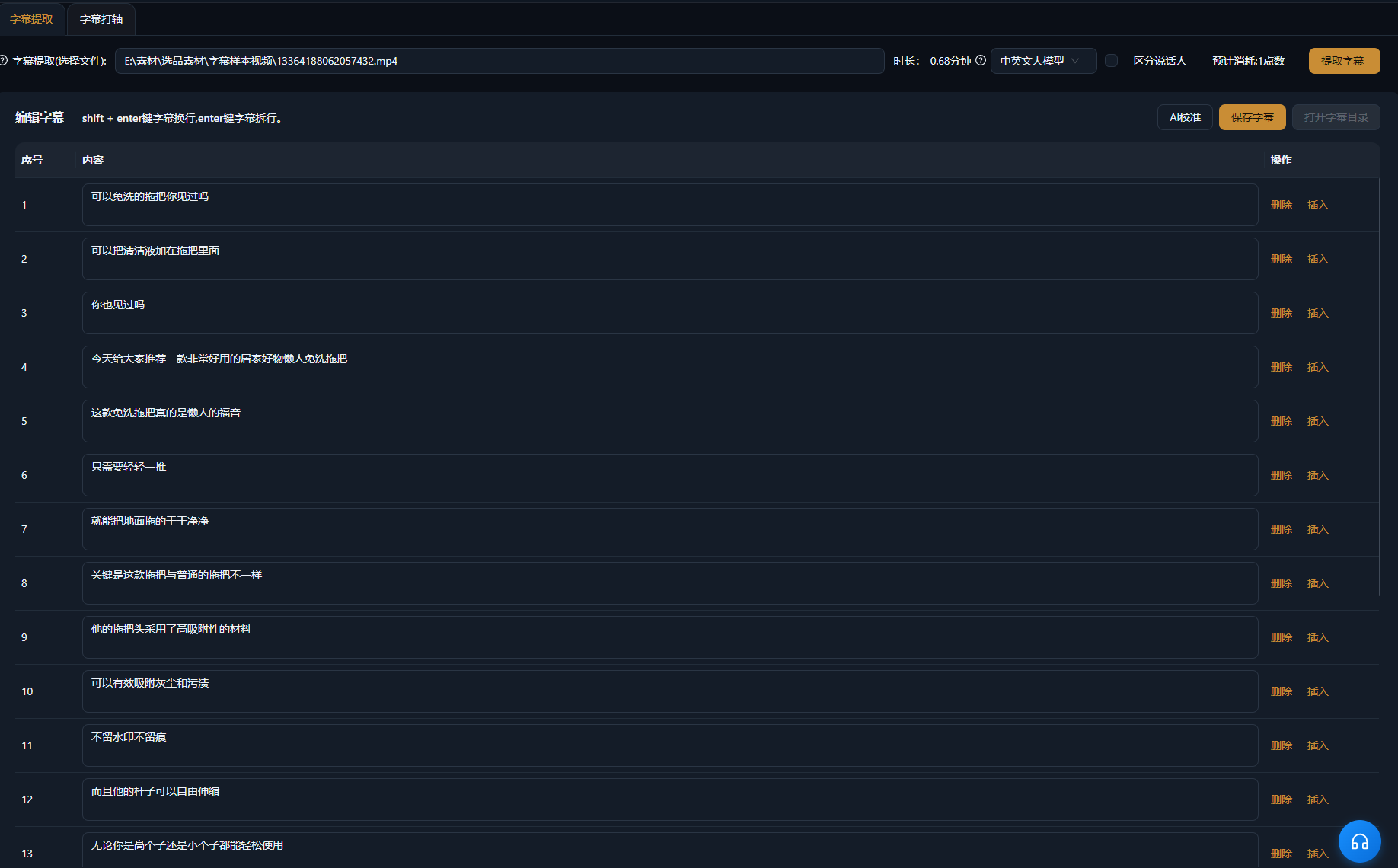
ตัวอย่างจริง
เคสด้านล่างนี้เป็นบันทึกการใช้งานจริงของฟีเจอร์นี้ในแอป AIMIX โดยไม่มีการแก้ไข
วิดีโอพูดหน้ากล้องที่ตัดเสร็จ: คำบรรยายชุดเต็มในหนึ่งนาที
เหมาะกับ: วิดีโอความรู้พูดหน้ากล้อง, วิดีโอขายของ · วิดีโอตัวเสร็จที่ต้องการคำบรรยายเร็ว
เวิร์กโฟลว์: วิดีโอพูดหน้ากล้องตัวเสร็จ → AI สร้างและจัดเวลาคำบรรยาย → ใส่เทมเพลตสไตล์ → ส่งออก
ไทม์ไลน์จัดแนวกับเสียงอัตโนมัติ · เทมเพลตสไตล์ใส่ได้ในคลิกเดียว · งานแบบแบตช์ดูแลหลายวิดีโอ
หลังตัดวิดีโอพูดหน้ากล้องเสร็จ คำบรรยายคืองานบ้านชิ้นสุดท้ายที่เหลืออยู่ ทิ้งมันเข้าฟีเจอร์สร้างคำบรรยาย: AI จดจำคำพูด สร้างคำบรรยายทีละบรรทัด และจัดแนวไทม์ไลน์อัตโนมัติ ใส่เทมเพลตสไตล์ให้เข้ากับช่องของคุณแล้วส่งออกได้เลย ครึ่งชั่วโมงของการจัดเวลาด้วยมือกลายเป็นงานหนึ่งนาที และการรันแบบแบตช์ครอบคลุมทุกวิดีโอที่คุณปล่อยวันนี้
เลือกสไตล์คำบรรยายอย่างไร
แต่ละแพลตฟอร์มเอนไปทางลุคคำบรรยายที่ต่างกัน:
ว
ิ
ว
ิ
ก
ร
เลือกเทมเพลตคำบรรยายเริ่มต้นหนึ่งชุดสำหรับช่องของคุณแล้วใช้ซ้ำกับทุกวิดีโอเพื่อรักษาลุคให้สม่ำเสมอ
ควบคุมงานตัดต่อได้เอง
ไทม์ไลน์ปรับเทียบอัตโนมัติ
จุดเข้า-ออกของคำบรรยายตรงกับเสียงพูดทีละบรรทัด ตัดขั้นตอนจัดเวลาด้วยมือที่กินเวลาที่สุดออกไป
สร้างแบบแบตช์หลายวิดีโอ
ไม่ต้องทำทีละชิ้นอีกต่อไป งานแบบแบตช์จบคำบรรยายของทุกวิดีโอในวันเดียวในการรันเดียว
เทมเพลตสไตล์ในคลิกเดียว
ฟอนต์ สี เส้นขอบ และตำแหน่งมาเป็นเทมเพลต คงความสม่ำเสมอของสไตล์คำบรรยายกับเอกลักษณ์ช่องของคุณ
คำถามที่พบบ่อย
การสร้างคำบรรยายมีค่าใช้จ่ายหรือไม่
การจดจำ AI ใช้พอยต์ตามความยาววิดีโอ ตามที่แสดงในแอป ระบบแสดงค่าใช้จ่ายโดยประมาณก่อนเริ่มสร้าง
คำบรรยายที่สร้างแม่นยำแค่ไหน
เสียงพากย์ที่พูดชัดถึงระดับความแม่นยำสูง สำหรับเนื้อหาที่เน้นชื่อเฉพาะจำนวนมาก แนะนำให้ตรวจทานเร็ว ๆ หลังสร้าง
ไทม์ไลน์ต้องปรับด้วยมือหรือไม่
AI กำหนดเวลาคำบรรยายอัตโนมัติที่จุดตัดประโยค ส่วนใหญ่ไม่ต้องปรับ จุดตัดที่ค้างคาสามารถขัดเกลาบนไทม์ไลน์ได้
รองรับภาษาใดบ้าง
จดจำภาษาจีน อังกฤษ และอื่น ๆ แล้วสร้างเป็นคำบรรยายที่ตรงภาษา โดยรายการภาษาที่แน่นอนเป็นไปตามแอป
ปรับแต่งสไตล์คำบรรยายเองได้หรือไม่
ได้ ฟอนต์ ขนาด สี เส้นขอบ และตำแหน่งปรับได้ทั้งหมด และบันทึกเป็นเทมเพลตเพื่อใช้ซ้ำได้
ส่งออกคำบรรยายเป็นไฟล์แยกได้หรือไม่
รองรับการเบิร์นคำบรรยายลงวิดีโอที่ส่งออก ส่วนการส่งออกไฟล์คำบรรยายแยกขึ้นอยู่กับเวอร์ชันแอปปัจจุบัน